Plug in PHP 100 POWER SOLUTIONS- P74 docx
Bạn đang xem bản rút gọn của tài liệu. Xem và tải ngay bản đầy đủ của tài liệu tại đây (358.7 KB, 5 trang )
C h a p t e r 1 2 : D i v e r s e S o l u t i o n s
331
C h a p t e r 1 2 : D i v e r s e S o l u t i o n s
331
About the Plug-in
This plug-in returns the HTML to use, as well as the corner and edge GIFs, for building a
table with rounded borders. It requires the following arguments:
• $width The width of the table, use ' ' for default
• $height The height of the table, use ' ' for default
• $bground The table’s background color
• $border The table’s border color
• $contents The table’s text and/or HTML contents
• $program The path to the program to create the GIF images
Variables, Arrays, and Functions
$t1 - $t5
Temporary string variables to avoid string duplication
How It Works
This plug-in returns the HTML required to display the supplied contents of $contents
within a table that has rounded borders. If a width and/or height are specified, then the table
dimensions are set to those values; otherwise, the browser is left to determine how to size it.
The table is created in nine segments with the eight outer ones each containing either
a corner or edge GIF, each of which is created and displayed by the program contained in
$program. The inner segment is populated with the string value in $contents.
The various variables $t1 through $t5 are used as shortcuts for repeated sequences to
reduce the plug-in in size.
How to Use It
You can use the plug-in in the following manner, which passes the text to display, colors to
use, and the path to the program for displaying the GIFs, like this:
$contents = "<b>Macbeth Act 5, scene 5, 19-28</b><br />" .
"<i>"Tomorrow, and tomorrow, and tomorrow, " .
"creeps in this petty pace from day to day, to " .
"the last syllable of recorded time; and all our " .
"yesterdays have lighted fools the way to dusty " .
"death. Out, out, brief candle! Life's but a " .
"walking shadow, a poor player, that struts and " .
"frets his hour upon the stage, and then is heard " .
"no more. It is a tale told by an idiot, full of " .
"sound and fury, signifying nothing."</i>";
echo PIPHP_RoundedTable('', '', 'dedede', '444444', $contents,
'corner.php');
In this code segment, the width and height of the table to create are set to the empty
string ('') to let the browser choose suitable dimensions. Then a background color of
dedede and foreground color of 444444 are passed, followed by the string value in
$contents, and the program for displaying the GIFs: corner.php.
As you can see, HTML can also be passed to the plug-in, so you can place an unlimited
variety of contents within these rounded border tables.
332
P l u g - i n P H P : 1 0 0 P o w e r S o l u t i o n s
332
P l u g - i n P H P : 1 0 0 P o w e r S o l u t i o n s
The Plug-in
function PIPHP_RoundedTable($width, $height, $bground,
$border, $contents, $program)
{
if ($width) $width = "width='$width'";
if ($height) $height = "height='$height'";
$t1 = "<td width='5'><img src='$program?c";
$t2 = "<td background='$program?c";
$t3 = "<td width='5' background='$program?c";
$t4 = "$border&f=$bground' /></td>";
$t5 = "<td bgcolor='#$bground'>$contents</td>";
return <<<_END
<table border='0' cellpadding='0' cellspacing='0'
$width $height>
<tr>$t1=tl&b=$t4 $t2=t&b=$t4 $t1=tr&b=$t4</tr>
<tr>$t3=l&b=$t4 $t5 $t3=r&b=$t4</tr>
<tr>$t1=bl&b=$t4 $t2=b&b=$t4 $t1=br&b=$t4</tr></table>
_END;
}
Display Bing Map
Maps are as popular as ever, and in a bid to compete with Google, Microsoft’s Virtual Earth
project is now used for Bing Maps, which has an API that this plug-in makes very easy for
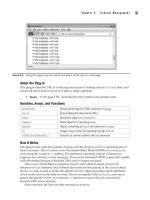
you to use. Figure 12-11 shows a scrollable Bing Map, which has been dropped into a web
page, with the Bird’s Eye view selected.
FIGURE 12-11 With this plug-in, you can incorporate Bing maps in your web pages.
100
C h a p t e r 1 2 : D i v e r s e S o l u t i o n s
333
C h a p t e r 1 2 : D i v e r s e S o l u t i o n s
333
About the Plug-in
This plug-in creates the JavaScript and HTML required to embed a scrollable Bing Map into
a web page. It requires the following arguments:
• $lat The latitude of a location
• $long The longitude of a location
• $zoom The amount to zoom in by (0 for none, 19 for maximum)
• $style The type of map out of Road or Aerial (exact spelling required)
• $width The width of the map
• $height The height of the map
Variables, Arrays, and Functions
$root
The base part of the API URL
How It Works
Normally, when you wish to include a Bing Map in a web page, you have to call it up from the
<body> tag and separately include the JavaScript and a <div> in which to display the map.
But this plug-in removes the need for all that by using PHP to create the JavaScript code
to load a map of the correct dimensions exactly where you want it. It does this by attaching
automatically to the events required so that only a single call is needed.
The JavaScript is based on the Virtual Earth API and is beyond the scope of this book to
explain, other than to say that all the code required is ready made for you, along with a
<div> tag in which to display the map.
How to Use It
To insert a Bing Map into a page, just pass this plug-in the location details, zoom level, type
of map, and dimensions, like this:
$result = PIPHP_DisplayBingMap(40.68913, -74.0446, 18, 'Aerial',
300, 214);
$text = "<b>The Statue of Liberty</b>, officially titled " .
"Liberty Enlightening the World, is a monument that " .
"was presented by the people of France to the United " .
"States of America in 1886 to celebrate its " .
"centennial. Standing on Liberty Island in New York " .
"Harbor, it welcomes visitors, immigrants, and " .
"returning Americans traveling by ship. The copper-" .
"clad statue, dedicated on October 28, 1886, " .
"commemorates the centennial of the signing of the " .
"United States Declaration of Independence and was " .
"given to the United States by France to represent " .
"the friendship between the two countries " .
"established during the American Revolution.";
echo "<table width='300' height='214' align=left><tr><td>" .
$result . "</td></tr></table><p align='justify'>$text";
The preceding code places the map into a table which is aligned to the left with text
flowing around it. You can equally use a <div> or <span> to include it, or just drop a map
in without placing it within an element.
334
P l u g - i n P H P : 1 0 0 P o w e r S o l u t i o n s
The map style should be one of Aerial or Road and the zoom level should be between
0 (for none) and 19 (for maximum). When you need to know the latitude and longitude
of a location, you can look it up in a search engine or there are useful web sites such as
www.hmmm.ip3.co.uk/longitude-latitude.
The Plug-in
function PIPHP_DisplayBingMap($lat, $long, $zoom, $style,
$width, $height)
{
if ($style != 'Aerial' && $style != 'Road') $style = 'Road';
$width .= 'px';
$height .= 'px';
$root = '
return <<<_END
<script src = "$root/mapcontrol.ashx?v=6.2"></script>
<script>
if (window.attachEvent)
{
window.attachEvent('onload', Page_Load)
window.attachEvent('onunload', Page_Unload)
}
else
{
window.addEventListener('DOMContentLoaded', Page_Load, false)
window.addEventListener('unload', Page_Unload, false)
}
function Page_Load()
{
GetMap()
}
function Page_Unload()
{
if (map != null)
{
map.Dispose()
map = null
}
}
function GetMap()
{
map = new VEMap('PIPHP_DBM')
map.LoadMap(new VELatLong($lat, $long),
$zoom, VEMapStyle.$style, false)
}
</script>
<div id='PIPHP_DBM' style="position:relative;
width:$width; height:$height;"></div>
_END;
}
?>
& (ampersand), 155–157, 257
‘ (apostrophe), 204
* (asterisk), 47, 215, 246
# (number sign), 220
; (semicolon), 209, 210, 211, 215
@ (at) symbol, 199, 224, 226, 250, 288
| (pipe) symbol, 149, 177, 184, 185, 304
A
absolute URLs, 88–90
accents
removing, 55–56
UTF-8 encoding and, 326
acronyms, text speak, 203–206
ActiveX objects, 278–279
Add User to DB plug-in, 208–214
Advanced Packaging Tool (APT) system, 12
Ajax (Asynchronous JavaScript and XML),
278–287
GET requests, 285–287
POST requests, 280–284
Ajax calls, 192
Ajax Request plug-in, 278–280
Amazon sales rank, 316–318
ampersand (&), 155–157, 257
Apache Web Server
.htaccess files and, 152–153
Linux systems, 20
Mac systems, 22, 23
Windows systems, 6–7, 8
API key, 253, 254, 257
API plug-ins, 236–272
API URL, 197
APIs (application programming interfaces)
described, 236
Facebook, 284
fetching Flickr streams, 249–251
getting content, 241–243
Google Charts, 236–240
Search Yahoo!, 256–259
Wiki export, 243–248
Yahoo! Answers, 252–255
Yahoo! Stock News, 259–264
apostrophe (‘), 204
application programming interfaces. See APIs
APT (Advanced Packaging Tool) system, 12
Aptitude tool, 12, 14
arithmetic operators, 113–114
array_count_values() function, 322
array_intersect() function, 322
array_reverse() function, 182
array_unique() function, 156, 165
arsort() function, 146, 322
aspect ratio, 66
asterisk (*), 47, 215, 246
Asynchronous JavaScript and XML. See Ajax
at (@) symbol, 199, 224, 226, 250, 288
Auto Back Links plug-in, 145–148
auto scrolling, 189–193
B
BB (bulletin board) code, 134–137
BB Code plug-in, 134–137
Bing Maps, 332–334
Bing Search, 256–259
Block User by Cookie plug-in, 230–233
blurring images, 69
books
Amazon sales rank, 316–318
ISBN number, 314–316
Index
335