Plug in PHP 100 POWER SOLUTIONS- P28 pptx
Bạn đang xem bản rút gọn của tài liệu. Xem và tải ngay bản đầy đủ của tài liệu tại đây (344.4 KB, 5 trang )
C h a p t e r 5 : C o n t e n t M a n a g e m e n t
101
C h a p t e r 5 : C o n t e n t M a n a g e m e n t
101
About the Plug-in
This plug-in takes a copyright message and the first year the copyright began. It requires
these arguments:
• $message The copyright message
• $year The year the copyright began
Variables, Arrays, and Functions
• None.
How It Works
Although this is a very short plug-in, it’s well worth using because it can save you no end of
time. What it does is return the message supplied in $message, along with a copyright sign,
the start year in $year and the current year, as returned by the date() function.
How to Use It
To add an always up-to-date copyright message to your web site, use code such as this:
echo PIPHP_RollingCopyright("All rights reserved", 2003);
The Plug-in
function PIPHP_RollingCopyright($message, $year)
{
return "$message ©$year-" . date("Y");
}
Embed YouTube Video
How often have you grabbed the embed code for a YouTube video only to find you have to
tweak it to get the right dimensions for your web site, or select high-quality video, or make
it auto start? With this plug-in you can replace all that with a single function call whenever
you need to embed a video. Figure 5-7 shows such a video displayed with a single call to
this plug-in.
About the Plug-in
This plug-in takes the YouTube ID of a video and the parameters required to display it to
your requirements. It accepts these arguments:
• $id A YouTube video ID such as “VjnygQ02aW4”
• $width The display width
• $height The display height
• $hq If set to 1, enable high-quality display, if available
• $full If set to 1, enable the video to play in full-screen mode
• $auto If set to 1, start the video playing automatically on page load
27
102
P l u g - i n P H P : 1 0 0 P o w e r S o l u t i o n s
102
P l u g - i n P H P : 1 0 0 P o w e r S o l u t i o n s
Variables, Arrays, and Functions
$q
String variable set to the required value to enable high-quality display
How It Works
This plug-in first checks whether $hq has a value of 1, and if so, sets $q to the value
&ap=%2526fmt%3D18, which will be tacked onto the YouTube URLs in order to enable high-
quality video (where available).
Then, a <<<_END … _END; construct is entered, which passes all the HTML within these
tags to the return keyword after substituting any PHP variables encountered with their
values. This means that, for example, in the <object> tag $width and $height are
substituted by the supplied values, and so on.
The result is that the plug-in returns the HTML required to display a YouTube video
exactly to your requirements.
How to Use It
To embed a YouTube video in a web page, call the plug-in like this:
echo PIPHP_EmbedYouTubeVideo("VjnygQ02aW4", 370, 300, 1, 1, 0);
Here a video showing President Obama’s inauguration has been selected to be displayed
at a width of 370 and height of 300 pixels, with both the high-quality and full-screen options
enabled, but with auto start disabled.
FIGURE 5-7 This plug-in facilitates embedding a YouTube video with various options such as video quality and
auto start.
C h a p t e r 5 : C o n t e n t M a n a g e m e n t
103
C h a p t e r 5 : C o n t e n t M a n a g e m e n t
103
TIP If you wish to display videos using YouTube’s recommended default dimensions, select a width
and height of 425 × 344 pixels.
The Plug-in
function PIPHP_EmbedYouTubeVideo($id, $width, $height, $hq,
$full, $auto)
{
if ($hq == 1) $q = "&ap=%2526fmt%3D18";
else $q = "";
return <<<_END
<object width="$width" height="$height">
<param name="movie"
value="
</param>
<param name="allowFullScreen" value="true"></param>
<param name="allowscriptaccess" value="always"></param>
<embed src="
type="application/x-shockwave-flash"
allowscriptaccess="always" allowfullscreen="true"
width="$width" height="$height"></embed></object>
_END;
}
Create List
Displaying lists is one of the most common elements of a web page. Whether for lists of
related blog entry URLs, headlines, navigation, or others, lists provide an instant visual cue
and are easy to use. With this plug-in, you can easily create the HTML for eight different types
of lists using a single function call. Figure 5-8 shows the types of list this plug-in suports.
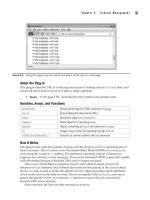
FIGURE 5-8 Using this plug-in, you can automatically create the HTML for eight different types of lists.
28
104
P l u g - i n P H P : 1 0 0 P o w e r S o l u t i o n s
104
P l u g - i n P H P : 1 0 0 P o w e r S o l u t i o n s
About the Plug-in
This plug-in takes an array containing all the items in a list, along with parameters to
control the display formatting. It accepts these arguments:
• $items An array containing all the items in the list
• $start The start number for ordered lists
• $type The type of list: ul for unordered and ol for ordered
• $bullet The type of bullet. For unordered lists: square, circle, or disc. For
ordered lists: 1, A, a, I, or i
Variables, Arrays, and Functions
$list
String variable containing HTML to be returned
How It Works
This plug-in starts by opening a new HTML list tag, which can be either <ol or <ul, depending
on the value in $type. It also sets the start value to $start and the bullet type to $bullet.
A foreach loop is then entered to iterate through every element in the $items array,
temporarily placing each in the string variable $item, which is then enclosed by <li> and
</li> tags. The result is then appended to the string $list which, once the loop completes,
is returned to the calling code, along with a closing </ol> or </ul> tag.
How to Use It
To create the HTML for a list, pass it an array containing the list of elements, along with the
formatting arguments required, as in the following, which creates the HTML for an
unordered list using the circle character as a bullet:
$fruits = array("Apple", "Pear", "Banana", "Plum", "Orange");
echo PIPHP_CreateList($fruits, NULL, "ul", "circle");
If you wish, with ordered lists you can change the start value to any numerical value
you like, instead of the default of 1. But note how the start argument in the pr
eceding code
is set to NULL because it isn’t required. In this case, you could actually set it to any value
since it will be ignored, but using NULL will remind you when browsing your code that no
value is being passed.
The types of bullets you can use depend on the type of list being created. For an or
dered
list, five different bullet types are available:
• 1 Numerical: From 1 onwards in decimal
• A Alphabetic: A–Z, then AA–AZ, then BA to BZ, and so on
• a Alphabetic: a–z, then aa–az, then ba to bz, and so on
• I Roman: I, II, III, IV, V, and so on
• i Roman: i, ii, iii, iv, v, and so on
For unordered lists, three types of bullets can be used:
• square A filled-in square
C h a p t e r 5 : C o n t e n t M a n a g e m e n t
105
C h a p t e r 5 : C o n t e n t M a n a g e m e n t
105
• circle An open circle
• disc A filled-in circle
The Plug-in
function PIPHP_CreateList($items, $start, $type, $bullet)
{
$list = "<$type start='$start' type='$bullet'>";
foreach ($items as $item) $list .= "<li>$item</li>\n";
return $list . "</$type>";
}
Hit Counter
For long-term statistical information, you can always use a service such as Google Analytics to
keep track of your web visitors. However, when you have a brand new page and need to know
instantly whether and how much traffic it is attracting, your normal recourse is to view the
server log files. But now you can use this plug-in to add a simple, invisible, counter to your
web pages in order to get a quick snapshot of raw and unique hits, as shown in Figure 5-9.
About the Plug-in
This plug-in takes the name of a file to hold the counts for the current page, as well as
details on what to do with it. It accepts these arguments:
• $filename A path/filename to use for storing hit count data
• $action What to do with the data: reset = reset all counts, add = add the current
visit to the data, get = retrieve hit stats, delete = delete the counter file
Variables, Arrays, and Functions
$data
String containing user’s IP address and browser details
$fp
File pointer to the counter file
$file String containing contents of $filename
$lines Array containing all lines extracted from $file
$raw
Numeric variable containing the total number of hits saved in the file
$unique
Numeric variable containing the number of hits with unique IP/browser details
FIGURE 5-9 When you need instant stats from your web site, this plug-in will provide them.
29