Plug in PHP 100 POWER SOLUTIONS- P29 pptx
Bạn đang xem bản rút gọn của tài liệu. Xem và tải ngay bản đầy đủ của tài liệu tại đây (211.67 KB, 5 trang )
106
P l u g - i n P H P : 1 0 0 P o w e r S o l u t i o n s
106
P l u g - i n P H P : 1 0 0 P o w e r S o l u t i o n s
How It Works
The first thing this plug-in does is make a note of the current visitor’s IP address, which is a
four-part number that directly identifies that user, and looks something like 208.77.188.166.
Then, because IP addresses can be shared, for example across a business or home network, the
browser’s User Agent string is also noted. This is a string that identifies the type and version of a
browser and varies widely in use but may look something like “Mozilla/4.0 (compatible; MSIE
8.0; Windows NT 6.1; Media Center PC 6.0)”. These two strings are then combined and placed
in the string variable $data, followed by a \n newline character.
Next a switch statement with four sections is entered. The first section is processed if
$action is set to reset. It opens the file $filename for writing, using an argument of “w”,
and then calls the function flock(). This is PHP’s file locking mechanism and what this
call does is request an exclusive lock on the file by passing the argument LOCK_EX. The
function waits until any and all other processes have finished using the file and then
releases the lock using flock() with an argument of LOCK_UN, and closes the file. This has
the effect of truncating the file to zero bytes. Had a lock not been set (and the program not
waited its turn), if two requests came through at the same time, one to append to the file,
and this one to truncate it, there would be no way of knowing which process might “win.”
This way, all accesses to the file are queued up and all processes take their turn.
The second section is executed if $action is set to add. Here the file is opened in a
similar way to the previous example, except that the argument “a+” is used, which stands
for append to. Again the flock() function is called, and when control over the file is gained,
the data in $data is appended to the file, the lock is released, and the file closed.
The third section is executed if $action is set to get, in which case the file is opened
just for reading using an argument of “r”. Then, flock() is called, and after control is
gained, the fread() function is called to read the entire contents of $filename into $file,
except for the final character which will be a \n newline, and is not needed. The file lock is
then released and the file is closed. With the contents of the file now stored in the variable
$file, it is extracted into the array $lines by using the explode() function, which splits
the contents of $file at every \n linefeed character. Then, the number of elements is
counted using count() and assigned to the variable $raw. To obtain the unique counts (the
number of hits made by different IP/browser combinations, ignoring multiple hits by the
same user), the array_unique() function is called before using count() and passing the
result to $unique. Afterward, a two-element array containing these raw and unique values
is returned.
The final section is executed when $action is set to delete and simply uses the
unlink() function to delete the file pointed to by $filename.
How to Use It
The way you will mostly use this plug-in is as follows:
PIPHP_HitCounter("counter.txt", "add");
This code passes the filename counter.txt and the parameter “add” to the function
PIPHP_HitCounter(), which then appends the IP address and User Agent of the current
user to the file. It’s not necessary to first create the file because, if it doesn’t already exist, it
will be created.
C h a p t e r 5 : C o n t e n t M a n a g e m e n t
107
C h a p t e r 5 : C o n t e n t M a n a g e m e n t
107
Should you wish to reset the file data and start over, you can issue the following
command, which truncates the data file back to zero bytes in length:
PIPHP_HitCounter("counter.txt", "reset");
To delete the counter, use this command:
PIPHP_HitCounter("counter.txt", "delete");
To instead get an instant hit count report, use code such as this:
$result = PIPHP_HitCounter("counter.txt", "get");
echo "Raw: $result[0] / Unique: $result[1]";
You can give the counter any name you like, but if you use the .txt extension, as in these
examples, you’ll be able to load it into a text editor and browse through it.
The Plug-in
function PIPHP_HitCounter($filename, $action)
{
$data = getenv("REMOTE_ADDR") .
getenv("HTTP_USER_AGENT") . "\n";
switch ($action)
{
case "reset":
$fp = fopen($filename, "w");
if (flock($fp, LOCK_EX))
;
flock($fp, LOCK_UN);
fclose($fp);
return;
case "add":
$fp = fopen($filename, "a+");
if (flock($fp, LOCK_EX))
fwrite($fp, $data);
flock($fp, LOCK_UN);
fclose($fp);
return;
case "get":
$fp = fopen($filename, "r");
if (flock($fp, LOCK_EX))
$file = fread($fp, filesize($filename) - 1);
flock($fp, LOCK_UN);
fclose($fp);
$lines = explode("\n", $file);
$raw = count($lines);
$unique = count(array_unique($lines));
return array($raw, $unique);
case "delete":
unlink($filename);
return;
}
}
108
P l u g - i n P H P : 1 0 0 P o w e r S o l u t i o n s
108
P l u g - i n P H P : 1 0 0 P o w e r S o l u t i o n s
Referer Log
In a similar way to being able to instantly track visitor hits, this plug-in keeps constant track
of the URLs from which your users are being sent. Again, this is something you can track
with a service such as Google Analytics, or by processing your log files, but neither of these
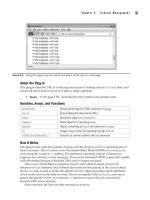
methods is as quick and easy to use as this plug-in for providing instant data, as shown in
Figure 5-10.
About the Plug-in
This plug-in takes the name of a file to hold the referring data for the current page, as well
as details on what to do with it. Upon success, it either updates or returns details fr
om the
data file. It accepts these arguments:
• $filename A path/file name to use for storing referring page data
• $action What to do with the data: reset = reset all data; add = add the current
visit to the data; get = retrieve referrer stats; delete = delete the file
Variables, Arrays, and Functions
$data
String containing the referring page URL
$fp
File pointer to the referrer file
$file String containing the contents of $filename
$temp
Temporary array containing unique referring URLs
How It Works
The first thing this plug-in does is make a note of the referring page’s URL, if there is one,
placing it in $date, followed by a \n newline character. If no referring page was passed to
the current program, perhaps because the URL was typed in directly, then $data is assigned
the string “No Referrer”, followed by a \n newline.
Next a switch statement with four sections is entered. The first section is processed if
$action is set to reset. It opens the file $filename for writing, using an argument of “w”,
and then calls the function flock(). The function waits until all other processes have
finished using the file and then releases the lock and closes the file, truncating it to zero bytes.
FIGURE 5-10 Keeping track of pages referring to your site is easy using this plug-in.
30
C h a p t e r 5 : C o n t e n t M a n a g e m e n t
109
C h a p t e r 5 : C o n t e n t M a n a g e m e n t
109
The second section is executed if $action is set to add. Here the argument “a+” is used
to open the file for appending. Again the flock() function is called, and when control over
the file is gained, the data in $data is appended to the file, the lock is released, and the file
is closed.
The third section is executed if $action is set to get, in which case the file is opened for
reading using an argument of “r”. Then flock() is called, and after control is gained, the
fread() function is called to read the entire contents of $filename into $file, excepting
the final character which will be a \n newline character, and is therefore not needed. The file
lock is then released and the file is closed. With the contents of the file now stored in the
variable $file, the explode() function is used to extract this contents into the array $temp,
splitting it at every \n linefeed character. All non-unique entries are then removed from the
array, which is sorted to remove the gaps, and the resulting array is returned.
The final section is executed when $action is set to delete and simply uses the
unlink() function to delete the file pointed to by $filename.
How to Use It
You will normally call the plug-in with code such as the following, which creates the file
refer.log if it doesn’t already exist, and writes the contents of $data to it. If the file does exist,
the data is appended to it:
PIPHP_RefererLog("refer.log", "add");
To delete this log file, use this command:
PIPHP_RefererLog("refer.log", "delete");
Or to reset the log file by truncating it back to zero length, use:
PIPHP_RefererLog("refer.log", "reset");
To display all the entries in the log file, you could use code such as the following, which
uses a for loop to iterate through all the entries in the returned array and display them:
$result = PIPHP_RefererLog("refer.log", "get");
for ($j = 0 ; $j < count($result) ; ++$j)
echo "$result[$j]<br />";
The Plug-in
function PIPHP_RefererLog($filename, $action)
{
$data = getenv("HTTP_REFERER") . "\n";
if ($data == "\n") $data = " No Referrer\n";
switch ($action)
{
case "reset":
$fp = fopen($filename, "w");
if (flock($fp, LOCK_EX))
;
110
P l u g - i n P H P : 1 0 0 P o w e r S o l u t i o n s
flock($fp, LOCK_UN);
fclose($fp);
return;
case "add":
$fp = fopen($filename, "a+");
if (flock($fp, LOCK_EX))
fwrite($fp, $data);
flock($fp, LOCK_UN);
fclose($fp);
return;
case "get":
$fp = fopen($filename, "r");
if (flock($fp, LOCK_EX))
$file = fread($fp, filesize($filename) -1);
flock($fp, LOCK_UN);
fclose($fp);
$temp = array_unique(explode("\n", $file));
sort($temp);
return $temp;
case "delete":
unlink($filename);
return;
}
}