Plug in PHP 100 POWER SOLUTIONS- P26 docx
Bạn đang xem bản rút gọn của tài liệu. Xem và tải ngay bản đầy đủ của tài liệu tại đây (385.39 KB, 5 trang )
C h a p t e r 5 : C o n t e n t M a n a g e m e n t
91
C h a p t e r 5 : C o n t e n t M a n a g e m e n t
91
About the Plug-in
This plug-in takes the URL of a web page and parses it looking only for <a href links, and
returns all that it finds in an array. It takes a single argument:
• $page A web page URL, including the http:// preface and domain name
Variables, Arrays, and Functions
$contents String containing the HTML contents of $page
$urls
Array holding the discovered URLs
$dom Document object of $contents
$xpath XPath object for traversing $dom
$hrefs Object containing all href link elements in $dom
$j Integer loop counter for iterating through $hrefs
PIPHP_RelToAbsURL()
Function to convert relative URLs to absolute
How It Works
This plug-in first reads the contents of $page into the string $contents (returning NULL if
there’s an error). Then it creates a new Document Object Model (DOM) of $contents in
$dom using the loadhtml() method. The statement is prefaced with an @ character to
suppress any warning or error messages. Even poorly formatted HTML is generally useable
with this method because it finds the URLs easy to extract and parse.
Then a new XPath object is created in $xpath with which to search $dom for all
instances of href elements, and all those discovered are then placed in the $hrefs object.
Next a for loop is used to iterate through the $hrefs object and extract all the attributes,
which in this case are the links we want. Prior to storing the URLs in $urls, each one is
passed through the PIPHP_RelToAbsURL() function to ensure they are converted to
absolute URLs (if not already).
Once extracted, the links are then returned as an array.
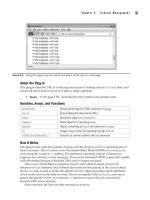
FIGURE 5-2 Using this plug-in you can extract and return all the links in a web page.
92
P l u g - i n P H P : 1 0 0 P o w e r S o l u t i o n s
92
P l u g - i n P H P : 1 0 0 P o w e r S o l u t i o n s
How to Use It
To extract all the URLs from a page and receive them in absolute form, just call PIPHP_
GetLinksFromURL() like this:
$result = PIPHP_GetLinksFromURL("");
You can then display (or otherwise make use of) the returned array like this:
for ($j = 0 ; $j < count($result) ; ++$j)
echo "$result[$j]<br />";
Note that this plug-in makes use of plug-in 21, PIPHP_RelToAbsURL(), and so it must
also be pasted into (or included by) your program.
The Plug-in
function PIPHP_GetLinksFromURL($page)
{
$contents = @file_get_contents($page);
if (!$contents) return NULL;
$urls = array();
$dom = new domdocument();
@$dom ->loadhtml($contents);
$xpath = new domxpath($dom);
$hrefs = $xpath->evaluate("/html/body//a");
for ($j = 0 ; $j < $hrefs->length ; $j++)
$urls[$j] = PIPHP_RelToAbsURL($page,
$hrefs->item($j)->getAttribute('href'));
return $urls;
}
Check Links
The two previous plug-ins provide the foundation for being able to crawl the Internet by:
• Reading in a third-party web page
• Extracting all URLs from the page
• Converting all the URLs to absolute
Armed with these abilities, it’s now a simple matter for this plug-in to offer the facility
to check all links on a web page and test whether the pages they refer to actually load or
not; a great way to alleviate the frustration of your users upon encountering dead links or
mistyped URLs. Figure 5-3 shows this plug-in being used to check the links on the alexa.com
home page.
23
C h a p t e r 5 : C o n t e n t M a n a g e m e n t
93
C h a p t e r 5 : C o n t e n t M a n a g e m e n t
93
About the Plug-in
This plug-in takes the URL of a web page (yours or a third party’s) and then tests all the
links found within it to see whether they resolve to valid pages. It takes these three
arguments:
• $page A web page URL, including the http:// preface and domain name
• $timeout The number of seconds to wait for a web page before considering it
unavailable
• $runtime The maximum number of seconds your script should run before timing
out
Variables, Arrays, and Functions
$contents String containing the HTML contents of $page
$checked
Array of URLs that have been checked
$failed
Array of URLs that could not be retrieved
$fail
Integer containing the number of failed URLs
$urls Array of URLs extracted from $page
$context
Stream context to set the URL load timeout
PIPHP_GetLinksFromURL()
Function to retrieve all links from a page
PIPHP_RelToAbsURL()
Function to convert relative URLs to absolute
How It Works
The first thing this plug-in does is set the maximum execution time of the script using the
ini_set() function. This is necessary because crawling a set of web pages can take a
considerable time. I recommend you may want to experiment with maximums of up to
180 seconds or more. If the script ends without returning anything, try increasing the value.
The contents of $page are then loaded into $contents. After these two arrays are
initialized. The first, $checked, will contain all the URLs that have been checked so that,
where a page links to another more than once, a second check is not made for that URL.
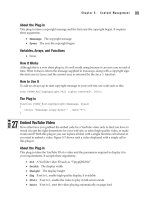
FIGURE 5-3 The plug-in has been run on the alexa.com home page, with all URLs reported present and correct.
94
P l u g - i n P H P : 1 0 0 P o w e r S o l u t i o n s
94
P l u g - i n P H P : 1 0 0 P o w e r S o l u t i o n s
The second array, $failed, will contain all the URLs that couldn’t be loaded. The counter
$fail is initially set to 0. When any URL fails to load, $fail will be incremented.
Next the array $urls is populated with all the URLs from $page using the PIPHP_
GetLinksFromURL() plug-in, and $context is assigned the correct values to set the
timeout for each checked page to the value that was supplied to the function in the variable
$timeout. This will be used shortly by the file_get_contents() function.
With all the variables, objects, and arrays initialized, a for loop is entered in which each
URL is tested in turn, but only if it hasn’t been already. This is determined by testing whether
the current URL already exists in $checked, the array of checked URLs. If it doesn’t, the URL
is added to the $checked array and the file_get_contents() function is called (with the
$context object) to attempt to fetch the first 256 bytes of the web page. If that fails, the URL
is added to the $failed array and $fail is incremented.
Once the loop has completed, an array is returned with the first element containing 0 if
there were no failed URLs. Otherwise, it contains the number of failures, while the second
element contains an array listing all the failed URLs.
How to Use It
To check all the links on a web page, call the function using code such as this:
$page = "";
$result = PIPHP_CheckLinks($page, 2, 180);
To then view or otherwise use the returned values, use code such as the following,
which either displays a success message or lists the failed URLs:
if ($result[0] == 0) echo "All URLs successfully accessed.";
else for ($j = 0 ; $j < $result[0] ; ++$j)
echo $result[1][$j] . "<br />";
Because this plug-in makes use of plug-in 22, PIPHP_GetLinksFromURL(), which itself
relies on plug-in 21, PIPHP_RelToAbsURL(), you must ensure you have copied both of
them into your program file, or that they are included by it.
TIP Because crawling like this can take time, when nothing is displayed to the screen you may
wonder whether your program is actually working. So, if you wish to view the plug-in’s progress,
you can uncomment the line shown to have each URL displayed as it’s processed.
The Plug-in
function PIPHP_CheckLinks($page, $timeout, $runtime)
{
ini_set('max_execution_time', $runtime);
$contents = @file_get_contents($page);
if (!$contents) return array(1, array($page));
$checked = array();
$failed = array();
$fail = 0;
$urls = PIPHP_GetLinksFromURL($page);
C h a p t e r 5 : C o n t e n t M a n a g e m e n t
95
C h a p t e r 5 : C o n t e n t M a n a g e m e n t
95
$context = stream_context_create(array('http' =>
array('timeout' => $timeout)));
for ($j = 0 ; $j < count($urls); $j++)
{
if (!in_array($urls[$j], $checked))
{
$checked[] = $urls[$j];
// Uncomment the following line to view progress
// echo " $urls[$j]<br />\n"; ob_flush(); flush();
if (!@file_get_contents($urls[$j], 0, $context, 0, 256))
$failed[$fail++] = $urls[$j];
}
}
return array($fail, $failed);
}
Directory List
When you need to know the contents of a directory on your server—for example, because
you support file uploads and need to keep tabs on them—this plug-in returns all the
filenames using a single function call. Figure 5-4 shows the plug-in in action.
FIGURE 5-4 Using the Directory List plug-in under Windows to return the contents of Zend Server CE’s
document root
24