Multiarea OSPF
Bạn đang xem bản rút gọn của tài liệu. Xem và tải ngay bản đầy đủ của tài liệu tại đây (43.25 KB, 9 trang )
1 - 9 Semester 5: Advanced Routing v2.0 - Lab 5.8.1 Copyright 2001, Cisco Systems, Inc.
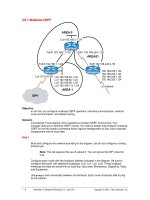
5.8.1 Multiarea OSPF
AREA 0
AREA51
AREA 1
Lo0 192.168.3.1 /24
S0/1 192.168.224.1 /30Fa0/0 192.168.1.3 /24
Lo0 192.168.64.1 /24
Lo1 192.168.80.1 /24
Lo2 192.168.96.1 /24
Lo3 192.168.112.1 /24
192.168.240.1 /24
192.168.244.1 /24
192.168.248.1 /24
192.168.252.1 /24
S0/0 192.168.224.2 /30
to Aukland
ISP1
SanJose3
SanJose1 Singapore
Fa0/0 192.168.1.1 /24
Lo5 10.0.0.6 /30
Objective
In this lab, you configure multiarea OSPF operation, interarea summarization, external
route summarization, and default routing.
Scenario
International Travel Agency (ITA) maintains a complex OSPF environment. Your
manager asks you to optimize OSPF routing. You need to design and configure multiarea
OSPF on the key routers connecting Asian regional headquarters to San Jose corporate
headquarters and its local sites.
Step 1
Build and configure the network according to the diagram, but do not configure a routing
protocol yet.
Note: This lab requires the use of subnet 0. You can ignore the ISP1 cloud for
now.
Configure each router with the loopback address indicated in the diagram. Be sure to
configure SanJose1 with additional loopbacks (Lo0, Lo1, Lo2, Lo3). These loopback
interfaces simulate the serial links to local San Jose sites: Westasman, Baypointe, Vista,
and Eastasman.
Use ping to test connectivity between all interfaces. Each router should be able to ping
its link partner.
2 - 9 Semester 5: Advanced Routing v2.0 - Lab 5.8.1 Copyright 2001, Cisco Systems, Inc.
Step 2
Configure multiarea OSPF. On SanJose1, configure FastEthernet 0/0 as a member of
Area 0 and all other interfaces as members of Area 1 by using the following commands:
SanJose1(config)#router ospf 1
SanJose1(config-router)#network 192.168.1.0 0.0.0.255 area 0
SanJose1(config-router)#network 192.168.64.0 0.0.63.255 area 1
On SanJose3, configure E0 and Lo0 as members of Area 0, but configure Serial 0/0 as
part of Area 51:
SanJose3(config)#router ospf 1
SanJose3(config-router)#network 192.168.1.0 0.0.0.255 area 0
SanJose3(config-router)#network 192.168.224.0 0.0.0.3 area 51
SanJose3(config-router)#network 192.168.3.0 0.0.0.255 area 0
Finally, on Singapore, configure Serial 0/0 to belong to Area 51:
Singapore(config)#router ospf 1
Singapore(config-router)#network 192.168.224.0 0.0.0.3 area 51
Issue the show ip ospf command on all three routers:
SanJose3#show ip ospf
Routing Process "ospf 1" with ID 192.168.3.1
Supports only single TOS(TOS0) routes
It is an area border router
SPF schedule delay 5 secs, Hold time between two SPFs 10 secs
Minimum LSA interval 5 secs. Minimum LSA arrival 1 secs
Number of external LSA 0. Checksum Sum 0x0
Number of DCbitless external LSA 0
Number of DoNotAge external LSA 0
Number of areas in this router is 2. 2 normal 0 stub 0 nssa
External flood list length 0
Area BACKBONE(0)
Number of interfaces in this area is 2
Area has no authentication
SPF algorithm executed 6 times
Area ranges are
Number of LSA 8. Checksum Sum 0x42B0C
Number of DCbitless LSA 0
Number of indication LSA 0
Number of DoNotAge LSA 0
Flood list length 0
Area 51
Number of interfaces in this area is 1
Area has no authentication
SPF algorithm executed 4 times
Area ranges are
Number of LSA 8. Checksum Sum 0x59B4F
Number of DCbitless LSA 0
Number of indication LSA 0
Number of DoNotAge LSA 0
Flood list length 0
1. According to the output of the show ip ospf command, which of these routers is an
ABR?
Area Border Routers connect one or more adjacent OSPF areas to the backbone area.
3 - 9 Semester 5: Advanced Routing v2.0 - Lab 5.8.1 Copyright 2001, Cisco Systems, Inc.
2. Are there any ASBRs?
Autonomous System Border Routers connect external (non-OSPF) networks to the
OSPF internetwork.
Issue the show ip ospf neighbor detail command on SanJose3:
SanJose3#show ip ospf neighbor detail
Neighbor 192.168.112.1, interface address 192.168.1.1
In the area 0 via interface FastEthernet0/0
Neighbor priority is 1, State is FULL, 6 state changes
DR is 192.168.1.1 BDR is 192.168.1.3
Options 2
Dead timer due in 00:00:33
Index 1/1, retransmission queue length 0, number of
retransmission 2
First 0x0(0)/0x0(0) Next 0x0(0)/0x0(0)
Last retransmission scan length is 1, maximum is 1
Last retransmission scan time is 0 msec, maximum is 0 msec
Neighbor 192.168.252.1, interface address 192.168.224.2
In the area 51 via interface Serial0/0
Neighbor priority is 1, State is FULL, 6 state changes
DR is 0.0.0.0 BDR is 0.0.0.0
Options 2
Dead timer due in 00:00:32
Index 1/2, retransmission queue length 0, number of
retransmission 1
First 0x0(0)/0x0(0) Next 0x0(0)/0x0(0)
Last retransmission scan length is 1, maximum is 1
Last retransmission scan time is 0 msec, maximum is 0 msec
3. Is a designated router on the 192.168.1.0/24 network? Why or why not?
4. Is a designated router on the 192.168.224.0/30 network? Why or why not?
These are different types of OSPF networks. The Ethernet core network is designated as
BROADCAST, and the WAN link between SanJose3 and Singapore is designated
POINT_TO_POINT. On a point-to-point link, there’s no need to elect a DR to reduce the
number of adjacencies, because only two routers exist in the network. The Ethernet
segment has only two routers, but a DR and BDR are elected because other routers
(neighbors) could join the area.
4 - 9 Semester 5: Advanced Routing v2.0 - Lab 5.8.1 Copyright 2001, Cisco Systems, Inc.
Step 3
Check each router’s routing table. You should see OSPF intra-area routes, which are
denoted by an O. You should also see routes denoted by an IA.
Singapore#show ip route
Codes: C - connected, S - static, I - IGRP, R - RIP, M - mobile,
B - BGP
D - EIGRP, EX - EIGRP external, O - OSPF, IA - OSPF
inter area
N1 - OSPF NSSA external type 1, N2 - OSPF NSSA external
type 2
E1 - OSPF external type 1, E2 - OSPF external type 2,
E - EGP
i - IS-IS, L1 - IS-IS level-1, L2 - IS-IS level-2, ia –
IS-IS inter area
* - candidate default, U - per-user static route, o - ODR
P - periodic downloaded static route
Gateway of last resort is not set
192.168.224.0/30 is subnetted, 1 subnets
C 192.168.224.0 is directly connected, Serial0/0
192.168.64.0/32 is subnetted, 1 subnets
O IA 192.168.64.1 [110/783] via 192.168.224.1, 00:00:28,
Serial0/0
192.168.80.0/32 is subnetted, 1 subnets
O IA 192.168.80.1 [110/783] via 192.168.224.1, 00:00:28,
Serial0/0
192.168.96.0/32 is subnetted, 1 subnets
O IA 192.168.96.1 [110/783] via 192.168.224.1, 00:00:28,
Serial0/0
192.168.112.0/32 is subnetted, 1 subnets
O IA 192.168.112.1 [110/783] via 192.168.224.1, 00:00:28,
Serial0/0
O IA 192.168.1.0/24 [110/782] via 192.168.224.1, 00:01:31,
Serial0/0
192.168.3.0/32 is subnetted, 1 subnets
O IA 192.168.3.1 [110/782] via 192.168.224.1, 00:01:31,
Serial0/0
1. What does IA stand for?
Check the codes listed with the routing table. Interarea routes point to networks in
separate areas within the same OSPF autonomous system.
Verify that your routing tables are complete. Notice that SanJose1’s loopback interfaces
appear in the other router’s tables with a 32-bit mask. Any route with a 32-bit mask is
called a host route, because it is a route to a host, not to a network. OSPF does not
advertise loopback interfaces as if they were connected to a network.
5 - 9 Semester 5: Advanced Routing v2.0 - Lab 5.8.1 Copyright 2001, Cisco Systems, Inc.
2. How many host routes are in Singapore’s table?
There should be a host route for every remote loopback advertised through OSPF.
Verify connectivity. From Singapore, ping SanJose3’s Lo0 interface (192.168.3.1) and
SanJose1’s Lo2 interface (192.168.96.1).
Step 4
To reduce routing table entries, you decide to implement interarea route summarization
throughout the internetwork. You must start by configuring SanJose1 to summarize Area
1’s networks and advertise this summary route to Area 0.
On SanJose1, enter the following commands to perform interarea summarization:
SanJose1(config)#router ospf 1
SanJose1(config-router)#area 1 range 192.168.64.0 255.255.192.0
When you finish configuring the summary address, check the routing tables of SanJose3
and Singapore. If the expected changes do not occur, save and reload the routers.
Singapore#show ip route
192.168.224.0/30 is subnetted, 1 subnets
C 192.168.224.0 is directly connected, Serial0/0
O IA 192.168.1.0/24 [110/782] via 192.168.224.1, 00:01:38,
Serial0/0
192.168.3.0/32 is subnetted, 1 subnets
O IA 192.168.3.1 [110/782] via 192.168.224.1, 00:01:38,
Serial0/0
O IA 192.168.64.0/18 [110/783] via 192.168.224.1, 00:00:02,
Serial0/0
1. What happened to the host routes?
2. How many host routes does Singapore have?
3. Singapore should still be able to ping 192.168.96.1. Why?
4. What network is Singapore sending ICMP requests to?
Singapore should have only one host route of 192.168.3.1/32 from SanJose3 Lo0. A host
route points to one host. A network route points to multiple hosts in one broadcast
domain. A summarized route points to a numerically contiguous series of networks.