CCNA: Fast Pass phần 10 pdf
Bạn đang xem bản rút gọn của tài liệu. Xem và tải ngay bản đầy đủ của tài liệu tại đây (679.71 KB, 43 trang )
4.5 Evaluate TCP/IP Communication Process and Its Associated Protocols
335
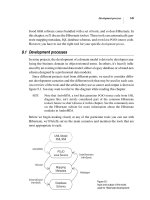
FIGURE 4.24 Port numbers for TCP and UDP
The different port numbers that can be used are explained next:
Numbers below 1024 are considered well-known port numbers and are defined in RFC 3232.
Numbers 1024 and above are used by the upper layers to set up sessions with other hosts,
and by TCP to use as source and destination addresses in the TCP segment.
In the following sections we’ll take a look at an analyzer output showing a TCP session.
TCP Session: Source Port
The following listing shows a TCP session captured with Etherpeek protocol analyzer software:
TCP - Transport Control Protocol
Source Port: 5973
Destination Port: 23
Sequence Number: 1456389907
Ack Number: 1242056456
Offset: 5
Reserved: %000000
Code: %011000
Ack is valid
Push Request
Window: 61320
Checksum: 0x61a6
Urgent Pointer: 0
No TCP Options
TCP Data Area:
vL.5.+.5.+.5.+.5 76 4c 19 35 11 2b 19 35 11 2b 19 35 11
2b 19 35 +. 11 2b 19
Frame Check Sequence: 0x0d00000f
FTP Telnet Doom TFTP POP3DNS
TCP
Transport
layer
Application
layer
Port
numbers
UDP
News
11911069536662321
4309c04.fm Page 335 Thursday, October 23, 2003 4:51 PM
336
Chapter 4
Technology
Notice that the source host makes up the source port; in this case it is 5973. The desti-
nation port is 23, which is used to tell the receiving host the purpose of the intended con-
nection (Telnet).
By looking at this session, you can see that the source host makes up the source port. But why
does the source make up a port number? To differentiate between sessions with different hosts,
my friend. How else would a server know where information is coming from if it didn’t have a
different number from a sending host? TCP and the upper layers don’t use hardware and logical
addresses to understand the sending host’s address like the Data Link and Network layer pro-
tocols do. Instead, they use port numbers. And it’s easy to imagine the receiving host getting
thoroughly confused if all the hosts used the same port number to get to FTP!
TCP Session: Destination Port
Now, you’ll sometimes look at an analyzer and see that only the source port is above 1024 and
the destination port is a well-known port, as shown in the following Etherpeek trace:
TCP - Transport Control Protocol
Source Port: 1144
Destination Port: 80 World Wide Web HTTP
Sequence Number: 9356570
Ack Number: 0
Offset: 7
Reserved: %000000
Code: %000010
Synch Sequence
Window: 8192
Checksum: 0x57E7
Urgent Pointer: 0
TCP Options:
Option Type: 2 Maximum Segment Size
Length: 4
MSS: 536
Option Type: 1 No Operation
Option Type: 1 No Operation
Option Type: 4
Length: 2
Opt Value:
No More HTTP Data
Frame Check Sequence: 0x43697363
As expected, the source port is over 1024, but the destination port is 80, or HTTP service.
The server, or receiving host, will change the destination port if it needs to.
4309c04.fm Page 336 Thursday, October 23, 2003 4:51 PM
4.5 Evaluate TCP/IP Communication Process and Its Associated Protocols
337
In the preceding trace, a “syn” packet is being sent to the destination device. This is visible
in the Code section (Etherpeek represents it as Synch). The syn sequence is what’s telling the
remote destination device that it wants to create a session.
TCP Session: Syn Packet Acknowledgment
The next trace shows an acknowledgment to the syn packet:
TCP - Transport Control Protocol
Source Port: 80 World Wide Web HTTP
Destination Port: 1144
Sequence Number: 2873580788
Ack Number: 9356571
Offset: 6
Reserved: %000000
Code: %010010
Ack is valid
Synch Sequence
Window: 8576
Checksum: 0x5F85
Urgent Pointer: 0
TCP Options:
Option Type: 2 Maximum Segment Size
Length: 4
MSS: 1460
No More HTTP Data
Frame Check Sequence: 0x6E203132
Notice the Ack is valid, which means that the source port was accepted and the device
agreed to create a virtual circuit with the originating host.
And here again, you can see that the response from the server shows the source is 80 and the
destination is the 1144 sent from the originating host—all’s well.
The Internet Layer Protocols
In the DoD model, there are two main reasons for the Internet layer’s existence: routing, and
providing a single network interface to the upper layers.
None of the other upper- or lower-layer protocols have any functions relating to routing—
that complex and important task belongs entirely to the Internet layer. The Internet layer’s second
duty is to provide a single network interface to the upper-layer protocols. Without this layer,
application programmers would need to write “hooks” into every one of their applications for
each different Network Access protocol. This would not only be a pain in the neck, but it would
lead to different versions of each application—one for Ethernet, another one for Token Ring, and
4309c04.fm Page 337 Thursday, October 23, 2003 4:51 PM
338
Chapter 4
Technology
so on. To prevent this, IP provides one single network interface for the upper-layer protocols. That
accomplished, it’s then the job of IP and the various Network Access protocols to get along and
work together.
All network roads don’t lead to Rome—they lead to IP. And all the other protocols at this
layer, as well as all those in the upper layers, use it. Never forget that. Let me say it again: all
paths through the DoD model go through IP. The following sections describe the protocols at
the Internet layer:
Internet Protocol (IP)
Internet Control Message Protocol (ICMP)
Address Resolution Protocol (ARP)
Reverse Address Resolution Protocol (RARP)
Internet Protocol (IP)
IP essentially is the Internet layer. The other protocols found here merely exist to support it. IP
holds the big picture and could be said to “see all,” in that it’s aware of all the interconnected
networks. It has this ability because all the machines on the network have a software, or logical,
address called an IP address.
IP looks at each packet’s address. Then, using a routing table, it decides where a packet is to
be sent next, choosing the best path. The protocols of the Network Access layer at the bottom
of the DoD model don’t possess IP’s enlightened scope of the entire network; they deal only with
physical links (local networks).
Identifying devices on networks requires answering these two questions: Which network is
it on? and What is its ID on that network? The first answer is the software address, or logical
address (the correct street). The second answer is the hardware address (the correct mailbox).
All hosts on a network have a logical ID called an IP address. This is the software, or logical,
address and contains valuable encoded information, which greatly simplifies the complex task
of routing. (Please note that IP is discussed in RFC 791.)
IP receives segments from the Host-to-Host layer and fragments them into datagrams (pack-
ets) if necessary. IP then reassembles datagrams back into segments on the receiving side. Each
datagram is assigned the IP address of the sender and of the recipient. Each router (Layer 3
device) that receives a datagram makes routing decisions based on the packet’s destination IP
address.
Figure 4.25 shows an IP header. This will give you an idea of what the IP protocol has
to go through every time user data is sent from the upper layers and is to be sent to a remote
network.
4309c04.fm Page 338 Thursday, October 23, 2003 4:51 PM
4.5 Evaluate TCP/IP Communication Process and Its Associated Protocols
339
FIGURE 4.25 IP header
The following fields make up the IP header:
Version IP version number.
Header Length (HLEN) Header length in 32-bit words.
Type of Service (ToS) with IP Precedence Bits Type of Service tells how the datagram should
be handled. The first three bits are the priority bits.
Total length Length of the packet including header and data.
Identification Unique IP packet value.
Flags Specifies whether fragmentation should occur.
Fragment offset Provides fragmentation and reassembly if the packet is too large to put in a
frame. It also allows different MTUs on the Internet.
Time to live (TTL) The TTL is set into a packet when it is originally generated. If it doesn’t
get to where it wants to go before the TTL expires, boom—it’s gone. This stops IP packets from
continuously circling the network looking for a home.
Protocol This is the port of the upper-layer protocol (TCP is port 6 or UDP is port 17 [hex]).
This allows IP to know which Transport layer protocol to pass the packet too.
Bit 0 Bit 15
Total length (16)
Header checksum (16)Time to Live (8) Protocol (8)
Version
(4)
Flags
(3)
Header
length (4)
Priority and
Type of Service (8)
Identification (16) Fragment offset (13)
Options (0 or 32 if any)
Destination IP address (32)
Source IP address (32)
Data (varies if any)
Bit 16 Bit 31
20 bytes
4309c04.fm Page 339 Thursday, October 23, 2003 4:51 PM
340
Chapter 4
Technology
Header checksum This means that this CRC is run on the IP header only.
Source IP address 32-bit IP address of the sending station.
Destination IP address 32-bit IP address of the station this packet is destined for.
Options Used for network testing, debugging, security, and more.
Data Upper-layer data.
Here’s a snapshot of an IP packet caught on a network analyzer (notice that all the header
information just discussed appears here):
IP Header - Internet Protocol Datagram
Version: 4
Header Length: 5
Precedence: 0
Type of Service: %000
Unused: %00
Total Length: 187
Identifier: 22486
Fragmentation Flags: %010 Do Not Fragment
Fragment Offset: 0
Time To Live: 60
IP Type: 0x06 TCP
Header Checksum: 0xd031
Source IP Address: 10.7.1.30
Dest. IP Address: 10.7.1.10
No Internet Datagram Options
Can you distinguish the logical, or IP, addresses in this header?
The Type field—it’s typically a Protocol field, but this analyzer sees it as an IP Type field—
is important. If the header didn’t carry the protocol information for the next layer, IP wouldn’t
know what to do with the data carried in the packet. The example above tells IP to hand the seg-
ment to TCP.
Figure 4.26 demonstrates how the Network layer sees the protocols at the Transport layer
when it needs to hand a packet to the upper-layer protocols.
FIGURE 4.26 The Protocol field in an IP header
TCP UDP
Protocol
numbers
IP
Transport
layer
Internet
layer
176
4309c04.fm Page 340 Thursday, October 23, 2003 4:51 PM
4.5 Evaluate TCP/IP Communication Process and Its Associated Protocols
341
In this example, the Protocol field tells IP to send the data to either TCP port 6 or UDP port
17 (both hex addresses). But it will only be UDP or TCP if the data is part of a data stream
headed for an upper-layer service or application. It could just as easily be destined for ICMP,
ARP, or some other type of Network layer protocol.
Table 4.3 is a list of some other popular protocols that can be specified in the Protocol
field.
Internet Control Message Protocol (ICMP)
ICMP works at the Network layer and is used by IP for many different services. ICMP is a man-
agement protocol and messaging service provider for IP. Its messages are carried as IP datagrams.
RFC 1256 is an annex to ICMP, which affords hosts’ extended capability in discovering routes to
gateways.
Periodically, router advertisements are announced over the network, reporting IP addresses
for the router’s network interfaces. Hosts listen for these network infomercials to acquire route
information. A router solicitation is a request for immediate advertisements and may be sent by
a host when it starts up.
RFC 792 references ICMP and describes how ICMP must be implemented by all
TCP/IP hosts.
TABLE 4.3 Possible Protocols Found in the Protocol Field of an IP Header
Protocol Protocol Number
ICMP 1
IGRP 9
EIGRP 88
OSPF 89
IPv6 41
GRE 47
IPX in IP 111
Layer-2 tunnel (L2TP) 115
4309c04.fm Page 341 Thursday, October 23, 2003 4:51 PM
342
Chapter 4
Technology
The following are some common events and messages that ICMP relates to:
Destination Unreachable If a router can’t send an IP datagram any further, it uses ICMP to
send a message back to the sender, advising it of the situation. For example, if a router receives
a packet destined for a network that the router doesn’t know about, it will send an ICMP Des-
tination Unreachable message back to the sending station.
Buffer Full If a router’s memory buffer for receiving incoming datagrams is full, it will use
ICMP to send out this message until the congestion abates.
Hops Each IP datagram is allotted a certain number of routers, called hops, to pass through.
If it reaches its limit of hops before arriving at its destination, the last router to receive that dat-
agram deletes it. The executioner router then uses ICMP to send an obituary message, informing
the sending machine of the demise of its datagram.
Ping Ping (Packet Internet Groper) uses ICMP echo messages to check the physical and logical
connectivity of machines on an internetwork.
Traceroute Traceroute uses the TTL field and receives progressive ICMP timeouts to discover
the path a packet takes as it traverses an internetwork.
Both Ping and Traceroute (also just called Trace; Microsoft Windows uses
tracert) allow you to verify address configurations in your internetwork.
The following data is from a network analyzer catching an ICMP echo request:
Flags: 0x00
Status: 0x00
Packet Length: 78
Timestamp: 14:04:25.967000 05/06/2002
Ethernet Header
Destination: 00:a0:24:6e:0f:a8
Source: 00:80:c7:a8:f0:3d
Ether-Type: 08-00 IP
IP Header - Internet Protocol Datagram
Version: 4
Header Length: 5
Precedence: 0
Type of Service: %000
Unused: %00
Total Length: 60
Identifier: 56325
Fragmentation Flags: %000
4309c04.fm Page 342 Thursday, October 23, 2003 4:51 PM
4.5 Evaluate TCP/IP Communication Process and Its Associated Protocols
343
Fragment Offset: 0
Time To Live: 32
IP Type: 0x01 ICMP
Header Checksum: 0x2df0
Source IP Address: 100.100.100.2
Dest. IP Address: 100.100.100.1
No Internet Datagram Options
ICMP - Internet Control Messages Protocol
ICMP Type: 8 Echo Request
Code: 0
Checksum: 0x395c
Identifier: 0x0300
Sequence Number: 4352
ICMP Data Area:
abcdefghijklmnop 61 62 63 64 65 66 67 68 69 6a 6b 6c 6d
qrstuvwabcdefghi 71 72 73 74 75 76 77 61 62 63 64 65 66
Frame Check Sequence: 0x00000000
Notice anything unusual? Did you catch the fact that even though ICMP works at the Internet
(Network) layer, it still uses IP to do the Ping request? The Type field in the IP header is 0x01,
which specifies ICMP
The Ping program just uses the alphabet in the data portion of the packet as a
payload, 100 bytes by default.
If you remember reading about the Data Link layer and the different frame types earlier in
this chapter, you should be able to look at the preceding trace and tell what type of Ethernet
frame this is. The only fields are destination hardware address, source hardware address, and
Ether-Type. The only frame that uses an Ether-Type field exclusively is an Ethernet_II frame.
(SNAP uses an Ether-Type field also, but only within an 802.2 LLC field, which isn’t present in
the frame.)
Address Resolution Protocol (ARP)
ARP finds the hardware address of a host from a known IP address. Here’s how it works: when
IP has a datagram to send, it must inform a Network Access protocol, such as Ethernet or Token
Ring, of the destination’s hardware address on the local network. (It has already been informed
by upper-layer protocols of the destination’s IP address.) If IP doesn’t find the destination host’s
hardware address in the ARP cache, it uses ARP to find this information.
As IP’s detective, ARP interrogates the local network by sending out a broadcast asking the
machine with the specified IP address to reply with its hardware address. So basically, ARP
translates the software (IP) address into a hardware address—for example, the destination
4309c04.fm Page 343 Thursday, October 23, 2003 4:51 PM
344
Chapter 4
Technology
machine’s Ethernet board address—and from it, deduces its whereabouts on LAN by broad-
casting for this address. Figure 4.27 shows how an ARP looks to a local network:
FIGURE 4.27 Local ARP broadcast
ARP resolves IP addresses to Ethernet (MAC) addresses.
The following trace shows an ARP broadcast. Notice that the destination hardware address
is unknown, and is all Fs in hex (all 1s in binary) and a hardware address broadcast:
Flags: 0x00
Status: 0x00
Packet Length: 64
Timestamp: 09:17:29.574000 01/04/2002
Ethernet Header
Destination: FF:FF:FF:FF:FF:FF Ethernet Broadcast
Source: 00:A0:24:48:60:A5
Protocol Type: 0x0806 IP ARP
ARP - Address Resolution Protocol
Hardware: 1 Ethernet (10Mb)
Protocol: 0x0800 IP
Hardware Address Length: 6
I heard that broadcast.
The message is for me.
Here is my Ethernet address.
10.1.1.2
I need the Ethernet
address of 10.1.1.2
10.1.1.1
IP: 10.1.1.2 = ???
IP: 10.1.1.2
Ethernet: 4523.7985.7734
4309c04.fm Page 344 Thursday, October 23, 2003 4:51 PM
Exam Essentials
345
Protocol Address Length: 4
Operation: 1 ARP Request
Sender Hardware Address: 00:A0:24:48:60:A5
Sender Internet Address: 172.16.10.3
Target Hardware Address: 00:00:00:00:00:00 (ignored)
Target Internet Address: 172.16.10.10
Extra bytes (Padding):
0A 0A 0A 0A 0A 0A 0A 0A 0A 0A 0A 0A 0A
0A 0A 0A 0A 0A
Frame Check Sequence: 0x00000000
Reverse Address Resolution Protocol (RARP)
When an IP machine happens to be a diskless machine, it has no way of initially knowing its IP
address—but it does know its MAC address. RARP discovers the identity of the IP address for
a diskless machine by sending out a packet that includes its MAC address and a request for the
IP address assigned to that MAC address. A designated machine, called a RARP server, responds
with the answer, and the identity crisis is over. RARP uses the information it does know about the
machine’s MAC address to learn its IP address and complete the machine’s ID portrait.
RARP resolves Ethernet (MAC) addresses to IP addresses.
Exam Essentials
Know the Process/Application layer protocols. Telnet is a terminal emulation protocol
and it allows you to log into a remote host and run programs. File Transfer Protocol (FTP)
is a connection-oriented service that allows you to transfer files. Trivial FTP (TFTP) is a connec-
tionless file transfer program. Simple Mail Transfer Protocol (SMTP) is a send-mail program.
Know the Host-to-Host layer protocols. Transmission Control Protocol (TCP) is a
connection-oriented protocol that provides reliable network service by using acknowl-
edgments and flow control. User Datagram Protocol (UDP) is a connectionless protocol
that provides low overhead and is considered unreliable.
Know the Internet layer protocols. Internet Protocol (IP) is a connectionless protocol that
provides network address and routing through an internetwork. Address Resolution Protocol
(ARP) finds a hardware address from a known IP address. Reverse ARP (RARP) finds an IP
address from a known hardware address. Internet Control Message Protocol (ICMP) provides
diagnostics and unreachable messages.
4309c04.fm Page 345 Thursday, October 23, 2003 4:51 PM
346
Chapter 4
Technology
4.6 Describe the Components of Network
Devices
In order to configure and troubleshoot a Cisco internetwork, you need to know the major com-
ponents of Cisco routers and understand what each one does. Table 4.4 describes the major
Cisco router components:
TABLE 4.4 Cisco Router Components
Component Description
Bootstrap Stored in the microcode of the ROM, the bootstrap is used
to bring a router up during initialization. It will boot the
router and then load the IOS.
POST (power-on-self-test) Stored in the microcode of the ROM, the POST is used to
check the basic functionality of the router hardware and
determines which interfaces are present.
ROM monitor Stored in the microcode of the ROM, the ROM monitor is
used for manufacturing, testing, and troubleshooting
Mini-IOS Called the RXBOOT or bootloader by Cisco, the mini-IOS
is a small IOS in ROM that can be used to bring up an inter-
face and load a Cisco IOS into flash memory. The mini-IOS
can also perform a few other maintenance operations.
RAM (random access memory) Used to hold packet buffers, ARP cache, routing tables,
and also the software and data structures that allow the
router to function. running-config is stored in RAM, and
the IOS can also be run from RAM in some routers.
ROM (read-only memory) Used to start and maintain the router.
Flash memory Used on the router to hold the Cisco IOS. Flash memory is
not erased when the router is reloaded. It is an EEPROM
created by Intel.
NVRAM (nonvolatile RAM) Used to hold the router and switch configuration. NVRAM
is not erased when the router or switch is reloaded.
Configuration register Used to control how the router boots up. This value can be
seen with the show version command and typically is
0x2102, which tells the router to load the IOS from flash
memory.
4309c04.fm Page 346 Thursday, October 23, 2003 4:51 PM
4.7 Evaluate Rules for Packet Control
347
When a router boots up, it performs a series of steps, called the boot sequence, to test the
hardware and load the necessary software. The boot sequence consists of the following steps:
1. The router performs a POST. The POST tests the hardware to verify that all components
of the device are operational and present.
2. The bootstrap looks for and loads the Cisco IOS software. By default, the IOS software is
loaded from flash memory in all Cisco routers.
3. The IOS software looks for a valid configuration file stored in NVRAM. This file is called
startup-config and is only there if an administrator copies the running-config file into
NVRAM.
4. If a startup-config file is in NVRAM, the router will load and run this file. The router
is now operational. If a startup-config file is not in NVRAM, the router will start the
setup mode configuration upon bootup.
Exam Essentials
Know the different components on a Cisco router. You need to know the difference between
RAM, ROM, NVRAM, and Flash types of memory. Also, understand that the configuration
register is used to control router bootup.
4.7 Evaluate Rules for Packet Control
When considering Cisco routers, there is really only one rule for packet control, and that rule
is an access control list or ACL. As you know, ACLs are used extensively by IOS for many
functions beyond packet control. However, they are the main tool used to control packets in
an internetwork.
An access list is essentially a list of conditions that categorize packets. Such a list can be really
helpful when you need to exercise control over network traffic—it would be your tool of choice
for decision-making in these situations.
One of the most common and easy-to-understand uses of access lists is for filtering unwanted
packets when you are implementing security policies. You can set them up to make very specific
decisions about regulating traffic patterns so that they’ll only allow certain hosts to access
WWW resources on the Internet while restricting others. With the right combination of access
lists, network managers arm themselves with the power to enforce nearly any security policy
they can invent.
Access lists can even be used in other situations that don’t necessarily involve blocking packets.
You can use them to control which networks will or won’t be advertised by dynamic routing
protocols. Creating or scripting the access list uses the same syntax or format regardless of
application. The difference here is simply how you apply them—to a routing protocol instead
of an interface. When you apply an access list like this, it’s called a distribute list, and it doesn’t
stop routing advertisements, it just controls their content. You can also use access lists to categorize
4309c04.fm Page 347 Thursday, October 23, 2003 4:51 PM
348
Chapter 4
Technology
packets for queuing or QoS type services, and for controlling which types of traffic can activate an
expensive ISDN link.
The CCNA focuses on using access lists as packet filters, so that’s what we’re
going to zero in on too!
Creating access lists is really a lot like programming a series of if-then statements—if a given
condition is met, then a given action is taken. If the specific condition isn’t met, nothing happens,
and the next statement is evaluated. Access lists statements are basically packet filters that packets
are compared against, categorized by, and acted upon accordingly. Once the lists are built, they
can be applied to either inbound or outbound traffic on any interface. Applying an access list
causes the router to analyze every packet crossing that interface in the specified direction and take
the appropriate action.
There are a few important rules a packet follows when it’s being compared with an
access list:
It’s always compared with each line of the access list in sequential order; that is, it’ll always
start with the first line of the access list, then go to line 2, then line 3, and so on.
It’s compared with lines of the access list only until a match is made. Once the packet
matches the condition on a line of the access list, the packet is acted upon, and no further
comparisons take place.
There is an implicit “deny” at the end of each access list—this means that if a packet doesn’t
match the condition on any of the lines in the access list, the packet will be discarded.
Each of these rules has some powerful implications when you are filtering IP packets with
access lists, so keep in mind that creating effective access lists truly takes some practice.
Exam Essentials
Understand the relationship between access lists and packet control. Access lists can be used
to filter or drop packets in order to control who has access to resources such as VTY, or to deter-
mine what networks are advertised by dynamic routing protocols.
Understand the term “implicit deny.” At the end of every access list is an implicit deny. What
this means is that if a packet does not match any of the lines in the access list, then it will be dis-
carded. Also, if you have nothing but deny statements in your list, then the list will not permit
any packets.
4309c04.fm Page 348 Thursday, October 23, 2003 4:51 PM
4.8 Evaluate Key Characteristics of WANs
349
4.8 Evaluate Key Characteristics
of WANs
So, what is it that makes something a WAN instead of a LAN? Distance is the first idea that
comes to mind, but these days, wireless LANs can cover some serious turf! So, is it bandwidth?
Here again, really big pipes can be had for a price in many places, so that’s not it either. Well,
what then? Perhaps one of the best ways to tell a WAN from a LAN is that you generally own
a LAN infrastructure, but you generally lease your WAN infrastructure from a service provider.
While modern technologies will blur even this definition, it applies well in the context of the
CCNA. I’ve already talked about a data link that you usually own (Ethernet), but now we’re
going to take a look at the data links you most often don’t own, but instead lease from a service
provider.
Key to understanding WAN technologies is being familiar with the different WAN terms and
connection types often used by service providers to join your networks together. So I’ll begin by
going over these with you.
Defining WAN Terms
It would be a good idea to understand the following terms that service providers commonly use
before ordering a WAN service type:
CPE Or customer premises equipment, is, (surprise!) equipment that’s owned by the subscriber
and located on the subscriber’s premises.
Demarcation point Marks the spot that the service provider’s responsibility ends and the CPE
begins. It’s generally a device in a telecommunications closet owned and installed by the telco.
The customer is responsible for installing cable (extended demarc) from this box to the CPE—
usually in the form of a CSU/DSU or ISDN interface.
Local loop This connects the demarc to the closest switching office, called a central office (CO).
Central office (CO) This point connects the customers to the provider’s switching network. A
CO is sometimes referred to as a point of presence (POP).
Toll network These are trunk lines inside a WAN provider’s network. The toll network is a
collection of switches and facilities.
Make sure you fully dial these terms in—they’re critical to understanding WAN
technologies!
4309c04.fm Page 349 Thursday, October 23, 2003 4:51 PM
350
Chapter 4
Technology
WAN Connection Types
Figure 4.28 shows the different WAN connection types that can be used to connect your LANs
together over a DCE network.
FIGURE 4.28 WAN connection types
Here’s a description of the different WAN connection types:
Leased lines Typically, these are referred to as a point-to-point connection or dedicated con-
nection. A leased line is a preestablished WAN communications path from the CPE, through the
DCE switch, to the CPE of the remote site; this allows DTE networks to communicate at any
time with no setup procedures before transmitting data. If you’re rolling in dough, it’s really the
best choice. It uses synchronous serial lines up to 45Mbps. HDLC and PPP encapsulations are
frequently used on leased lines.
Circuit switching When you hear circuit switching, think phone call. The big advantage is
cost—you only pay for the time you actually use. No data can transfer before an end-to-end
connection is established. Circuit switching uses dial-up modems or ISDN and is used for
low-bandwidth data transfers.
Packet switching This is a WAN switching method that allows you to share bandwidth with
other companies to save money. Think of packet switching as a network that’s designed to look
like a leased line (always available), yet it costs more like circuit switching (pay for what you
use). Think I’m making this up? I’m not, but there is a downside—if you need to transfer data
constantly, forget about this option. Just get yourself a leased line. This will only work well if
your data transfers are bursty in nature. Frame Relay and X.25 are packet-switching technologies.
Speeds can range from 56Kbps to T3 (45Mbps).
Dedicated
Circuit-switched
Packet-switched
Synchronous serial
Asynchronous serial, ISDN
Synchronous serial
Telephone
company
Service
provider
4309c04.fm Page 350 Thursday, October 23, 2003 4:51 PM
Exam Essentials
351
WAN Protocols
Many WAN protocols have been developed. Some have even been deployed, and a few have
seen huge deployments. Following is a look at some of the most popular WAN protocols:
Frame Relay A packet-switched technology that emerged in the early 1990s, Frame Relay is a
Data Link and Physical layer specification that provides high performance. Frame Relay is a
successor to X.25, except that much of the technology in X.25 used to compensate for physical
errors (noisy lines) has been eliminated. Frame Relay can be more cost-effective than point-to-point
links, and can typically run at speeds of 64Kbps up to 45Mbps (T3). Frame Relay provides features
for dynamic bandwidth allocation and congestion control.
LAPB Link Access Procedure, Balanced (LAPB) was created to be a connection-oriented protocol
at the Data Link layer for use with X.25. It can also be used as a simple Data Link transport. LAPB
causes a huge amount of overhead because of its strict timeout and windowing techniques.
HDLC High-Level Data Link Control (HDLC) was derived from Synchronous Data Link
Control (SDLC), which was created by IBM as a Data Link connection protocol. HDLC is
a connection-oriented protocol at the Data Link layer, but it has very little overhead com-
pared to LAPB. HDLC wasn’t intended to encapsulate multiple Network layer protocols
across the same link. The HDLC header carries no identification of the type of protocol
being carried inside the HDLC encapsulation. Because of this, each vendor that uses HDLC
has their own way of identifying the Network layer protocol, which means that each vendor’s
HDLC is proprietary for their equipment.
PPP Point-to-Point Protocol (PPP) is an industry-standard protocol. Because all multi-protocol
versions of HDLC are proprietary, you can use PPP to create point-to-point links between different
vendors’ equipment. It uses a NCP field in the Data Link header to identify the Network layer
protocol. It allows authentication and multilink connections and can be run over asynchronous
and synchronous links.
ATM Asynchronous Transfer Mode (ATM) was created for time-sensitive traffic; it provides simul-
taneous transmission of voice, video, and data. ATM uses cells instead of packets that are a fixed
53-bytes long. It also uses isochronous clocking (external clocking) to help the data move faster.
Exam Essentials
Know the differences between leased lines, circuit switching, and packet switching. A leased
line is a dedicated connection, a circuit-switched connection is like a phone call and can be on
or off, and packet switching is essentially a connection that looks like a leased line but is priced
more like a circuit-switched connection.
Understand the different WAN protocols. Pay particular attention to HDLC, Frame Relay, and
PPP. HDLC is the default encapsulation on Cisco routers; PPP provides an industry-standard way
of encapsulating multiple routed protocols across a link and must be used when connecting
equipment from multiple vendors. Frame Relay is a packet-switched technology that can offer
cost advantages over leased lines but has more complex configuration options.
4309c04.fm Page 351 Thursday, October 23, 2003 4:51 PM
352
Chapter 4
Technology
Review Questions
1. Which of the following are Presentation layer protocols? Select all that apply.
A.
TFTP
B. IP
C. RTF
D. QuickTime
E. MIDI
2. Which two statements about a reliable connection-oriented data transfer are true?
A.
Receiving hosts acknowledge receipt of data.
B. When buffers are full, packets are discarded and are not retransmitted.
C. Windowing is used to provide flow control and unacknowledged data segments.
D. If the transmitting host’s timer expires before receipt of an acknowledgment, the trans-
mitting host drops the virtual circuit.
3. If you use either Telnet or FTP, which is the highest layer you are using to transmit data?
A.
Application
B. Presentation
C. Session
D. Transport
4. The DoD model (also called the TCP/IP stack) has four layers. Which layer is the Network layer
from the OSI model equivalent to on the DoD model?
A.
Application
B. Host-to-Host
C. Internet
D. Network Access
5. You want to install a wireless network in your corporate office and need good speed, but you
only need a range of no more than about 250 feet. Which of the following wireless technologies
should you install?
A.
Narrowband
B. Narrowband PCS
C. Broadband PCS
D. Infrared
E. Spread Spectrum
4309c04.fm Page 352 Thursday, October 23, 2003 4:51 PM
Review Questions
353
6. Which layer of the OSI provides translation of data?
A.
Application
B. Presentation
C. Session
D. Transport
E. Data Link
7. Which of the following are true? (Choose two.)
A.
TCP is connection-oriented but doesn’t use flow control.
B. IP is not necessary on all hosts that use TCP.
C. ICMP must be implemented by all TCP/IP hosts.
D. ARP is used to find a hardware address from a known IP address.
8. Which LAN switch method is also known as a modified version of cut-through?
A.
Cut-throughout
B. FragmentFree
C. Store-and-forward
D. Store-and-release
9. Which of the following are true regarding store-and-forward? (Select all that apply.)
A.
The latency time varies with frame size.
B. The latency time is constant.
C. The frame is transmitted only after the complete frame is received.
D. The frame is transmitted as soon as the header of the frame is read.
10. What could happen on a network if no loop avoidance schemes are put in place? (Choose two
options.)
A. Faster convergence times
B. Broadcast storms
C. Multiple frame copies
D. IP routing will cause flapping on a serial link.
4309c04.fm Page 353 Thursday, October 23, 2003 4:51 PM
354
Chapter 4
Technology
Answers to Review Questions
1. C, D, E. The Presentation layer defines many protocols; RTF, QuickTime, and MIDI are
correct answers. IP is a Network layer protocol; TFTP is an Application layer protocol.
2. A, C. When a virtual circuit is created, windowing is used for flow control and acknowledgment
of data.
3. A. Both FTP and Telnet use TCP at the Transport layer; however, they both are Application
layer protocols, so the Application layer is the best answer for this question.
4. C. The four layers of the DoD model are Application/Process, Host-to-Host, Internet, and
Network Access. The Internet layer is equivalent to the Network layer of the OSI model.
5. E. Spread Spectrum LANs typically can run up to 11Mbps for about 300 feet depending on the
environment, although the speeds are increasing to 20Mbps or higher.
6. B. The only layer of the OSI model that can actually change data is the Presentation layer.
7. C, D. ICMP must be implemented by all TCP/IP hosts, and ARP is used to find a hardware
address from a known IP address. TCP always requires IP, and TCP always uses flow control.
8. B. The modified version of cut-through is called FragmentFree. This technology essentially
delays forwarding of the frame until the collision window has passed, resulting in fewer
errors. Store-and-forward operates differently. There is no such thing as cut-throughout or
store-and-release.
9. A, C. Store-and-forward latency (delay) will always vary because the complete frame must be
received before the frame is transmitted back out the switch.
10. B, C. Broadcast storms and multiple frame copies are typically found in a network that has
multiple links to remote locations without some type of loop-avoidance scheme.
4309c04.fm Page 354 Thursday, October 23, 2003 4:51 PM
Index
Note to the reader:
Throughout this index
boldfaced
page numbers indicate primary
discussions of a topic.
Italicized
page numbers indicate illustrations.
Symbols and Numbers
? (question mark), for router configu-
ration command help, 161–162
^ marker, for command input
errors, 163
10Base2, 310
10Base5, 310
10BaseT, 303, 310
100BaseFX, 311
100BaseTX, 311
100VG-AnyLAN, 305
802.1Q routing, 125
1000BaseCX, 311
1000BaseLX, 311
1000BaseSX, 311
1000BaseT, 311
A
ABRs (area border routers), 26
access layer in Cisco hierarchical
model,
283
,
284–285
access links, 33
access lists,
37–39
,
198–210
, 347
dial-on-demand routing (DDR)
with, 221
exam essentials, 39
extended lists,
203–208
examples, 204–208
named lists,
208–210
standard lists,
198–203
controlling VTY (Telnet)
access,
203
example,
202–203
wildcard mask,
200–201
troubleshooting,
269–272
exam essentials, 271–272
acknowledgments, in Transport
layer,
293
active state for virtual circuit, 50
Address Resolution Protocol (ARP),
69, 320,
343–345
administrative distances (AD),
14–15
, 68
for static routes, 72
agents in SNMP, 328
aggregate rate, 304
"Ambiguous command" message, 163
American National Standards Institute
(ANSI), LMI signaling format, 49
any command, for access list, 199, 202
Application layer (OSI),
287–288
access list to filter by protocol,
204, 205
application-specific integrated circuit
(ASIC), 296
area border routers (ABRs), 26
areas for OSPF, 26
ARP.
See
Address Resolution
Protocol (ARP)
AS.
See
autonomous system (AS)
ASBR (autonomous system boundary
router), 26
Asynchronous Transfer Mode
(ATM), 351
authentication, by Link Control
Protocol, 41
4309Index.fm Page 355 Thursday, October 23, 2003 4:55 PM
356
auto-detect mechanism – caret (^), for command input errors
auto-detect mechanism, 304
autonomous system (AS), 14
autonomous system boundary router
(ASBR), 26
autonomous system numbers
(ASNs), 23
for IGRP configuration, 76
autosense feature for LMI, 49
auxiliary password,
168–169
B
B (Bearer) channels in ISDN, 51
backup
device configuration file,
146–148
system image file,
142–143
Backward-Explicit Congestion Notifi-
cation (BECN), 50
bandwidth, 212
bandwidth command, 178
banners,
172–174
baseline, in SNMP, 328
Basic Management for setup mode, 153
Basic Rate Interface (BRI), 53–54
BECN (Backward-Explicit Congestion
Notification), 50
"best effort" basis of delivery, 47
binary notation for IP addresses, 7
conversion to decimal and hexa-
decimal,
246–249
subnet masks,
94–95
binding, 229
bit, 7
bit-oriented protocols, 40
block sizes
for access list masks, 199, 201
for VLSM masks, 105, 109
blocked port, 301
for Spanning Tree Protocol, 299
"'boot' aborted due to user interrupt"
message, 115
boot sequence of router, 152, 347
interrupting,
115
bootloader, 346
bootstrap, 346
Bootstrap Protocol (BootP), 328–329
BPDU, 299
BRI (Basic Rate Interface), 53–54
bridge ID, 299
for root bridge selection, 300
bridges,
4
, 313
vs. LAN switching, 316
operating with switches and
routers, 4–6,
5
broadband PCS, 318–319
broadcast address, 7
for subnet, 96
broadcast domain, 2
routers to break up, 3
broadcast storms, 296
broadcasts, control,
29
buffer, 291
Buffer Full, ICMP and, 342
burst, 46
byte, 7, 246
byte-oriented protocols, 40
C
cabling
crossover,
136
,
136–137
exam essentials, 138
rolled,
137
,
137–138
straight-through,
135–136
,
136
for WANs,
211–212
call setup, 290
callback, PPP, 42–43
caret (^), for command input errors, 163
4309Index.fm Page 356 Thursday, October 23, 2003 4:55 PM
Carrier Sense Multiple Access with Collision Detect (CSMA/CD) – clock command
357
Carrier Sense Multiple Access with
Collision Detect (CSMA/CD), 303
Catalyst 1900 switch
VLAN configuration, 119
verifying, 232
Catalyst 2950 switch, VLANs for,
120–121
CDP.
See
Cisco Discovery
Protocol (CDP)
cdp enable command, 258
central office (CO), 349
Challenge Handshake Authentication
Protocol (CHAP), 41, 42
CIDR (Classless Inter-Domain
Routing),
91–93
CIR (Committed Information Rate),
46–47
circuit switching for WAN, 350
Cisco
encapsulation type for Frame
Relay, 47
HDLC frame format,
40
LMI signaling format, 49
Cisco 2500 series router
changing bit value, 116
interface and connection options,
151
Cisco 2600 series router
changing bit value, 116
interface and connection options,
151
Cisco 2950 switch, 190
startup, 190
VTP configuration, 127
Cisco Catalyst 1900 switch, 190
startup, 190
Cisco CCNA exam
LAN information, 135
time constraints, 95
Cisco device console port, connection
to, 137–138
Cisco Discovery Protocol (CDP),
254–259
getting timers and holdtime infor-
mation, 254–255
for interface traffic information, 258
for neighbor information, 255–257
for port and interface information,
258–259
Cisco IOS,
150
.
See also
system
image file
connection to,
150–151
Cisco routers, software register for, 111
Cisco serial connections, 211
Cisco three-layer hierarchical model,
282–285
,
283
access layer,
284–285
core layer,
283–284
distribution layer,
284
exam essentials, 298
CiscoFusion, 150
Class A IP addresses,
8
,
9
subnet masks,
102
Class B IP addresses,
8
,
10
subnet masks,
99–102
in your head,
101–102
Class C IP addresses,
8
,
10–11
subnet masks,
93–96
binary method,
94–95
fast method, 95–96
practice examples,
96–98
in your head,
98–99
classful routing, 19, 102–103,
103
Classless Inter-Domain Routing
(CIDR),
91–93
classless routing, 19, 103
clear counters command, 185
clear line command, 268
CLI.
See
command-line interface (CLI)
client mode in VTP domain, 36
clock command, 162–163
4309Index.fm Page 357 Thursday, October 23, 2003 4:55 PM
358
clock rate command – copy start run command
clock rate command, 177
clocking, for serial interface, 177
CO (central office), 349
collapsed backbone,
312
, 312
collision domain
routers and, 3
switches and, 4
switches vs. hubs, 297
command-line interface (CLI),
157–188
banners,
172–174
descriptions,
178–179
editing and help features,
161–166
history of router commands,
164–165
hostnames,
178
information gathering,
166–167
logging into router,
158–159
passwords,
167–171
auxiliary,
168–169
console,
169–170
enabling,
167–168
encrypting,
171–174
for Telnet,
170–171
prompts,
159–161
router interfaces,
174–178
bringing up, 175
IP address configuration on, 176
serial interface commands,
177–178
router modes,
159
verifying configuration,
182–188
with show controllers
command, 188
with show interface command,
183–187
with show ip interface brief
command, 187
with show ip interface
command, 187
viewing and saving configurations,
179–181
Committed Information Rate (CIR),
46–47
Compaq, 298
composite metric, 20
for IGRP, 78
compression, by Link Control
Protocol, 42
config mem command, 148
config-register command, 114, 116
configuration register, 346
bits,
111–113
boot field bits, 113
changing, 114
current value, 113–114
configure memory command, 159
configure network command, 159
configure terminal command, 159
congestion
causes, 3
Frame Relay control of, 50
connection-oriented
communication, 329
in Transport layer, 290–291, 291
connector for WAN cabling, 211
console password, 169–170
console port, connection to, 150
contention media access, 295
convergence
of routing tables, 16, 17
in Spanning Tree Protocol, 301–302
copy flash tftp command, 142–143
copy run start command, 145, 146
copy running-config startup-config
command, 179
copy running-config tftp command,
146, 148
copy start run command, 117
4309Index.fm Page 358 Thursday, October 23, 2003 4:55 PM
copy startup-config running-config command – Department of Defense (DoD) model
359
copy startup-config running-config
command, 117, 148
copy startup-config tftp command, 146
copy tftp flash command, 143–144
copy tftp running-config command, 148
core layer in Cisco hierarchical model,
283, 283–284
costs, packet switching vs. leased line
networks, 44
counting to infinity, 18
CPE (customer premises
equipment), 349
crossover cabling, 136, 136–137
CSMA/CD. See Carrier Sense Multiple
Access with Collision Detect
(CSMA/CD)
cut-through switch, 317
D
D (Data) channel in ISDN, 51
data communication equipment
(DCE), 212
configuration, 63
for Frame Relay, 45
data encapsulation, 230, 230–231
Data field, in Ethernet frame, 307
data frame, 295
Data Link, 2
Data Link Connection Identifiers
(DLCI), 48
Data Link layer (OSI), 231,
294–297, 295
devices, 296
Ethernet on, 304–309
in IP routing, 321
show interface command for
status, 185
data packets, 294
data terminal equipment (DTE), 212
for Frame Relay, 45
datagram, 231
DDR. See dial-on-demand routing
(DDR)
DE (Discard Eligibility), in Frame
Relay header, 50
de-encapsulation, 231
debug dialer command, 277
debug frame lmi command, 275–276
debug ip igrp command, 238
debug ip igrp events command,
238–239
debug ip igrp transactions
command, 239
debug ip rip command, 237
debug isdn q921 command, 277
debug isdn q931 command, 277
decimal notation for IP addresses,
binary conversion to hexadecimal
and, 246–249
default gateway, 321
ARP need for hardware address, 69
default routing, 70–71
network address, 9
default subnet masks, 91
deleted state for virtual circuit, 50
deleting startup-config file, 149
demarcation (demarc), 46, 212, 349
deny statement, in access list, 199
Department of Defense (DoD) model,
324–325
exam essentials, 345
Host-to-Host layer protocols,
329–337
key concepts, 333–334
port numbers, 334–337
4309Index.fm Page 359 Thursday, October 23, 2003 4:55 PM