Ant The Definitive Guide phần 2 pptx
Bạn đang xem bản rút gọn của tài liệu. Xem và tải ngay bản đầy đủ của tài liệu tại đây (449.35 KB, 32 trang )
Ant: The Definitive Guide
29
Simple Object Access Protocol (SOAP). Outside of the Java world, XML finds equally great
acceptance, giving Ant a wide potential user base. XML's parser and model libraries are freely
available as Java libraries. Documentation is not a problem; there are hundreds of books,
magazines, and web sites dedicated to XML technology. As a general-purpose description
language, XML fits the complex use-case requirements set forth earlier. It can describe
operations, data types, data values, and project layout. These attributes of XML map closely
to Ant's design requirements. XML is the best choice for Ant.
3.2 Ant Building Blocks
With XML elements and tags, we can look at the primary components of an Ant buildfile as
components or building blocks. We build the buildfile using these blocks. Some pieces have
very specialized uses, while others are more common and used more frequently. Let's look at
the primary components of the Ant buildfile.
3.2.1 The Project
We call the set of tags and elements in an XML file from the root element — in this case
<project> — to the lowest-nested tag, the document object model (or DOM). The first or
root element of any buildfile is always the <project> tag. No buildfile can be without one,
nor can it have more than one. The DOM lays elements out in a tree-like hierarchy, making
the buildfile more of an object model than simply a plain process-description document. The
following example shows a valid project tag:
<project name="MyProject" default="all" basedir=".">
</project>
The <project> tag has three attributes: name, default, and basedir. The name attribute
gives the project a name. A project name is valuable for purposes of identifying log output (to
know what project you're building). For systems that manage buildfiles, such as an IDE that
can read buildfiles, the project name acts like an identifier for the buildfile. The
default
attribute refers to a target name within the buildfile. If you run Ant without specifying a target
on the command line, Ant executes the default target. If the default target doesn't exist, Ant
returns an error. While we do not recommend it, the value of
default does not have to be a
valid target name (i.e., a name corresponding to an actual target name in the buildfile). We
suggest either making the default target compile everything or display help for using the
buildfile. The basedir attribute defines the root directory of a project. Typically, it is ".", the
directory in which the buildfile resides, regardless of the directory you're in when you run
Ant. However,
basedir can also define different points of reference. For example, a buildfile
that is part of a hierarchical project structure needs a different reference point, referring to the
project's root directory. You can use the
basedir to specify this point of reference.
3.2.2 Targets
Targets map directly to the broad goals set forth in a build's requirements specification. For
example, compiling the latest source code for the package org.jarkarta and placing it into a
JAR is a broad goal and, thus, would be a target in a buildfile. Targets consist of tasks that do
the actual work of accomplishing the target goal.
Ant: The Definitive Guide
30
The following target compiles a set of files and packages them into a JAR called finallib.jar.
<target name="build-lib">
<javac srcdir="${src.ejb.dir}:${src.java.dir}"
destdir="${build.dir}"
debug="on"
deprecation="on"
includes="**/*.java"
excludes="${global.exclude}">
<classpath>
<pathelement location="."/>
<pathelement location="${lib.dir}/somelib.jar"/>
</classpath>
</javac>
<jar jarfile="${dist}/lib/finallib.jar" basedir="${build.dir}"/>
</target>
If necessary, targets can be more fine-grained, as in the following example, which contains
one target to compile the source code, and another to package the JAR file:
<target name="build-lib">
<javac srcdir="${src.ejb.dir}:${src.java.dir}"
destdir="${build.dir}"
debug="on"
deprecation="on"
includes="**/*.java"
excludes="${global.exclude}">
<classpath path="${classpath.compile}" />
</javac>
</target>
<target name="package-lib">
<jar jarfile="${dist}/lib/lib.jar" basedir="${build.dir}"/>
</target>
Such granularity may be required, for example, if the failure of one task (e.g., a task that
compiles source code) should not stop the execution of another, related task (e.g., a task
building the JAR). In this example, the library JAR builds regardless of the compilation
target's success.
In general, it is better that targets are coarse-grained operations. Tasks solve fine-grained
goals better than targets. While not every attempt at writing a buildfile will follow the model
we are showing, if you at least attempt to maintain a consistent granularity in your targets,
you will be much better off in the end. Haphazardly writing buildfiles means more work in the
future for you, since everyone on your project team will look to you, the original buildfile
author, for guidance as new functions and build goals complicate the project. Your goal
should be to create something requiring little modification, if any, and this effort begins with
target design.
3.2.3 Tasks
Tasks are the smallest building blocks of a buildfile and solve the more granular goals of a
build. They perform the actual work, compiling source code, packaging classes, retrieving file
revisions from CVS, or copying files and/or directories. Rather than provide a direct conduit
to the underlying shell like some other build tools, Ant wraps all operations into task
Ant: The Definitive Guide
31
definitions, each correlating to a Java object within Ant's object model. There are no tasks in
Ant that do not have a corresponding object. Contrast this to shells that not only can run
executable programs (a similar pattern to Ant's task objects), but also have commands that do
not correspond to executables — for example, the Win32 shell's dir command. The "every
task is an object" architecture provides Ant with its flexible extensibility, which we discuss
later in Chapter 5 and Chapter 6.
The following task example uses the copy task to copy all the files (and subdirectories) from
jsp in the project's www source directory to the jsp directory in the system's WebLogic
installation. The "/" path separator works in Windows and Unix, which is one of Ant's
benefits:
<copy todir="${weblogic.dir}/${weblogic.server.home}/public_html/jsp">
<fileset dir="${src.www.dir}/jsp"/>
</copy>
Tasks can do pretty much anything their implementers design them to do. You could even
write a task that deleted the buildfile and all the directories in the project. It would not be
useful (at least we don't think it would be) but nothing in Ant stops you from doing this.
While tasks, both as Java objects and as XML tags, follow an object hierarchy, these
hierarchies are not related. For instance, you cannot look at a copy task and imply that, since
it has nested <fileset> elements, the Fileset object is a subclass of the Copy object.
Conversely, although the Jar object extends from the Zip object, this does not imply that a
<jar> tag can nest within a <zip> tag.
3.2.4 Data Elements
Data elements are probably the most confusing aspects of Ant. Part variable, part abstract data
type, these elements represent data rather than represent a task to be performed. Data elements
fall into two categories: properties and DataTypes. To avoid confusion, let's clarify some
terminology used in this chapter and throughout the rest of the book:
property
A name-value pair represented by the <property/> tag in a buildfile.
DataType
A class of elements that represent complex sets of data. Examples include fileset
and path.
data element
This term encompasses both properties and DataTypes.
In Chapter 4, we go into more detail as to how Ant's DataTypes work and how you can use
them in your buildfiles.
Ant: The Definitive Guide
32
3.2.4.1 Properties
Properties are the simpler of the two data elements. They represent nothing more than name-
value pairs of string data. No other data type besides a string can be associated with a
property. As a bonus for Java programmers, properties relate, indirectly, to the Property
object found in the Java SDK. This means that you can dynamically define properties at build
time, using such things as property files or JVM command-line property settings.
The following are some examples of properties being set in a buildfile using the <property>
tag. The first two elements set one property to a given value, and the third <property>
element loads a properties file. The code looks for the properties file inside the directory
designated by the <project> element's basedir attribute.
<property name="my.first.property" value="ignore me"/>
<property name="my.second.property" value="a longer, space-filled string"/>
<property file="user.properties"/>
Reference properties, or more precisely, their values, by using the ${<property-name>}
syntax, as in the following example.
<property name="property.one" value="one"/>
<property name="property.two" value="${property.one}:two"/>
In Section 3.4.2 later in this chapter, we describe how Ant uses properties and how they fit in
the processing scheme.
An upside of properties, as opposed to DataTypes, is that their values are type-agnostic (i.e.,
they're always strings. What does this mean? Take, for example, a property representing a
directory name. The property doesn't know its value is a directory and it doesn't care if the
directory actually exists. This is great if you need to represent the names of temporary build
directories that exist only during the build process. However, properties are not always the
ideal data element for paths; sometimes, you may want more control over defining a path. For
this, you can use a DataType.
3.2.4.2 DataTypes
Paths and file lists are cumbersome and error-prone as property definitions. For example, say
your project has a library directory containing 25 JARs. Represent those using a path string,
and you'll end up with a very long property definition, such as the following:
<property name="classpath"
value="${lib.dir}/j2ee.jar:${lib.dir}/activation.jar:
${lib.dir}/servlet.jar:${lib.dir}/jasper.jar:${lib.dir}/crimson.jar:${lib.d
ir}/jaxp.
jar"/>
Adding and removing JARs to and from your library means you have to add and remove them
to and from this path string. There is a better way. You can use a fileset DataType instead
of one long path string in a property. For example:
Ant: The Definitive Guide
33
<path id="classpath">
<fileset dir="${lib.dir}">
<include name="j2ee.jar"/>
<include name="activation.jar"/>
<include name="servlet.jar"/>
</fileset>
</path>
Even better, since all your JARs are under the same directory, you can use wildcard characters
and specify only one <include> pattern. (Properties cannot use patterns.) For example:
<path id="classpath">
<fileset dir="${lib.dir}">
<include name="**/*.jar"/>
</fileset>
</path>
This is much easier! Aside from the obvious typing savings, the use of the fileset DataType
has another advantage over the use of the property tag. Regardless of whether there are 2 or
25 JARs in the project's library directory, the fileset DataType (shown in the most recent
example) will set the classpath to represent them all. On the other hand, you still need to
change a path-property value, adding or changing JAR filenames, every time you add or
change a JAR.
Some DataTypes, but not all, can be defined at the "project level" of a buildfile DOM,
meaning they are nested within the <project> element. This capability is inherent to Ant and
you cannot change it, unless you want to maintain your own version of Ant. Refer to
Chapter 4 for more information on DataTypes, and Chapter 7 and Chapter 8 for details as to
how particular tasks use DataTypes.
3.3 An Example Project and Buildfile
To provide an example buildfile for this book, we need an example project. We use a project
that already exists as a GNU Make-based project called irssibot, an IRC bot
1
written by Matti
Dahlbom (the original can be found at This project
requires all the features of a typical build: compiling source code, packaging classes, cleaning
directories, and deploying the application. As an exercise, we took this project and converted
it to use Ant.
3.3.1 Understanding the Project Structure
Let's begin by looking at how we configure the directories for the irssibot project. Java project
organization methods vary — sometimes considerably so — depending on the project (e.g.,
web applications have very different project structures from GUI tools). Many times, the tools
dictate a project's structure. Some IDE's, for example VisualAge versions prior to 3.5, require
that all source code is in one file. EJB and CORBA compilers require naming conventions for
source files and directories. For all cases, the project model should fit the requirements of
your revision control system (you use a revision control system, right?). Because of such
1
IRC, or Internet Relay Chat, consists of a series of servers that allow users to communicate in real-time using IRC clients. People communicate, or
"chat," in channels. Frequently, these channels have "bots," or automated IRC clients that manage the channel and keep it open. Otherwise, if no one is
in a channel, it goes away. Irssibot is an example of such a bot.
Ant: The Definitive Guide
34
varied requirements and dependencies, a perfect project organizational pattern does not exist
and we do not propose to suggest one here. The layout and organization we describe,
however, is simple enough to work with many projects, and it works especially well with Ant.
Designing and implementing a project structure is not a trivial task, so do not assign and
dedicate less than an hour of work to it and think you will do a good job. It's not just hard, it's
tedious. Most Java programs have cross-platform capabilities, and you may be thinking of
how to organize projects with this goal in mind. Traditionally, this thinking applies to
working across operating systems and/or hardware configurations. However, in development
teams, a different platform also means changes as small as toolset differences between
heterogeneous workstations. Clean separation of functionality, the ability to be self-contained,
and the lack of outside requirements should all be goals for Java projects. The benefits of
working out such a structure for your project will not be immediately apparent, but as more
developers use your build system, and as functionality is added to your project, you'll be glad
you thought ahead. It is much easier to change the buildfile than it is to change an established
project with 45 directories and 1,000 classes.
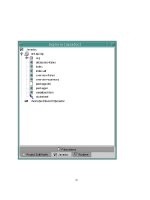
The directories in Figure 3-1 illustrate the directory and file structure we devised to meet
the goals just discussed for the example project.
Figure 3-1. irssibot directory structure
Let's begin from the top by talking about build.xml, which is the buildfile.
2
Placing the
buildfile in the project's root directory provides us with the ability to use relative paths for
project directory definitions in data elements and properties. Avoid the use of absolute paths
since it breaks the distributable property of your project. Our Java source package roots begin
in the /src directory. This setup allows us to separate the source from the resulting class files.
The class files are placed in /build. Sometimes (but not with our project) it is necessary to
break the classes apart into groups — for example, into a library and the application. You
should make this separation below the /src and /build directories, leaving the root directory
alone. For one thing, this cuts down on clutter in your project's root directory. On a more
technical note, proper segregation makes file manipulation easier on a broad scale. When you
delete the /build directory, for example, you delete all of the compiled classes. This method
remains valid no matter how much you break down your project. You can always add targets
and tasks to handle the more specific details, but you cannot always change the project layout.
2
Reminder: build.xml is the default buildfile name. If you invoke Ant without specifying a buildfile on the command line, Ant will assume
the buildfile name is build.xml.
Ant: The Definitive Guide
35
JARs and directories of a libraries' classes that are not built as part of the project are in the /lib
directory. Redistributing libraries can be a tricky endeavor, but don't ignore this issue. You
may assume that you can explain which libraries are necessary and where to get them in some
README file, leaving everything up to the developer. Try to avoid this!
3
Developers
probably have every version of a library known to man stored somewhere on their system
because of other projects they work with. You'll never be able to predict what they have.
Redistributing the libraries that you know work with your project helps these developers.
They'll have fewer problems running your application on their machines because you've given
them the proper libraries. Redistributing the libraries increases the size of your application
package, but the benefits are worth the extra pain.
We put the application's scripts (whether they are installation or execution scripts) in the /bin
directory. The example project provides scripts that run the IRC bot for Windows (bot.bat)
and Unix (via a Bourne Shell script, bot.sh). Sometimes, projects have hard-to-find or custom
executables necessary to build the project. These belong in /bin, also. While relying upon
executables may be your easiest option for performing functions not supported by current Ant
tasks, consider writing a custom task instead since executables usually eliminate the cross-
platform capabilities of Ant.
As for documentation, we place non-JavaDoc documentation in the /doc directory. This may
include READMEs for the project, end-user documentation, and documentation for the
included libraries. Basically, any documentation the build cannot generate.
The /dist directory is where we distribute the finished product. Nonarchive class packages,
JARs, WARs, EARs, and TARs, among other files, go here. Under the /dist directory, we
have a lib directory (/dist/lib) for JARs and other package files needed by the newly built
application. There is a dist/doc directory for both the distributed documentation and generated
javadoc, if necessary. The dist/bin directory is for scripts and executables that make running
the application easier. A distribution directory facilitates installations since, in most cases,
installation is as simple as copying the files from /dist to some other named location on the
filesystem.
3.3.2 Designing and Writing the Example Buildfile
Now that we have our directory structure, let's design and write the buildfile for our example
project. To better illustrate the relationship between project goals and parts of the buildfile,
we display the resulting buildfile syntax after defining and describing a particular goal. It is
almost always better to describe and design your build first before you begin writing the
buildfile.
One method to designing and implementing a buildfile for the project is via a set of questions.
The answers to these questions make up the various parts of the buildfile, and together
constitute the complete solution. Following are the questions, in no particular order:
• How does the buildfile begin?
• What properties and DataTypes should we define for use throughout the build?
• What directories need to be created before any compiling or packaging goals?
3
This is not a hard and fast rule, but it works more often than not. Even large projects like Tomcat and JBoss ship with libraries normally available
elsewhere.
Ant: The Definitive Guide
37
<! Project-wide settings. All directories are relative to the >
<! project root directory >
<! Project directories >
<property name="src.dir" value="src"/>
<property name="doc.dir" value="doc"/>
<property name="dist.dir" value="dist"/>
<property name="lib.dir" value="lib"/>
<property name="bin.dir" value="bin"/>
<! Temporary build directory names >
<property name="build.dir" value="build"/>
<property name="build.classes" value="${build.dir}/classes"/>
<property name="build.doc" value="${build.dir}/doc"/>
<property name="build.lib" value="${build.dir}/lib"/>
Aside from globally defining directory names, properties are also good for globally defining
values for some tasks. Here, we define a global property telling the javac task whether to
produce bytecode with debug pointers. All instances of the javac task use this property.
<! Global settings >
<property name="javac.debug" value="on"/>
The next property we set is build.compiler. The value here, modern, means that javac uses
the latest version of the Sun compiler available in the Java SDK toolkit (i.e., Java SDK
Versions 1.3 and higher). This is a "magic property," and some of the negative side effects of
these are discussed later in this chapter. Even though it's likely you'll use this value in every
buildfile you write, it still makes sense to document its purpose. Many people new to Ant will
be understandably confused if they see this property here, but never see it used in the buildfile
again.
<! Global "magic" property for <javac> >
<property name="build.compiler" value="modern"/>
We have one last step before we delve into defining (and meeting) our project's major goals.
The irrsibot project ships with a set of libraries, mysql.jar and xerces.jar. We define a globally
available classpath that includes these libraries and any future ones we (or another developer)
may add later. The file set and include pattern ('**/*.jar') means that all files in the library
directory (lib/) and its subdirectories should form a path suitable for use with path-compatible
tasks,
4
such as javac.
<path id="classpath">
<fileset dir="${lib.dir}">
<include name="**/*.jar"/>
</fileset>
</path>
3.3.2.3 Directory creation
Now we need to answer the question:
• What directories need to be created before any compiling or packaging goals?
4
A path-compatible task is capable of operating on a set of directories or files rather than on one directory or file. These tasks typically correspond to
tools that exhibit the same behavior, such as javac or rm.
Ant: The Definitive Guide
38
For our project, the compile-related directory (in which Ant saves all compiled classes) is the
build directory, build, and its subdirectories, if any. We will define a preparation target to
create the build directory.
Furthermore, we add a little bit to this preparation step and timestamp the build, which is most
useful with automated, unattended builds.
<! Target to create the build directories prior to a compile target >
<! We also mark the start time of the build, for the log. >
<target name="prepare">
<mkdir dir="${build.dir}"/>
<mkdir dir="${build.lib}"/>
<mkdir dir="${build.classes}"/>
<mkdir dir="${build.classes}/modules"/>
<tstamp/>
<echo message="${TSTAMP}"/>
</target>
3.3.2.4 Compiling
To compile our project, we need to answer a number of questions:
• What constitutes the complete program?
• What about libraries?
• What about scripts for installation or execution?
• What about static and generated documentation?
We tackle these questions with one target for each. The term "complete program" can mean
many things. For most projects, including ours, the answer is simple. The complete
application consists of all the compiled classes, the scripts to execute the application, and the
program's configuration file.
First, we compile the application and bundle it neatly into a JAR. In some cases, you may
want to separate the compilation and JAR'ing steps. To keep things simple, we made this one
target in our example.
<! Build the IRC bot application >
<target name="bot" depends="prepare">
<! Compile the application classes, not the module classes >
<javac destdir="${build.classes}"
debug="${debug.flag}"
deprecation="on">
<! We could have used javac's srcdir attribute >
<src path="${src.dir}"/>
<exclude name="irssibot/modules/**"/>
<classpath refid="classpath"/>
</javac>
<! Package the application into a JAR >
<jar jarfile="${build.lib}/irssibot.jar"
basedir="${build.classes}" >
<exclude name="irssibot/modules/**"/>
</jar>
</target>
Ant: The Definitive Guide
39
The irssibot application also consists of a set of modules that extend the functionality of the
bot. Separating the class files between modules and application classes makes updating the
application a bit easier. In the future, it is more likely that developers will modify and add
modules rather than modify parts of the main application. By separating the packages, we
give developers the ability to update only the class files that need updating. We compile and
package the modules as a separate JAR.
<! Build the IRC bot modules >
<target name="modules" depends="prepare,bot">
<! Compile just the module classes >
<javac destdir="${build.classes}/modules"
debug="${debug.flag}"
deprecation="on" >
<! We could have used javac's srcdir attribute >
<src path="${src.dir}"/>
<include name="irssibot/modules/**"/>
<classpath refid="classpath"/>
</javac>
<! Bundle the modules as a JAR >
<jar jarfile="${build.lib}/irssimodules.jar"
basedir="${build.classes}/modules" >
<include name="irssibot/modules/**"/>
</jar>
</target>
The irssibot scripts require no processing during a build, so we provide no target to process
them. The same goes for the configuration files. Even though we do not write a target for
making changes to or packaging the scripts and configuration files, it is still important to
consider these files for the future. In your own builds, such consideration may change the
implementations of other targets.
When we started all this, we mentioned the default target for the buildfile called all. This is
simply a target that uses Ant's dependency mechanism to force both the bot and modules
targets to run, building the application. Ant executes the
all target if you invoke ant with no
arguments. All we need to write for
all is the following:
<target name="all" depends="bot,modules"/>
In your own buildfiles, you don't always need to have a target like all. Another option is to
provide a default target that does nothing. Our suggestion is to write a help target (you should
have one even if it won't be your default). If users invoke ant with no arguments, they'll be
presented with your buildfile's help documentation. For example, you might display
something like the following:
Build the foo application with Ant. Targets include:
full - build the entire application and its libraries
app - build just the application (no libraries)
lib - build just the libraries (no application)
install - install the application. Read README for details
help - display this information
Ant: The Definitive Guide
40
If you're familiar with "usage statements" from console programs, you have some idea of
what we're talking about. We show an example of a buildfile target that creates a usage
statement in Appendix B.
The last part of our current question, relating to documentation, requires a target that produces
JavaDoc for the project. JavaDoc is a tricky concept to manage in a project. The JavaDoc tool
cannot process code that cannot compile. In addition, compared to compilation steps, JavaDoc
processing is very slow. It is not something you would want your developers to have to wait
on for every build. Consider these issues when writing your own JavaDoc targets.
<! Generate the API documentation irssibot and the >
<! modules >
<target name="javadoc" depends="bot">
<mkdir dir="${doc.dir}/api"/>
<javadoc packagenames="irssibot.*"
sourcepath="${src.dir}"
destdir="${doc.dir}/api"
author="true"
version="true"
use="true" >
<classpath refid="classpath"/>
</javadoc>
</target>
3.3.2.5 Cleanup
One or more cleanup targets are sometimes necessary as a result of asking the following
questions:
• How do we rebuild the project after changing files?
• Do we need to delete all of the class files?
• Do we delete the generated JARs?
Developers sometimes forget to clean up after themselves. This can be a problem since Java
compilers' dependency checkers are not the best at determining every dependency between
classes. Furthermore, to do its own dependency checking, the javac task performs timestamp
checks on the compiled class files versus their corresponding source code files. While
effective in most cases, timestamp checks are not perfect. Classes with no dependencies,
5
classes with static finals, and other special cases can result in successful builds (from Ant's
standpoint) even though the compilation steps overlook some classes. Because of this,
developers should always have the ability to delete everything generated by the build process
and start the build fresh. Only then can you guarantee that everything that needed to be
compiled was compiled. We call this a clean build.
The following example defines two targets that can be used to ensure clean builds:
5
This is a big issue when building Ant itself, since Ant calls most of its classes using introspection; no direct dependencies exist to any of the tasks.
Ant: The Definitive Guide
41
<! Delete class files built during previous builds. Leave
directories >
<target name="clean">
<delete>
<fileset dir="${build.classes}" includes="**/*.class"/>
</delete>
</target>
<! Delete any created directories and their contents >
<target name="cleanall" depends="clean">
<delete dir="${build.dir}"/>
<delete dir="${dist.dir}"/>
<delete dir="${doc.dir}/api"/>
</target>
In these targets, we present two different clean build solutions for the irssibot build. The
clean target deletes the class files, a step that should be sufficient to guarantee a successful
dependency check during the compilation step. The cleanall target deletes everything
generated by previous builds — in effect, returning the project to a state in which no builds
seem to have taken place.
In our example, cleanall doesn't need to depend on clean. However,
in practice, the clean target may do more than just delete files. In this
case, we want Ant to process it during a cleanall. To be safe, it's good
practice to include the dependency by default.
Sometimes, it may be necessary to include a distribution clean target in a project
buildfile. A distribution clean deletes all generated files, directories, and all of the source
code. While this may sound crazy (in a way, it is), it is most useful for projects under revision
control. Hence, if your project isn't under revision control, don't delete the source code!
Theoretically, it should be possible to distribute a project as just a buildfile with targets to
retrieve or update the source code from a revision control system such as CVS.
6
For our
example, we do not provide a
distribution clean target because irssibot is not under
revision control.
3.3.2.6 Distribution
The final thing we need to worry about when writing a buildfile for the example project is
how to distribute that project. We need to answer the following questions:
• What directories need to be created prior to preparing the application for distribution?
• Do we need to distribute the source as well as the application?
• What constitutes an application distribution?
We can achieve the goals for these questions by defining just one target. Our directory layout
for the project provides us with the desired end result. The distribution directories already
exist — all that is left is for the build to copy files to those directories. The following target
creates the distribution directories and copies the class files, scripts, and other components of
the final application:
6
This is really convenient if you have stringent bandwidth restrictions on your distribution servers, but not on your CVS servers.
Ant: The Definitive Guide
42
<! Deploy the application in a "ready-to-run" state >
<target name="deploy" depends="bot,javadoc">
<! Create the distribution directory >
<mkdir dir="${dist.dir}"/>
<mkdir dir="${dist.dir}/bin"/>
<mkdir dir="${dist.dir}/lib"/>
<mkdir dir="${dist.dir}/doc"/>
<mkdir dir="${dist.dir}/config"/>
<! Copy the primary program and modules >
<copy todir="${dist.dir}/lib">
<fileset dir="${build.classes}"/>
<fileset dir="${build.lib}" includes="irssibot.jar"/>
<fileset dir="${build.lib}" includes="irssimodules.jar"/>
<fileset dir="${lib.dir}" includes="*.jar"/>
</copy>
<! Copy the documentation >
<copy todir="${dist.dir}/doc">
<fileset dir="${doc.dir}"/>
</copy>
<! Copy the pre-fab configuration files >
<copy todir="${dist.dir}/config">
<fileset dir="${lib.dir}" includes="*.xml"/>
</copy>
<! Copy the running scripts >
<copy todir="${dist.dir}/bin">
<fileset dir="${bin.dir}" includes="bot.sh"/>
<fileset dir="${bin.dir}" includes="bot.bat"/>
</copy>
</target>
Notice that we place target dependencies on the bot and javadoc targets. We're simply
requiring that the application is up-to-date before we deploy it. Of all the targets, deploy
makes the most use of Ant's
filesets since the target's tasks do a lot of file operations. Each
fileset attempts to group only the files we want to deploy. Look, for example, at the task
that copies the configuration files:
<! Copy the pre-fab configuration files >
<copy todir="${dist.dir}/config">
<fileset dir="${lib.dir}" includes="*.xml"/>
</copy>
This task copies only XML files. Everything else in the configuration directory (denoted by
${lib.dir}) is left alone.
Example 3-1 shows the complete buildfile.
Example 3-1. Complete buildfile for the irssibot project
<?xml version="1.0"?>
<! Comments are just as important in buildfiles, do not >
<! avoid writing them! >
<! Example build file for "Ant: The Definitive Guide" >
Ant: The Definitive Guide
43
<project name="irssibot" default="all" basedir=".">
<! Project-wide settings. All directories are relative to the >
<! project directories >
<property name="src.dir" value="src"/>
<property name="doc.dir" value="doc"/>
<property name="dist.dir" value="dist"/>
<property name="lib.dir" value="lib"/>
<property name="bin.dir" value="bin"/>
<! Build directories >
<property name="build.dir" value="build"/>
<property name="build.classes" value="${build.dir}/classes"/>
<property name="build.doc" value="${build.dir}/doc"/>
<property name="build.lib" value="${build.dir}/lib"/>
<! Global settings >
<property name="debug.flag" value="on"/>
<property name="java.lib" value="${java.home}/jre/lib/rt.jar"/>
<! Global property for <javac> >
<property name="build.compiler" value="modern"/>
<path id="classpath">
<fileset dir="${lib.dir}">
<include name="**/*.jar"/>
</fileset>
</path>
<target name="prepare">
<mkdir dir="${build.dir}"/>
<mkdir dir="${build.lib}"/>
<tstamp/>
<echo message="${TSTAMP}"/>
</target>
<target name="all" depends="bot,modules"/>
<! Build the IRC bot application >
<target name="bot" depends="prepare">
<mkdir dir="${build.classes}"/>
<javac destdir="${build.classes}"
debug="${debug.flag}"
deprecation="on">
<! We could have used javac's srcdir attribute >
<src path="${src.dir}"/>
<exclude name="irssibot/modules/**"/>
<classpath refid="classpath"/>
</javac>
<jar jarfile="${build.lib}/irssibot.jar"
basedir="${build.classes}" >
<exclude name="irssibot/modules/**"/>
</jar>
</target>
Ant: The Definitive Guide
44
<! Build the IRC bot modules >
<target name="modules" depends="prepare,bot">
<mkdir dir="${build.classes}/modules"/>
<javac destdir="${build.classes}/modules"
debug="${debug.flag}"
deprecation="on" >
<! We could have used javac's srcdir attribute >
<src path="${src.dir}"/>
<include name="irssibot/modules/**"/>
<classpath refid="classpath"/>
</javac>
<jar jarfile="${build.lib}/irssimodules.jar"
basedir="${build.classes}/modules"
manifest="MANIFEST.MF" >
<manifest>
<attribute name="ModuleType" value="irssibot"/>
</manifest>
<include name="irssibot/modules/**"/>
</jar>
</target>
<! Deploy the application in a "ready-to-run" state >
<target name="deploy" depends="bot,javadoc">
<! Create the distribution directory >
<mkdir dir="${dist.dir}"/>
<mkdir dir="${dist.dir}/bin"/>
<mkdir dir="${dist.dir}/lib"/>
<mkdir dir="${dist.dir}/doc"/>
<mkdir dir="${dist.dir}/config"/>
<! Copy the primary program and modules >
<copy todir="${dist.dir}/lib">
<fileset dir="${build.classes}"/>
<fileset dir="${build.lib}" includes="irssibot.jar"/>
<fileset dir="${build.lib}" includes="irssimodules.jar"/>
<fileset dir="${lib.dir}" includes="*.jar"/>
</copy>
<! Copy the documentation >
<copy todir="${dist.dir}/doc">
<fileset dir="${doc.dir}"/>
</copy>
<! Copy the pre-fab configuration files >
<copy todir="${dist.dir}/config">
<fileset dir="${lib.dir}" includes="*.xml"/>
</copy>
<! Copy the running scripts >
<copy todir="${dist.dir}/bin">
<fileset dir="${bin.dir}" includes="bot.sh"/>
<fileset dir="${bin.dir}" includes="bot.bat"/>
</copy>
</target>
Ant: The Definitive Guide
45
<! Generate the API documentation for the IRC library and the >
<! IRC bot using the library >
<target name="javadoc" depends="bot">
<mkdir dir="${doc.dir}/api"/>
<javadoc packagenames="irssibot.*"
sourcepath="${src.dir}"
destdir="${doc.dir}/api"
classpath="${lib.dir}/xerces.jar:${lib.dir}/mysql.jar"
author="true"
version="true"
use="true" />
</target>
<! Delete class files built during previous builds. Leave
directories >
<target name="clean">
<delete>
<fileset dir="${build.classes}" includes="**/*.class"/>
</delete>
<delete dir="${doc.dir}/api"/>
</target>
<! Delete any created directories and their contents >
<target name="cleanall" depends="clean">
<delete dir="${build.dir}"/>
<delete dir="${dist.dir}"/>
<delete dir="${doc.dir}/api"/>
</target>
</project>
3.4 The Buildfile Execution Process
We have the buildfile, but what happens when Ant runs? Understanding how Ant parses the
buildfile and executes the targets is key to writing good, solid buildfiles.
3.4.1 Error Handling
Ant interprets the buildfile's XML, meaning that it processes the elements as it parses them.
The XML library that Ant uses represents a hierarchal tree structure; Ant follows this tree's
path during processing. At the project level, the level of XML just inside the <project>
element, Ant does a breadth-first traversal of the XML elements. This means that it loads and
processes all of the elements just below the level of the <project> element first, and then
moves on to the first target. Inside a target, Ant does a depth-first traversal. This means that,
starting with a target's first element, Ant processes each element as deep as it can before it
moves on to the next element.
Understanding this design is most important when trying to understand how Ant processes its
own errors (as opposed to errors from bad compilation or failed file copies). At the project
level, Ant does a kind of syntax check before it actually processes any elements. In general,
when speaking of Ant processing an element, we mean that Ant goes through the full
processing life cycle on that element. Assuming a syntactically correct element declaration,
the processing appears to be atomic from the outside; you cannot insert any operations
between the time Ant parses the element and when Ant performs the operations that form the
Ant: The Definitive Guide
46
basis of the element's definition. Errors, however, occur within two distinct phases during the
processing of an element, and understanding these phases alleviates some frustration.
3.4.1.1 Project-level errors
At the project level, Ant loads all of the elements in the buildfile. It processes every element
type except targets. This means any project-level tasks or DataTypes are processed.
Processing a target means running the tasks and DataTypes within that target. You do not
want Ant to execute all targets when it loads the buildfile. Instead, think of Ant as making a
list of targets for future use. The list consists only of target names and attributes, and any
invalid values in these particular items cause Ant to fail.
With project-level tasks and DataTypes, errors occur as you might expect. Errors in reading a
DataType's element or executing the DataType's operations are build errors, and Ant handles
them as such. If Ant discovers a particular element it does not "expect" (e.g., it finds
<notatag/> as a subelement of <project>), this is an error, and the build stops and fails.
With all of these errors, keep one very important fact in mind: by default, Ant breaks at the
first error. There can be 100 attribute and elements errors in the buildfile, and Ant still
discovers them one by one (and so do you), with every execution. Furthermore, Ant has no
concept of "rollback," so errors break the build immediately with possibly dire consequences.
There is nothing to catch, and there is no chance to clean up. You must extend Ant using a
listener to have any impact on controlling errors. For these reasons, be careful when you write
a buildfile, and be extremely careful editing a working buildfile for a stable project. Syntax
and processing errors can leave your project in an undefined state, requiring you (or worse,
your developers) to do a full rebuild. This can waste valuable time if your build is a long one.
3.4.1.2 Target-level errors
Errors at the target level have repercussions similar to those at the project level, except that
the times at which these errors occur can differ slightly. Rather than load every element
nested within a <target> element (thus, creating a list like Ant's target list), Ant loads and
processes each element one by one. This, of course, makes their order important. If Ant makes
it to the second element, Ant considers the operations from the first element successful. Ant
considers data, file, or project states associated or created by the completed element to be
successful as well. Conversely, when an error occurs in a project-level task or DataType, Ant
considers the elements that follow it to be unknown.
3.4.1.3 Error-handling examples
Let's illustrate the error processing concepts just discussed with a few, invalid buildfiles. We'll
look at the following buildfile as a start:
<project name="mybad" basedir="." default="all">
<property naame="oblivion" value="nil"/>
<notarealtag/>
</project>
What will happen if Ant processes this buildfile? Because property is a project-level
DataType, the invalid attribute naame causes Ant to fail when it tries to call the setter method
associated with the
naame attribute and finds none. Ant doesn't display any messages about
the <notarealtag/> element because Ant stops when the first failure occurs. Note as well
Ant: The Definitive Guide
47
that the buildfile has no all target, even though we set the <project> element's default
attribute to all. Once you fix the first two problems (the invalid attribute naame and the
invalid <notarealtag/>), a third run results in an error stating there is no all target. Ant
(and you) discovers each error one at a time.
Following is another erroneous buildfile, based on the earlier example:
<project name="mybad" basedir="." default="all">
<target name="all">
<notarealtag/>
</target>
<property naame="oblivion" value="nil"/>
</project>
What happens when Ant process this buildfile? We moved the property DataType to follow
the newly added default target,
all. Does Ant see the invalid tag before it sees the invalid
attribute on the property DataType? No. At the target level, Ant thinks all is well with the
all target and moves headlong into the invalid attribute error. Of course, once you fix the
attribute error, Ant gladly informs you it cannot process <notarealtag/>.
Modifying the previous examples, we'll correct the attribute and target errors. Additionally,
we add a new target, chaos, containing the invalid element, <notarealtag/>. Here is the
resulting code snippet:
<project name="mybad" basedir="." default="all">
<property name="oblivion" value="nul"/>
<target name="all">
<echo message="Hello there, all you happy people."/>
</target>
<target name="chaos">
<notarealtag/>
</target>
</project>
What does Ant do now? Ant displays the message we instruct it to: "Hello there, all you
happy people." There are no errors. Surprised? Unless you make chaos a dependency of the
all target, or call the chaos target directly from the command line, Ant misses the error
within the chaos target. This is an example of what we call a festering error. Errors like this
go unnoticed over long periods of time and rear their ugly heads at inopportune moments.
Prevent these festering errors by testing early and testing often.
This is how Ant handles and processes nonbuild related errors. Now that you know where
errors can come from and how to avoid them, let's take a look at what Ant does when
everything is okay.
3.4.2 Project-Level Data Elements and Tasks
Before Ant executes any targets, it takes care of all data elements and tasks defined at the
project level. Of course, Ant also makes a list of the targets, as explained in the previous
section, but that's not important right now.
Ant: The Definitive Guide
48
There are very few project-level tasks and data elements. Introducing
one requires many changes to the core Ant engine, so it's unlikely many
will be added in the future. For now, consider the project-level elements
to be: property, path, taskdef, patternset, filterset, mapper, and
target.
In the case of our project example, project-level data elements consist of the properties that
define directories, the global property for the javac task, and the compilation classpath as a
path DataType. Ant processes all of these in the order they appear, making them globally
available to the rest of the buildfile. Order, as it turns out, is very important for related
properties.
Let's take a moment to talk about properties. Properties have two prominent characteristics.
They are immutable and they always have global scope, regardless of where they're defined.
Being immutable means a property's value cannot change once Ant processes the property's
name-value pair for the first time. This is very important to keep in mind when designing your
project and writing your buildfile. Many newcomers to Ant make the mistake of treating
properties like variables in a script and expect them to behave as such. To add to the
confusion, Ant allows properties to be redeclared, throwing no errors when you try to change
the value. Ant defines an order of precedence for declaring properties. Properties declared on
Ant's command line always take precedence over properties defined elsewhere. After that,
Ant determines precedence based on when it first sees a property declared.
Immutability impacts how property values resolve. Let's use the following code example to
illustrate:
<property name="property.one" value="${property.two}:one"/>
<property name="property.two" value="two"/>
What is the value of property.one? Because of Ant's ordered property resolution, the value
is ${property.two}:one, not two:one. Usually, you'll rely on this behavior when defining
directories with increasing depths. It can be very disconcerting to suddenly discover that
you're creating a directory called ${property.two}. Remember that order counts, and you won't
go wrong.
The other prominent property characteristic is properties are always global in scope. A
property's global scope means it is a global variable. Look at the following buildfile segment:
<property name="prop1" value="one"/>
<target name="target1">
<property name="prop2" value="two"/>
<echo message="${prop1}:${prop2}"/>
</target>
<target name="target2" depends="target1">
<echo message="${prop1}:${prop2}"/>
</target>
target1
defines the property prop2. Because all properties are global in scope, prop2
becomes available to the rest of the buildfile once Ant processes target1.
Ant: The Definitive Guide
49
Cascading Buildfiles
Cascading buildfiles can change the rules of property immutability and scope.
Developers sometimes use cascading buildfiles in large projects with many
subprojects, and each subproject has its own buildfile. A master buildfile at the root
of the project executes one or more of the subproject buildfiles to build parts o
f
the project or the whole thing. Developers wanting to build individual subprojects
run the buildfile in that subproject's directory and can effectively ignore the other
subprojects in their day to day work (hence the reason for the design). A public
example of such a project using cascading buildfiles is Jakarta's taglibs. In
Appendix B, we provide a section on writing cascading buildfiles, as well as tips on
how to manage the problems that the immutability (and possible mutability) o
f
properties may present.
3.4.3 Targets
When you run ant with no arguments, Ant reads the <project> element and uses the
default attribute to get the name of the first target to execute. In our example, that target is
called all. The all target in turn has dependencies on the bot and module targets, meaning
that Ant executes these targets before running anything inside of all (let's ignore, for the
moment, that the all target contains no elements); and these targets must complete
successfully in order for Ant to start processing all. Since there are no elements in our all
target, the success of bot and module targets equates to the success of the all target.
3.4.3.1 The bot target
Since it is the first dependency in the list for the all target, the bot target runs first. The
purpose of the bot target is to compile the application and then package it up into a JAR file.
The bot target also has a dependency: the prepare target. The prepare target creates the
temporary build directories needed by the compilation steps. The mkdir task it uses is usually
successful, even if the directories mkdir is trying to create already exist. The mkdir task fails
only if the I/O system throws an exception because of file permissions, space limitations, or
some hardware or operating system error. In addition to creating directories, the prepare
target also timestamps the build using the tstamp task. The tstamp task has no attributes and
outputs nothing to the console or log. Instead, it sets properties that can be used later,
primarily in echo tasks, but also in any other tasks requiring the date and time. See Chapter 7
for details on the tstamp task.
The javac task compiles the Java source code. Let us take a close look at the javac task, as
it's defined in the bot target:
<javac destdir="${build.classes}"
debug="${debug.flag}"
deprecation="on">
<src path="${src.dir}"/>
<exclude name="irssibot/modules/**"/>
<classpath refid="classpath"/>
</javac>
There are three required settings for every javac task:
Ant: The Definitive Guide
50
•
The source directory
• The classpath
• The destination directory
We specify the source directory (the place in which the Java source files are stored) with the
src nested DataType.
7
We could have used the srcdir attribute, but chose instead to use a
DataType for demonstration purposes. In practice, it is probably more common to see the
srcdir attribute used. We specify the compiler's classpath in a similar manner, using the
classpath DataType. This time, we use a reference ID to reference an earlier path definition.
Earlier in the buildfile, we defined a classpath consisting of all the JARs in the /lib project
directory, and we gave it the reference ID
classpath. To use that path later, as we do in the
javac task, we declare a similar DataType having the attribute refid. We set refid to the
reference ID of another DataType, defined earlier (the classpath path DataType). Ant
manages the values of these DataTypes so that you can define a DataType once and reference
it other times. It's important to note that DataType references, unlike properties, work only
within the same buildfile.
[8]
[8]
Ant 1.5, expected to be released after this book is published, will have a solution for referencing DataTypes across buildfile
contexts.
As for the destination for the compiled classes, we use the destdir attribute to specify that
information. Since the destination directory is always a single directory and not a collection of
files or a directory path, we use an attribute and a property rather than a DataType.
So far, we've discussed the required settings for javac, but, if you notice, we also specify a
couple of optional attributes and DataTypes. The optional attributes are debug and
deprecation. The optional DataType is exclude.
Since we are still developing irssibot, it's likely we will try to run it within a debugger. This
requires that the debug flag is on at compile time, and we denote this with the debug attribute
of javac. Since we need this to be a global option, we use a property, set once at the
beginning of the buildfile. Note that values of yes|no and true|false work for Boolean
attributes such as debug.
By default, the various Java compilers do not provide detailed information concerning
deprecated method calls.
9
Should irssibot use a deprecated method or field, the compiler
notifies us only that we use deprecated calls in general. It does not tell us which method or
even which class used the deprecated call. To get detailed information, we use
javac's
deprecation attribute and set it to "true" (or "yes").
To distinguish between module code and application code, the class package structure is
separated into two subpackages, one being modules. We do not want these classes becoming
part of the application JAR, so we use the <excludes> element to tell javac not to compile
them. Our <excludes> element tells javac to exclude all files in its fileset — in this case,
nondependent source code below the modules package directory.
All together, we tell javac to do the following:
7
Through a slight trick of introspective methods, the javac task class hides the fact that <src> is just a <path> element under a different name.
There is no DataType called src available to other tasks, although other tasks can duplicate javac's programming trick.
9
For more information on deprecated methods and fields, refer to Java in a Nutshell, by David Flanagan (O'Reilly).
Ant: The Definitive Guide
51
•
Compile the source code found in ${src.dir}, excluding Java files in the modules
package.
• Send newly built class files to the build directory, as defined by the ${build.dir}
property.
• Include debug information with the class files for use in a debugger.
• Present detailed deprecation error messages stating which classes and calls are
deprecated.
• Cause the bot target to fail if any operation in javac fails.
Sit back and consider that with about 11 lines of XML, we define a step in a build that will
always compile the correct Java files with the correct classpath, no matter how many source
files or libraries you add or remove in the future. Unless the project's requirements (and not
just the parameters) change, we will never have to modify this part of the buildfile again. If
the requirements do change, then we rework our goals and modify the targets appropriately.
This is expected. As an added bonus, XML's verbose and human-readable nature creates an
easy-to-maintain build description file. Remember, a new goal means editing the buildfile, but
minor project changes require no modifications. If you find yourself modifying your own
buildfile frequently, try to take some time and refactor your build's design. The goal is to
write the buildfile once and forget about it as much as possible.
3.4.3.2 Dependency checking
Even though the javac task specifies exclusions, you may notice the compiler compiling
source code under the module subpackage. From a build perspective, we cannot avoid this if
code in the application references code from the modules.
10
Per the Java compiler
specification, the Java compiler is responsible for resolving all dependencies during compile-
time. It performs dependency checks on a class-by-class basis as it compiles each class. In
other words, if class A is dependent on classes B and C, then, when compiling A, the Java
compiler must find compiled versions of B and C. If they do not exist, the compiler must find
the source code for classes B and C and compile it before compiling class A.
The job of managing dependencies falls squarely on the shoulders of the developers creating
their project's object model. Therefore, Java class dependencies and methods to manage them
is a concept that is beyond the scope of this book. As it applies to working with Ant,
dependency checking is an automatic behavior.
3.4.3.3 Packaging the class files
After Ant compiles the source files, which generate the class files, the bot target uses the jar
task to package the class files into a JAR. We do this with only four more lines of XML:
<jar jarfile="${build.lib}/irssibot.jar"
basedir="${build.classes}" >
<exclude name="irssibot/modules/**"/>
</jar>
The jar task places all of the files from the build.classes directory, excluding those beneath
the modules package directory, into a file called irssibot.jar.
10
We could always write the code to make sure such circular dependencies do not exist. We chose this particular application because it exhibited this
codependent behavior, allowing us to discuss it.
Ant: The Definitive Guide
52
3.4.3.4 The module target
The module target is almost identical to the bot target. The javac and jar tasks use nearly
the same attributes and DataTypes. The only difference is in what these DataTypes exclude
from javac and jar. For the bot target, we explicitly exclude files from below the modules
subpackage directory. In the case of the module target, we explicitly include files from the
modules directories. Indirectly, we exclude all other files.
The result of including the files in the modules subpackage directory, and of our de-facto
exclusion of the other source files, is that our build produces two JARs with mutually
exclusive sets of class files. This result meets our requirements set earlier, which state we
need two packages: one for the application and one for the modules.
The module and bot targets are those that will run by default, because of the all target's
dependency on them. The all target does not include dependencies on distribution,
documentation, or cleanup, so Ant doesn't execute these targets unless the user explicitly
requests it on the command line at runtime.
3.4.4 The Other Targets
In addition to the bot and modules targets used for compiling and packaging the irssibot
project, our buildfile has targets for generating documentation, post-build cleanup, and for
deployment.
3.4.4.1 The javadoc target
The javadoc target compiles the dynamically generated code documentation with the
JavaDoc tool. The javadoc task operates similarly to the javac task. Both perform syntax
checking on the Java code: javac as a precompile step and javadoc to guarantee that the
documentation at least represents code that will compile. Most JavaDoc comes from the class,
field, and method comments written by the developers, but some of it is dynamically
generated; hence the reason why the code must compile.
For our target, we add the dynamic documentation to the existing documentation directory,
doc/, under a separate directory called api/. This way, when the distribution target executes,
we need only to package or copy what exists in the doc/ directory. With the
javadoc target,
we also give the distribution target a dependency. This is helpful for distribution. It will make
sure
javadoc runs, giving us the latest code documentation, and fails if it can't create the most
up-to-date documents. Of course, as we mentioned earlier, no other targets should be
dependent on the javadoc target. The JavaDoc tool can take an extraordinary amount of time
to complete — sometimes longer than the compile step itself.
3.4.4.2 Cleanup
Targets that clean the project directories are the most important targets of any build — even
more important than the compilation targets. Why do we say this? Software development is a
deterministic operation. Your project, no matter how simple or complex it may be, should run
in a deterministic fashion. Your build is no different. At no point should you be unable to
explain why a build performed at 8 a.m. is different than one performed at 9 a.m., given no
Ant: The Definitive Guide
53
other changes in the project. This deterministic behavior should be the very reason you're
creating a build process in the first place.
Clean targets achieve this goal by giving you and your developers a sort of "reset switch."
You can and should always be able to return the project to the state prior to compilation. We
use two targets for this because there are, technically, two starting points. The first is the fresh
project. This project state exists after you first download the zip/tar/jar or run a checkout from
your revision control system. When projects get to be 700+ classes and cover multiple
packages and subprojects, tracking all the changes you make can become very cumbersome.
Having a build step that effectively resets the project for a developer is very important, almost
essential. Without such a step, developers must reverse-engineer the build process to figure
out all the changes made on their systems.
3.4.4.3 Deployment and installation
Deploying and installing Java projects can be a tricky endeavor. In fact, we suggest that, if
you're just beginning to manage projects and write buildfiles, you hold off on writing
installation targets until the project is in stable condition. If we were writing programs for one
platform, say a RedHat distribution of Linux, we have an easy installation goal to solve. We
make an RPM (the deploy step) and run some RPM commands (the install step). For Java
developers, life is not this easy. Note, we have an entire chapter on installing and configuring
Ant, and Ant distributes with an install target in its own buildfile. The catch with all
installations is that you, the project manager, rarely know how other administrators and
developers manage their own servers and workstations. The Ant project actually has it easy. It
assumes only a JRE on the workstation and has scripts that should run on many platforms.
Installation requires a root installation directory like /usr/local/ant or c:\ant and everything is
fine.
For irssibot, we took the tack of creating a distributable package for the deploy target, but
leaving it up to the individual using the program to decide how to use the package
installations. To keep things simple, we do not try to understand the structure of other
workstations. You could say irssibot is self-contained; it does not attempt to do anything
outside of its own project directory. We create a dist/ directory, placing in it all of the JARs,
documentation, and scripts that constitute the final program. As an exercise, you may consider
writing an installation target similar to Ant's. You require some property to be set on the
command line (the installation directory), and the target uses it to copy everything from the
dist/ directory to the installation directory.
So far, installation looks somewhat easy and you may be wondering why we omit such a
target in our own project. The reason is because of the other portion of Java developers: the
server-side developers. Up to the deploy step, our example touches upon all facets of Java
development. For web applications or EJB applications, the deploy target builds the WARs
and EARs. Of course, not all application servers support WARs and EARs (e.g., BEA's
WebLogic 5.1 does not support EARs). Installation for these developers is very difficult and
we do not want it to appear that it's an easy step. It's better if you make your build create a
deployable set of directories and package files, then stop. From there, review how you're
installing the application and see if you can move on.