Professional VB 2005 - 2006 phần 2 pps
Bạn đang xem bản rút gọn của tài liệu. Xem và tải ngay bản đầy đủ của tài liệu tại đây (5.34 MB, 110 trang )
concerns when casting to and from the object type, collections should allow you to specify what specific
type they will contain. Generics not only prevent you from paying the cost of boxing for value types, but
add to the ability to create type-safe code at compile time. Generics are a powerful extension to the .NET
environment and are covered in detail in Chapter 8.
Parameter Passing
When an object’s methods or an assembly’s procedures and methods are called, it’s often appropriate
to provide input for the data to be operated on by the code. Visual Basic has changed the way that func-
tions, procedures, and methods are called and how those parameters are passed. The first change actu-
ally makes writing such calls more consistent. Under Visual Basic 6.0, the parameter list for a procedure
call didn’t require parentheses. On the other hand, a call to a
method did require parentheses around the
parameter list. In Visual Basic, the parentheses are always required and the
Call keyword is obsolete.
Another change in Visual Basic is the way parameters with default values are handled. As with Visual
Basic 6.0, it is possible to define a function, procedure, or method that provides default values for the
last parameter(s). This way it is possible to call a method such as
PadRight, passing either with a single
parameter defining the length of the string and using a default of space for the padding character, or
with two parameters, the first still defining the length of the string but the second now replacing the
default of space with a dash.
Public Function PadRight(ByVal intSize as Integer, _
Optional ByVal chrPad as Char = “ “c)
End Function
To use default parameters, it is necessary to make them the last parameters in the function declaration.
Visual Basic also requires that every optional parameter have a default value. It is not acceptable to just
declare a parameter and assign it the
Optional keyword. In Visual Basic, the Optional keyword must
be accompanied by a value that will be assigned if the parameter is not passed in.
How the system handles parameters is the most important change related to them in Visual Basic. In
Visual Basic 6.0, the default was that parameters were passed by reference. Passing a parameter by refer-
ence means that if changes are made to the value of a variable passed to a method, function, or proce-
dure call, these changes were to the actual variable and, therefore, are available to the calling routine.
Passing a parameter by reference sometimes results in unexpected changes being made to a parameter’s
value. It is partly because of this that parameters default to passing by value in Visual Basic. The advan-
tage of passing by value is that regardless of what a function might do to a variable while it is running,
when the function is completed, the calling code still has the original value.
However, under .NET passing a parameter by value only indicates how the top-level reference for that
object is passed. Sometimes referred to as a ‘shallow’ copy operation, the system only copies the top-
level reference value for an object passed by value. This is important to remember because it means
that referenced memory is not protected. Thus, while the reference passed as part of the parameter will
remain unchanged for the calling method, the actual values stored in referenced objects can be updated
even when an object is passed by reference.
78
Chapter 3
06_575368 ch03.qxd 10/7/05 10:49 PM Page 78
Simpo PDF Merge and Split Unregistered Version -
Boxing
Normally, when a conversion (implicit or explicit) occurs, the original value is read from its current
memory location and then the new value is assigned. For example, to convert a
Short to a Long, the
system reads the 2 bytes of
Short data and writes them to the appropriate bytes for the Long variable.
However, under Visual Basic if a value type needs to be managed as an object, then the system will per-
form an intermediate step. This intermediate step involves taking the value that is on the stack and
copying it to the heap, a process referred to as boxing. As noted earlier, the
Object class is implemented
as a reference type. Therefore, the system needs to convert value types into reference types for them to
be objects. This doesn’t cause any problems or require any special programming, because boxing isn’t
something you declare or directly control. However, it does have an impact on performance.
In a situation where you are copying the data for a single value type, this is not a significant cost.
However, if you are processing an array that contains thousands of values, the time spent moving
between a value type and a temporary reference type can be significant.
There are ways to limit the amount of boxing that occurs. One method that has been shown to work well
is to create a class based on the value type you need to work with. On first thought, this seems counter-
intuitive because it costs more to create a class. The key is how often you reuse the data that is contained
in the class. By repeatedly using this object to interact with other objects, you will save on the creation of
a temporary boxed object.
There are two important areas to examine with examples to better understand boxing. The first involves
the use of arrays. When an array is created, the portion of the class that tracks the element of the array is
created as a reference object, but each of the elements of the array is created directly. Thus, an array of
integers consists of the array object and a set of
Integer value types. When you update one of these val-
ues with another
Integer value there is no boxing involved:
Dim arrInt(20) as Integer
Dim intMyValue as Integer = 1
arrInt(0) = 0
arrInt(1) = intMyValue
Neither of these assignments of an Integer value into the integer array that was defined previously
requires boxing. In each case, the array object identifies which value on the stack needs to be referenced,
and the value is assigned to that value type. The point here is that just because you have referenced
an object doesn’t mean you are going to box a value. The boxing only occurs when the values being
assigned are being transitioned from value to reference types:
Dim objStrBldr as New System.Text.StringBuilder()
Dim objSortedList as New System.Collections.SortedList()
Dim intCount as Integer
For intCount = 1 to 100
objStrBldr.Append(intCount)
objSortedList.Add(intCount, intCount)
Next
79
Variables and Type
06_575368 ch03.qxd 10/7/05 10:49 PM Page 79
Simpo PDF Merge and Split Unregistered Version -
The preceding snippet illustrates two separate calls to object interfaces. One of these calls requires box-
ing of the value
intCount, while the other does not. There is nothing in the code to indicate which call
is which. The answer is that the
Append method of StringBuilder has been overridden to include a
version that accepts an
Integer, while the Add method of SortedList collection expects two objects.
While the
Integer values can be recognized by the system as objects, doing so requires the runtime
library to box up these values so that they can be added to the sorted list.
The key to boxing isn’t that you are working with objects as part of an action, but that you are passing
a value to a parameter that expects an object or are taking an object and converting it to a value type.
However, one time that boxing does not occur is when you call a method on a value type. There is no
conversion to an object, so if you need to assign an
Integer to a String using the ToString method,
there is no boxing of the integer value as part of the creation of the string. On the other hand, you are
explicitly creating a new
String object, so the cost is similar.
Retired Keywords and Methods
This chapter has covered several changes from Visual Basic 6.0 that are part of Visual Basic under .NET.
They include the removal of the
Currency type, String function, Rset, and Lset functions. Other
functions such as
Left, Right, and Mid have been discussed as becoming obsolete, although they may
still be supported. Functions such as
IsEmpty and IsNull have been replaced with new versions.
Additionally, this chapter has looked at some of the differences in how Visual Basic now works with
arrays.
Visual Basic has removed many keywords that won’t be missed. For example, the
DefType statement
has been removed. This statement was a throwback to Fortran, allowing a developer to indicate, for
example, that all variables starting with the letters I, J, K, L, M, N would be integers. Most program-
mers have probably never used this function, and it doesn’t have a logical replacement in Visual Basic
under .NET.
One of the real advantages of Visual Basic under .NET is the way that it removed some of the more eso-
teric and obsolete functions from Visual Basic. The following list contains the majority of such functions.
As with others that have already been discussed, some have been replaced; for example, the math func-
tions are now part of the
System.Math library, while others such as IsObject really don’t have much
more meaning than
LBound in the context of .NET, where everything is an object and the lower bound
of all arrays is
0.
Elements of Visual Basic 6.0 Removed in .NET
Also as previously noted, the UDT has also been removed from the Visual Basic vocabulary. Instead, the
ability to create a user-defined set of variables as a type has been replaced with the ability to create cus-
tom structures and classes in Visual Basic.
Remember that Visual Basic wasn’t revised to work with .NET. Instead Visual Basic was rebuilt from the
ground up as an entirely new language based on the .NET Framework and the syntax of Visual Basic.
80
Chapter 3
06_575368 ch03.qxd 10/7/05 10:49 PM Page 80
Simpo PDF Merge and Split Unregistered Version -
As Any Now function
Atn function Null keyword
Calendar property On . . . GoSub
Circle statement On . . . GoTo
Currency Option Base
Date function and statement Option Private Module
Date$ function Property Get, Property Let, and Property Set
Debug.Assert method PSet method
Debug.Print method Rnd function
DefType Round function
DoEvents function Rset
Empty Scale method
Eqv operator Set statement
GoSub statement Sgn function
Imp operator Sqr function
Initialize event String function
Instancing property Terminate event
IsEmpty function Time function and statement
IsMissing function Time$ function
IsNull function Timer function
IsObject function Type statement
Let statement Variant datatype
Line statement VarType function
Lset Wend keyword
Summary
This chapter looked at many of the basic building blocks of Visual Basic that are used throughout project
development. Understanding how they work will help you to write more stable and better performing
software. There are five specific points to take note of:
❑ Beware of array sizes; all arrays start at
0 and are defined not by size but by the highest index.
❑ Remember to use the
StringBuilder class for string manipulation.
81
Variables and Type
06_575368 ch03.qxd 10/7/05 10:49 PM Page 81
Simpo PDF Merge and Split Unregistered Version -
❑ Use Option Strict; it’s not just about style, it’s about performance.
❑ Beware of parameters that are passed
ByValue so changes are not returned.
❑ Take advantage of the new collection classes.
While this chapter covered many other items such as how the new
Decimal type works and how boxing
works, these five items are really the most important. Whether you are creating a new library of methods
or a new user interface, these five items will consistently turn up in some form. While .NET provides a
tremendous amount of power, this chapter has hopefully provided information on places where that
power comes at a significant performance cost.
82
Chapter 3
06_575368 ch03.qxd 10/7/05 10:49 PM Page 82
Simpo PDF Merge and Split Unregistered Version -
Object Syntax Introduction
Visual Basic supports the four major defining concepts required for a language to be fully
object-oriented:
❑ Abstraction — Abstraction is merely the ability of a language to create “black box” code,
to take a concept and create an abstract representation of that concept within a program.
A
Customer object, for instance, is an abstract representation of a real-world customer.
A
DataTable object is an abstract representation of a set of data.
❑ Encapsulation — This is the concept of a separation between interface and implementa-
tion. The idea is that you can create an interface (
Public methods, properties, fields, and
events in a class), and, as long as that interface remains consistent, the application can
interact with your objects. This remains true even if you entirely rewrite the code within
a given method — thus, the interface is independent of the implementation.
Encapsulation allows you to hide the internal implementation details of a class. For exam-
ple, the algorithm you use to compute pi might be proprietary. You can expose a simple
API to the end user, but you hide all of the logic used by the algorithm by encapsulating
it within your class.
❑ Polymorphism — Polymorphism is reflected in the ability to write one routine that can
operate on objects from more than one class — treating different objects from different
classes in exactly the same way. For instance, if both
Customer and Vendor objects have
a
Name property, and you can write a routine that calls the Name property regardless of
whether you’re using a
Customer or Vendor object, then you have polymorphism.
Visual Basic, in fact, supports polymorphism in two ways—through late binding (much
like Smalltalk, a classic example of a true object-orientated language) and through the
implementation of multiple interfaces. This flexibility is very powerful and is preserved
within Visual Basic.
❑ Inheritance — Inheritance is the idea that a class can gain the preexisting interface and
behaviors of an existing class. This is done by inheriting these behaviors from the existing
class through a process known as subclassing.
07_575368 ch04.qxd 10/7/05 10:50 PM Page 83
Simpo PDF Merge and Split Unregistered Version -
We’ll discuss these four concepts in detail in Chapter 7, using this chapter and Chapter 6 to focus on the
syntax that enables us to utilize these concepts.
Visual Basic is also a component-based language. Component-based design is often viewed as a succes-
sor to object-oriented design. Due to this, component-based languages have some other capabilities.
These are closely related to the traditional concepts of object orientation.
❑ Multiple interfaces — Each class in Visual Basic defines a primary interface (also called the
default or native interface) through its
Public methods, properties, and events. Classes can also
implement other, secondary interfaces in addition to this primary interface. An object based on
this class then has multiple interfaces, and a client application can choose by which interface it
will interact with the object.
❑ Assembly (component) level scoping — Not only can you define your classes and methods as
Public (available to anyone), Protected (available through inheritance), and Private (avail-
able locally only), but you can also define them as
Friend — meaning that they are available
only within the current assembly or component. This is not a traditional object-oriented concept,
but is very powerful when designing component-based applications.
In this chapter, you’ll explore the creation and use of classes and objects in Visual Basic. You won’t get
too deeply into code. However, it is important that you spend a little time familiarizing yourself with
basic object-oriented terms and concepts.
Object-Oriented Terminology
To start with, let’s take a look at the word object itself, along with the related class and instance terms.
Then we’ll move on to discuss the four terms that define the major functionality in the object-oriented
world — encapsulation, abstraction, polymorphism, and inheritance.
Objects, Classes, and Instances
An object is a code-based abstraction of a real-world entity or relationship. For instance, you might have
a
Customer object that represents a real-world customer, such as customer number 123, or you might
have a
File object that represents C:\ config.sys on your computer’s hard drive.
A closely related term is class. A class is the code that defines an object, and all objects are created based
on a class. A class is an abstraction of a real-world concept, and it provides the basis from which you cre-
ate instances of specific objects. For example, in order to have a
Customer object representing customer
number 123, you must first have a
Customer class that contains all of the code (methods, properties,
events, variables, and so on) necessary to create
Customer objects. Based on that class, you can create
any number of objects, each one an instance of the class. Each object is identical to the others, except that
it may contain different data.
You can create many instances of
Customer objects based on the same Customer class. All of the
Customer objects are identical in terms of what they can do and the code they contain, but each one
contains its own unique data. This means that each object represents a different physical customer.
84
Chapter 4
07_575368 ch04.qxd 10/7/05 10:50 PM Page 84
Simpo PDF Merge and Split Unregistered Version -
Composition of an Object
You use an interface to get access to an object’s data and behavior. The object’s data and behaviors are
contained within the object, so a client application can treat the object like a black box accessible only
through its interface. This is a key object-oriented concept called encapsulation. The idea is that any
program that makes use of this object won’t have direct access to the behaviors or data; rather, those
programs must make use of our object’s interface.
Let’s walk through each of the three elements in detail.
Interface
The interface is defined as a set of methods (Sub and Function routines), properties (Property routines),
events, and fields (variables) that are declared
Public in scope.
You can also have
Private methods and properties in your code. While these methods can be called by
code within your object, they are not part of the interface and cannot be called by programs written to
use our object. Another option is to use the
Friend keyword, which defines the scope to be your current
project, meaning that any code within our project can call the method, but no code outside your project
(that is, from a different .NET assembly) can call the method. To complicate things a bit, you can also
declare methods and properties as
Protected, which are available to classes that inherit from your
class. We’ll discuss
Protected in Chapter 6 along with inheritance.
For example, you might have the following code in a class:
Public Function CalculateValue() As Integer
End Function
Since this method is declared with the Public keyword, it is part of the interface and can be called by
client applications that are using the object. You might also have a method such as this:
Private Sub DoSomething()
End Sub
This method is declared as being Private, and so it is not part of the interface. This method can only be
called by code within the class — not by any code outside the class, such as the code in a program that is
using one of the objects.
On the other hand, you can do something like this:
Public Sub CalculateValue()
DoSomething()
End Sub
In this case, you’re calling the Private method from within a Public method. While code using your
objects can’t directly call a
Private method, you will frequently use Private methods to help structure
the code in a class to make it more maintainable and easier to read.
85
Object Syntax Introduction
07_575368 ch04.qxd 10/7/05 10:50 PM Page 85
Simpo PDF Merge and Split Unregistered Version -
Finally, you can use the Friend keyword:
Friend Sub DoSomething()
End Sub
In this case, the DoSomething method can be called by code within the class, or from other classes or
modules within the current Visual Basic project. Code from outside the project will not have access to
the method.
The
Friend scope is very similar to the Public scope in that it makes methods available for use by code
outside the object itself. However, unlike
Public, the Friend keyword restricts access to code within
the current Visual Basic project, preventing code in other .NET assemblies from calling the method.
Implementation or Behavior
The code inside of a method is called the implementation. Sometimes it is also called behavior, since it is
this code that actually makes the object do useful work.
For instance, you might have an
Age property as part of the object’s interface. Within that method, you
might have some code:
Private mAge As Integer
Public ReadOnly Property Age() As Integer
Get
Return mAge
End Get
End Sub
In this case, the code is returning a value directly out of a variable, rather than doing something better
like calculating the value based on a birth date. However, this kind of code is often written in applica-
tions, and it seems to work fine for a while.
The key concept here is to understand that client applications can use the object even if you change the
implementation, as long as you don’t change the interface. As long as the method name and its parameter
list and return datatype remain unchanged, you can change the implementation any way you want.
The code necessary to call our
Age property would look something like this:
theAge = myObject.Age
The result of running this code is that you get the Age value returned for your use. While the client
application will work fine, you’ll soon discover that hard-coding the age into the application is a prob-
lem and so, at some point, you’ll want to improve this code. Fortunately, you can change the implemen-
tation without changing the client code:
Private mBirthDate As Date
Public ReadOnly Property Age() As Integer
Get
86
Chapter 4
07_575368 ch04.qxd 10/7/05 10:50 PM Page 86
Simpo PDF Merge and Split Unregistered Version -
Return CInt(DateDiff(DateInterval.Year, mBirthDate, Now))
End Get
End Sub
You’ve changed the implementation behind the interface, effectively changing how it behaves, without
changing the interface itself. Now, when you run the client application, you’ll find that the
Age value
returned is accurate over time, whereas in the previous implementation it was not.
It is important to keep in mind that encapsulation is a syntactic tool — it allows the code to continue to
run without change. However, it is not semantic, meaning that just because the code continues to run,
that doesn’t mean it continues to do what you actually want it to do.
In this example, the client code may have been written to overcome the initial limitations of the imple-
mentation in some way, and, thus, the client code might not only rely on being able to retrieve the
Age
value but also be counting on the result of that call being a fixed value over time.
While the update to the implementation won’t stop the client program from running, it may very well
prevent the client program from running correctly.
Fields or Instance Variables
The third key part of an object is its data, or state. In fact, it might be argued that the only important part of
an object is its data. After all, every instance of a class is absolutely identical in terms of its interface and its
implementation; the only thing that can vary at all is the data contained within that particular object.
Fields are variables that are declared so that they are available to all code within the class. Typically,
fields are
Private in scope, available only to the code in the class itself. They are also sometimes
referred to as instance variables or as member variables.
You shouldn’t confuse fields with properties. In Visual Basic, a
Property is a type of method that is
geared to retrieving and setting values, while a field is a variable within the class that may hold the
value exposed by a
Property.
For instance, you might have a class that has fields:
Public Class TheClass
Private mName As String
Private mBirthDate As Date
End Class
Each instance of the class — each object — will have its own set of these fields in which to store data.
Because these fields are declared with the
Private keyword, they are only available to code within each
specific object.
While fields can be declared as
Public in scope, this makes them available to any code using the objects
in a manner you can’t control. Such a choice directly breaks the concept of encapsulation, since code out-
side our object can directly change data values without following any rules that might otherwise be set
in the object’s code.
87
Object Syntax Introduction
07_575368 ch04.qxd 10/7/05 10:50 PM Page 87
Simpo PDF Merge and Split Unregistered Version -
If you want to make the value of a field available to code outside of the object, you should use a property:
Public Class TheClass
Private mName As String
Private mBirthDate As Date
Public ReadOnly Property Name() As String
Get
Return mName
End Get
End Property
End Class
Since the Name property is a method, you are not directly exposing the internal variables to client code,
so you preserve encapsulation of the data. At the same time, through this mechanism, you are able to
safely provide access to your data as needed.
Fields can also be declared with the
Friend scope, which means that they are available to all code in
your project. Like declaring them as
Public, this breaks encapsulation and is strongly discouraged.
Now that you have a grasp of some of the basic object-oriented terminology, you’re ready to explore the
creation of classes and objects. First, you’ll see how Visual Basic allows you to interact with objects, and
then you’ll dive into the actual process of authoring those objects.
Working with Objects
In the .NET environment, and within Visual Basic in particular, you use objects all the time without even
thinking about it. Every control on a form—in fact, every form—is an object. When you open a file or
interact with a database, you are using objects to do that work.
Object Declaration and Instantiation
Objects are created using the New keyword, indicating that you want a new instance of a particular class.
There are a number of variations on how or where you can use the
New keyword in your code. Each one
provides different advantages in terms of code readability or flexibility.
The most obvious way to create an object is to declare an object variable and then create an instance of
the object:
Dim obj As TheClass
obj = New TheClass()
The result of this code is that you have a new instance of TheClass ready for use. To interact with this
new object, you will use the
obj variable that you declared. The obj variable contains a reference to the
object, a concept you’ll explore later.
88
Chapter 4
07_575368 ch04.qxd 10/7/05 10:50 PM Page 88
Simpo PDF Merge and Split Unregistered Version -
You can shorten this by combining the declaration of the variable with the creation of the instance:
Dim obj As New TheClass()
In previous versions of Visual Basic, this was a very poor thing to do because it had both negative per-
formance and maintainability effects. However, in Visual Basic, there is no difference between the first
example and this one, other than that the code is shorter.
This code both declares the variable
obj as datatype TheClass and creates an instance of the class,
immediately creating an object that you can use.
Another variation on this theme is:
Dim obj As TheClass = New TheClass()
Again, this both declares a variable of datatype TheClass and creates an instance of the class.
This third syntax example provides a great deal of flexibility while remaining compact. Though it is a
single line of code, it separates the declaration of the variable’s datatype from the creation of the object.
Such flexibility is very useful when working with inheritance or with multiple interfaces. You might
declare the variable to be of one type—say, an interface —and instantiate the object based on a class that
implements that interface. You’ll revisit this syntax when interfaces are covered in detail in Chapter 6.
So far you’ve been declaring a variable for new objects. However, sometimes you may simply need to
pass an object as a parameter to a method, in which case you can create an instance of the object right in
the call to that method:
DoSomething(New TheClass())
This calls the DoSomething method, passing a new instance of TheClass as a parameter.
This can be even more complex. Perhaps, instead of needing an object reference, your method needs an
Integer. You can provide that Integer value from a method on the object:
Public Class TheClass
Public Function GetValue() As Integer
Return 42
End Function
End Class
You can then instantiate the object and call the method all in one shot, thus passing the value returned
from the method as a parameter:
DoSomething(New TheClass().GetValue())
Obviously, you need to carefully weigh the readability of such code against its compactness. At some
point, having more compact code can detract from readability rather than enhancing it.
89
Object Syntax Introduction
07_575368 ch04.qxd 10/7/05 10:50 PM Page 89
Simpo PDF Merge and Split Unregistered Version -
Object References
Typically, when you work with an object, you are using a reference to that object. On the other hand,
when you are working with simple datatypes, such as
Integer, you are working with the actual value
rather than with a reference. Let’s explore these concepts and see how they work and interact.
When you create a new object using the
New keyword, you store a reference to that object in a variable.
For instance:
Dim obj As New TheClass()
This code creates a new instance of TheClass. You gain access to this new object via the obj variable.
This variable holds a reference to the object. You might then do something like this:
Dim another As TheClass
another = obj
Now, you have a second variable, another, which also has a reference to the same object. You can use
either variable interchangeably, since they both reference the exact same object. You need to remember
that the variable you have is not the object itself but is just a reference or pointer to the object.
Dereferencing Objects
When you are done working with an object, you can indicate that you’re through with it by dereferenc-
ing the object.
To dereference an object, you need to simply set the object reference to
Nothing:
Dim obj As TheClass
obj = New TheClass()
obj = Nothing
Once any or all variables that reference an object are set to Nothing, the .NET runtime can tell that you
no longer need that object. At some point, the runtime will destroy the object and reclaim the memory
and resources consumed by the object.
Between the time that you dereference the object and the time that the .NET Framework gets around to
actually destroying it, the object simply sits in the memory, unaware that it has been dereferenced. Right
before .NET destroys the object, the Framework will call the
Finalize method on the object (if it has
one). The
Finalize method will be discussed in Chapter 6.
Early versus Late Binding
One of the strengths of Visual Basic has long been that it provided access to both early and late binding
when interacting with objects.
Early binding means that code directly interacts with an object by directly calling its methods. Since the
Visual Basic compiler knows the object’s datatype ahead of time, it can directly compile code to invoke
90
Chapter 4
07_575368 ch04.qxd 10/7/05 10:50 PM Page 90
Simpo PDF Merge and Split Unregistered Version -
the methods on the object. Early binding also allows the IDE to use IntelliSense to aid development
efforts; it allows the compiler to ensure that you are referencing methods that exist and you are provid-
ing the proper parameter values.
Late binding means that your code interacts with an object dynamically at runtime. This provides a
great deal of flexibility since the code doesn’t care what type of object it is interacting with as long as the
object supports the methods you want to call. Because the type of the object isn’t known by the IDE or
compiler, neither IntelliSense nor compile-time syntax checking is possible, but in exchange you get
unprecedented flexibility.
If you enable strict type checking by using
Option Strict On in the project properties dialog or at
the top of the code modules, then the IDE and compiler will enforce early binding behavior. By default,
Option Strict is turned off, so you have easy access to the use of late binding within the code. Chap-
ter 4 discussed
Option Strict.
Implementing Late Binding
Late binding occurs when the compiler can’t determine the type of object that you’ll be calling. This level
of ambiguity is achieved through the use of the
Object datatype. A variable of datatype Object can
hold virtually any value, including a reference to any type of object. Thus, code such as the following
could be run against any object that implements a
DoSomething method that accepts no parameters:
Option Strict Off
Module LateBind
Public Sub DoWork(ByVal obj As Object)
obj.DoSomething()
End Sub
End Module
If the object passed into this routine does not have a DoSomething method that accepts no parameters,
then an exception will be thrown. Thus, it is recommended that any code that uses late binding always
provide exception handling:
Option Strict Off
Module LateBind
Public Sub DoWork(ByVal obj As Object)
Try
obj.DoSomething()
Catch ex As MissingMemberException
‘ do something appropriate given failure
‘ to call this method
End Try
End Sub
End Module
Here, the call to the DoSomething method has been put in a Try block. If it works, then the code in the
Catch block is ignored, but in the case of a failure, the code in the Catch block is run. You need to write
code in the
Catch block to handle the case in which the object does not support the DoSomething
method call. This Catch block only catches the MissingMemberException, which indicates that the
method doesn’t exist on the object.
91
Object Syntax Introduction
07_575368 ch04.qxd 10/7/05 10:50 PM Page 91
Simpo PDF Merge and Split Unregistered Version -
While late binding is flexible, it can be error prone and is slower than early bound code. To make a late
bound method call, the .NET runtime must dynamically determine if the target object actually has a
method that matches the one you’re calling. It must then invoke that method on your behalf. This takes
more time and effort than an early bound call where the compiler knows ahead of time that the method
exists and can compile the code to make the call directly. With a late bound call, the compiler has to gen-
erate code to make the call dynamically at runtime.
Use of the CType Function
Whether you are using late binding or not, it can be useful to pass object references around using the
Object datatype, converting them to an appropriate type when you need to interact with them. This is
particularly useful when working with objects that use inheritance or implement multiple interfaces,
concepts that will be discussed in Chapter 6.
If
Option Strict is turned off, which is the default, you can write code that allows you to use a variable
of type
Object to make an early bound method call:
Module LateBind
Public Sub DoWork(obj As Object)
Dim local As TheClass
local = obj
local.DoSomething()
End Sub
End Module
This code uses a strongly typed variable, local, to reference what was a generic object value. Behind the
scenes, Visual Basic converts the generic type to a specific type so that it can be assigned to the strongly
typed variable. If the conversion can’t be done, you’ll get a trappable runtime error.
The same thing can be done using the
CType function. If Option Strict is enabled, then the previous
approach will not compile, and the
CType function must be used. Here is the same code making use of
CType:
Module LateBind
Public Sub DoWork(obj As Object)
Dim local As TheClass
local = CType(obj, TheClass)
local.DoSomething()
End Sub
End Module
This code declares a variable of type TheClass, which is an early bound datatype that you want to use.
The parameter you’re accepting, though, is of the generic
Object datatype, and so you use the CType( )
method to gain an early bound reference to the object. If the object isn’t of type TheClass, the call to
CType( ) will fail with a trappable error.
Once you have a reference to the object, you can call methods by using the early bound variable,
local.
92
Chapter 4
07_575368 ch04.qxd 10/7/05 10:50 PM Page 92
Simpo PDF Merge and Split Unregistered Version -
This code can be shortened to avoid the use of the intermediate variable. Instead, you can simply call
methods directly from the datatype:
Module LateBind
Public Sub DoWork(obj As Object)
CType(obj, TheClass).DoSomething()
End Sub
End Module
Even though the variable you’re working with is of type Object and, thus, any calls to it will be late
bound, you use the
CType method to temporarily convert the variable into a specific type — in this case,
the type
TheClass.
If the object passed as a parameter is not of type
TheClass, you will get a trappable error, so it is
always wise to wrap this code in a
Try . . . Catch block.
As Chapter 6 discusses, the
CType function can also be very useful when working with objects that
implement multiple interfaces. When an object has multiple interfaces, you can reference a single object
variable through the appropriate interface as needed.
Use of the DirectCast Function
Another function that is very similar to CType is DirectCast. DirectCast also converts values of one
type into another type. It is more restrictive in its working than
CType, but the tradeoff is that it can be
somewhat faster than
CType. DirectCast is used as shown in the following code:
Dim obj As TheClass
obj = New TheClass
DirectCast(obj, ITheInterface).DoSomething()
This is similar to the last example with CType, illustrating the parity between the two functions. There
are differences, however. First,
DirectCast works only with reference types, while CType accepts both
reference and value types. For instance,
CType can be used in the following code:
Dim int As Integer = CType(123.45, Integer)
Trying to do the same thing with DirectCast would result in a compiler error, since the value 123.45
is a value type, not a reference type.
The other difference is that
DirectCast is not as aggressive about converting types as CType. CType can
be viewed as an intelligent combination of all the other conversion functions (such as
CInt, CStr, and
so on).
DirectCast, on the other hand, assumes that the source data is directly convertible and it won’t
take extra steps to convert the data.
As an example, consider the following code:
Dim obj As Object = 123.45
Dim int As Integer = DirectCast(obj, Integer)
93
Object Syntax Introduction
07_575368 ch04.qxd 10/7/05 10:50 PM Page 93
Simpo PDF Merge and Split Unregistered Version -
If you were using CType this would work, since CType would use CInt-like behavior to convert the
value to an
Integer. DirectCast, however, will throw an exception because the value is not directly
convertible to
Integer.
Use of the TryCast Function
A function that is similar to DirectCast is TryCast. TryCast converts values of one type into another
type, but unlike
DirectCast, if it can’t do the conversion, TryCast doesn’t throw an exception. Instead,
TryCast simply returns Nothing if the cast can’t be performed. TryCast only works with reference val-
ues, it cannot be used with value types such as
Integer or Boolean.
Using
TryCast, you can write code like this:
Module LateBind
Public Sub DoWork(obj As Object)
Dim temp As TheClass = TryCast(obj)
If temp Is Nothing Then
‘ the cast couldn’t be accomplished
‘ so do no work
Else
temp.DoSomething()
End If
End Sub
End Module
If you aren’t sure if a type conversion is possible, it is often best to use TryCast. This function avoids the
overhead and complexity of catching possible exceptions from
CType or DirectCast and still provides
you with an easy way to convert an object to another type.
Creating Classes
Using objects is fairly straightforward and intuitive. It is the kind of thing that even the most novice pro-
grammers pick up and accept rapidly. Creating classes and objects is a bit more complex and interesting,
and that is covered throughout the rest of the chapter.
Creating Basic Classes
As discussed earlier, objects are merely instances of a specific template (a class). The class contains the
code that defines the behavior of its objects, as well as defining the instance variables that will contain
the object’s individual data.
Classes are created using the
Class keyword and include definitions (declaration) and implementations
(code) for the variables, methods, properties, and events that make up the class. Each object created
based on this class will have the same methods, properties, and events, and will have its own set of data
defined by the fields in the class.
94
Chapter 4
07_575368 ch04.qxd 10/7/05 10:50 PM Page 94
Simpo PDF Merge and Split Unregistered Version -
The Class Keyword
If you want to create a class that represents a person—a Person class—you could use the Class
keyword like this:
Public Class Person
‘ implementation code goes here
End Class
As you know, Visual Basic projects are composed of a set of files with the .vb extension. Each file can
contain multiple classes. This means that, within a single file, you could have something like this:
Public Class Adult
‘ Implementation code goes here.
End Class
Public Class Senior
‘ Implementation code goes here.
End Class
Public Class Child
‘ Implementation code goes here.
End Class
The most common approach is to have a single class per file. This is because the Visual Studio .NET
(VS.NET) Solution Explorer and the code-editing environment are tailored to make it easy to navigate
from file to file to find code. For instance, if you create a single class file with all these classes, the
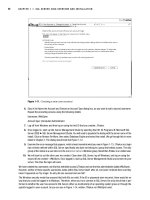
Solution Explorer simply displays a single entry, as shown in Figure 4-1.
Figure 4-1
95
Object Syntax Introduction
07_575368 ch04.qxd 10/7/05 10:50 PM Page 95
Simpo PDF Merge and Split Unregistered Version -
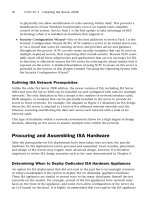
However, the VS.NET IDE does provide the Class View window. If you do decide to put multiple classes
in each physical .vb file, you can make use of the Class View window to quickly and efficiently navigate
through the code, jumping from class to class without having to manually locate those classes in specific
code files, as shown in Figure 4-2.
Figure 4-2
The Class View window is incredibly useful even if you keep to one class per file, since it still provides
you with a class-based view of the entire application.
In this chapter, you’ll stick with one class per file, because it is the most common approach. Open
the VS.NET IDE and create a new Windows Application project. Name it
ObjectIntro. Choose the
Project➪ Add Class menu option to add a new class module to the project. You’ll be presented with the
standard Add New Item dialog box. Change the name to
Person.vb and click Open. The result will
be the following code, which defines the
Person class:
Public Class Person
End Class
With the Person class created, you’re ready to start adding code to declare the interface, implement the
behaviors, and declare the instance variables.
Fields
Fields are variables declared in the class that will be available to each individual object when the appli-
cation is run. Each object gets its own set of data — basically, each object gets its own copy of the fields.
96
Chapter 4
07_575368 ch04.qxd 10/7/05 10:50 PM Page 96
Simpo PDF Merge and Split Unregistered Version -
Earlier, this chapter discussed how a class is simply a template from which you create specific objects.
Variables that you define within the class are also simply templates—and each object gets its own copy
of those variables in which to store its data.
Declaring member variables is as easy as declaring variables within the
Class block structure. Add the
following code to our
Person class:
Public Class Person
Private mName As String
Private mBirthDate As Date
End Class
You can control the scope of the fields by using the following keywords:
❑
Private — Available only to code within the class
❑
Friend — Available only to code within the project/component
❑
Protected — Available only to classes that inherit from the class (discussed in detail in
Chapter 6)
❑
Protected Friend — Available to code within our project/component and classes that inherit
from the class whether in the project or not (discussed in detail in Chapter 6)
❑
Public — Available to code outside the class and to any projects that reference the assembly
Typically, fields are declared using the
Private keyword, making them available only to code within
each instance of the class. Choosing any other option should be done with great care, because all the
other options allow code outside the class to directly interact with the variable, meaning that the value
could be changed and your code would never know that a change took place.
One common exception to making fields
Private is the use of the Protected keyword, as discussed
in Chapter 6.
Methods
Objects typically need to provide services (or functions) that can be called when working with the object.
Using their own data or data passed as parameters to the method, they manipulate information to yield
a result or to perform an action.
Methods declared as
Public, Friend, or Protected in scope define the interface of the class. Methods
that are
Private in scope are available to the code only within the class itself and can be used to provide
structure and organization to code. As discussed earlier, the actual code within each method is called
implementation, while the declaration of the method itself is what defines the interface.
Methods are simply routines that are coded within the class to implement the services that you want to
provide to the users of an object. Some methods return values or provide information to the calling code.
These are called interrogative methods. Others, called imperative methods, just perform an action and
return nothing to the calling code.
97
Object Syntax Introduction
07_575368 ch04.qxd 10/7/05 10:50 PM Page 97
Simpo PDF Merge and Split Unregistered Version -
In Visual Basic, methods are implemented using Sub (for imperative methods) or Function (for inter-
rogative methods) routines within the class module that defines the object.
Sub routines may accept
parameters, but they don’t return any result value when they are complete.
Function routines can also
accept parameters, and they always generate a result value that can be used by the calling code.
A method declared with the
Sub keyword is merely one that returns no value. Add the following code to
the
Person class:
Public Sub Walk()
‘ implementation code goes here
End Sub
The Walk method presumably contains some code that performs some useful work when called but has
no result value to return when it is complete.
To use this method, you might write code such as:
Dim myPerson As New Person()
myPerson.Walk()
Once you’ve created an instance of the Person class, you can simply invoke the Walk method.
Methods That Return Values
If you have a method that does generate some value that should be returned, you need to use the
Function keyword:
Public Function Age() As Integer
Return CInt(DateDiff(DateInterval.Year, mBirthDate, Now()))
End Function
Notice that you need to indicate the datatype of the return value when you declare a Function. In this
example, you are returning the calculated age as a result of the method. You can return any value of the
appropriate datatype by using the
Return keyword.
You can also return the value without using the
Return keyword, by setting the value of the function
name itself:
Public Function Age() As Integer
Age = CInt(DateDiff(DateInterval.Year, mBirthDate, Now()))
End Function
This is functionally equivalent to the previous code. Either way, you can use this method with code simi-
lar to the following:
Dim myPerson As New Person()
Dim age As Integer
age = myPerson.Age()
98
Chapter 4
07_575368 ch04.qxd 10/7/05 10:50 PM Page 98
Simpo PDF Merge and Split Unregistered Version -
The Age method returns an Integer data value that you can use in the program as required; in this case,
you’re just storing it in a variable.
Indicating Method Scope
Adding the appropriate keyword in front of the method declaration indicates the scope:
Public Sub Walk()
This indicates that Walk is a Public method and is, thus, available to code outside the class and even
outside the current project. Any application that references the assembly can use this method. Being
Public, this method becomes part of the object’s interface.
Alternately, you might choose to restrict the method somewhat:
Friend Sub Walk()
By declaring the method with the Friend keyword, you are indicating that it should be part of the
object’s interface only for code inside the project; any other applications or projects that make use of the
assembly will not be able to call the
Walk method.
Private Function Age() As Integer
The Private keyword indicates that a method is only available to the code within our particular class.
Private methods are very useful to help organize complex code within each class. Sometimes the meth-
ods will contain very lengthy and complex code. In order to make this code more understandable, you
may choose to break it up into several smaller routines, having the main method call these routines in
the proper order. Moreover, you can use these routines from several places within the class, so, by mak-
ing them separate methods, you enable reuse of the code. These subroutines should never be called by
code outside the object, so you make them
Private.
Method Parameters
You will often want to pass information into a method as you call it. This information is provided via
parameters to the method. For instance, in the
Person class, perhaps you want the Walk method to track
the distance the person walks over time. In such a case, the
Walk method would need to know how far
the person is to walk each time the method is called. Add the following code to the
Person class:
Public Class Person
Private mName As String
Private mBirthDate As Date
Private mTotalDistance As Integer
Public Sub Walk(ByVal distance As Integer)
mTotalDistance += distance
End Sub
Public Function Age() As Integer
Return CInt(DateDiff(DateInterval.Year, mBirthDate, Now()))
End Function
End Class
99
Object Syntax Introduction
07_575368 ch04.qxd 10/7/05 10:50 PM Page 99
Simpo PDF Merge and Split Unregistered Version -
With this implementation, a Person object will sum up all of the distances walked over time. Each time
the
Walk method is called, the calling code must pass an Integer value, indicating the distance to be
walked. Our code to call this method would be similar to the following code:
Dim myPerson As New Person()
myPerson.Walk(12)
The parameter is accepted using the ByVal keyword. This indicates that the parameter value is a copy of
the original value. This is the default way by which Visual Basic accepts all parameters. Typically, this is
desirable because it means that you can work with the parameter inside the code, changing its value
with no risk of accidentally changing the original value back in the calling code.
If you do want to be able to change the value in the calling code, you can change the declaration to pass
the parameter by reference by using the
ByRef qualifier:
Public Sub Walk(ByRef distance As Integer)
In this case, you’ll get a reference (or pointer) back to the original value rather than receiving a copy. This
means that any change you make to the
Distance parameter will be reflected back in the calling code,
very similar to the way object references work, as discussed earlier in this chapter.
Using this technique can be dangerous, since it is not explicitly clear to the caller of the method that the
value will change. Such unintended side effects can be hard to debug and should be avoided.
Properties
The .NET environment provides for a specialized type of method called a property. A property is a
method specifically designed for setting and retrieving data values. For instance, you declared a variable
in the
Person class to contain a name, so the Person class may include code to allow that name to be set
and retrieved. This can be done using regular methods:
Public Sub SetName(ByVal name As String)
mName = name
End Sub
Public Function GetName() As String
Return mName
End Function
Using methods like these, you write code to interact with the object, such as:
Dim myPerson As New Person()
myPerson.SetName(“Jones”)
MsgBox(myPerson.GetName())
While this is perfectly acceptable, it is not as nice as it could be with the use of a property. A Property
style method consolidates the setting and retrieving of a value into a single structure, and also makes the
code within the class smoother overall. You can rewrite these two methods into a single property. Add
the following code to the
Person class:
100
Chapter 4
07_575368 ch04.qxd 10/7/05 10:50 PM Page 100
Simpo PDF Merge and Split Unregistered Version -
Public Property Name() As String
Get
Return mName
End Get
Set(ByVal Value As String)
mName = Value
End Set
End Property
By using a property method instead, you can make the client code much more readable:
Dim myPerson As New Person()
myPerson.Name = “Jones”
MsgBox(myPerson.Name)
The Property method is declared with both a scope and a datatype:
Public Property Name() As String
In this example, you’ve declared the property as Public in scope, but it can be declared using the same
scope options as any other method —
Public, Friend, Private, or Protected.
The return datatype of this property is
String. A property can return virtually any datatype appropriate
for the nature of the value. In this regard, a property is very similar to a method declared using the
Function keyword.
Though a
Property method is a single structure, it is divided into two parts: a getter and a setter. The
getter is contained within a
Get . . . End Get block and is responsible for returning the value of the prop-
erty on demand:
Get
Return mName
End Get
Though the code in this example is very simple, it could be more complex, perhaps calculating the value
to be returned or applying other business logic to change the value as it is returned.
Likewise, the code to change the value is contained within a
Set . . . End Set block:
Set(ByVal Value As String)
mName = Value
End Set
The Set statement accepts a single parameter value that stores the new value. The code in the block can
then use this value to set the property’s value as appropriate. The datatype of this parameter must match
the datatype of the property itself. Having the parameter declared in this manner allows you to change
the name of the variable used for the parameter value if needed.
101
Object Syntax Introduction
07_575368 ch04.qxd 10/7/05 10:50 PM Page 101
Simpo PDF Merge and Split Unregistered Version -
By default, the parameter is named Value. However, if you dislike the name Value, you can change the
parameter name to something else, for example:
Set(ByVal NewName As String)
mName = NewName
End Set
In many cases, you can apply business rules or other logic within this routine to ensure that the new
value is appropriate before you actually update the data within the object.
It is also possible to restrict the scope of either the
Get or Set block to be more narrow than the scope of
the property itself. For instance, you may want to allow any code to retrieve the property value, but only
allow other code in your project to alter the value. In this case, you can restrict the scope of the
Set block
to
Friend, while the Property itself is scoped as Public:
Public Property Name() As String
Get
Return mName
End Get
Friend Set(ByVal Value As String)
mName = Value
End Set
End Property
The new scope must be more restrictive than the scope of the Property itself. Also, either the Get or
Set block can be restricted, not both. The one you don’t restrict uses the scope of the Property method.
Parameterized Properties
The Name property you created is an example of a single-value property. You can also create property
arrays or parameterized properties. These properties reflect a range, or array, of values. As an example,
a person will often have several phone numbers. You might implement a
PhoneNumber property as a
parameterized property, storing not only phone numbers, but also a description of each number. To
retrieve a specific phone number you’d write code such as:
Dim myPerson As New Person()
Dim homePhone As String
homePhone = myPerson.Phone(“home”)
Or, to add or change a specific phone number, you’d write the following code:
myPerson.Phone(“work”) = “555-9876”
Not only are you retrieving and updating a phone number property, but you’re also updating a specific
phone number. This implies a couple of things. First, you’re no longer able to use a simple variable to
hold the phone number, since you are now storing a list of numbers and their associated names. Second,
you’ve effectively added a parameter to your property. You’re actually passing the name of the phone
number as a parameter on each property call.
102
Chapter 4
07_575368 ch04.qxd 10/7/05 10:50 PM Page 102
Simpo PDF Merge and Split Unregistered Version -