C++ Primer Plus (P5) pps
Bạn đang xem bản rút gọn của tài liệu. Xem và tải ngay bản đầy đủ của tài liệu tại đây (308.38 KB, 20 trang )
This is logically consistent: main() is supposed to return a type int value, and you have it
return the integer 0. But, you might wonder, to what are you returning a value? After all,
nowhere in any of your programs have you seen anything calling main():
squeeze = main(); // absent from our programs
The answer is that you can think of your computer's operating system (UNIX, say, or DOS)
as calling your program. So main()'s return value is returned not to another part of the
program but to the operating system. Many operating systems can use the program's
return value. For example, UNIX shell scripts and DOS batch files can be designed to run
programs and test their return values, usually called exit values. The normal convention is
that an exit value of zero means the program ran successfully, whereas a nonzero value
means there was a problem. Thus, you can design your C++ program to return a nonzero
value if, say, it fails to open a file. You then can design a shell script or batch file to run that
program and to take some alternative action if the program signals failure.
Keywords
Keywords are the vocabulary of a computer language. This
chapter has used four C++ keywords: int, void, return,
and double. Because these keywords are special to C++,
you can't use them for other purposes. That is, you can't
use return as the name for a variable or double as the
name of a function. But you can use them as part of a
name, as in painter (with its hidden int) or return_ aces.
Appendix B, "C++ Keywords," provides a complete list of
C++ keywords. Incidentally, main is not a keyword
because it's not part of the language. Instead, it is the
name of a required function. You can use main as a
variable name. (That can cause a problem in
circumstances too esoteric to describe here, and because
it is confusing in any case, you'd best not.) Similarly, other
function names and object names are not keywords.
However, using the same name, say cout, for both an
object and a variable in a program confuses the compiler.
That is, you can use cout as a variable name in a function
that doesn't use the cout object for output, but you can't
use cout both ways in the same function.
This document was created by an unregistered ChmMagic, please go to to register it. Thanks.
User-Defined Function with a Return Value
Let's go one step further and write a function that uses the return statement. The main()
function already illustrates the plan for a function with a return value: Give the return type in
the function heading and use return at the end of the function body. You can use this form
to solve a weighty problem for those visiting the United Kingdom. In the U.K., many
bathroom scales are calibrated in stone instead of in U.S. pounds or international
kilograms. The word stone is both singular and plural in this context. (The English
language does lack the internal consistency of, say, C++.) One stone is 14 pounds, and the
program in Listing 2.6 uses a function to make this conversion.
Listing 2.6 convert.cpp
// convert.cpp converts stone to pounds
#include <iostream>
using namespace std;
int stonetolb(int); // function prototype
int main()
{
int stone;
cout << "Enter the weight in stone: ";
cin >> stone;
int pounds = stonetolb(stone);
cout << stone << " stone are ";
cout << pounds << " pounds.\n";
return 0;
}
int stonetolb(int sts)
{
return 14 * sts;
}
Here's a sample run:
Enter the weight in stone: 14
This document was created by an unregistered ChmMagic, please go to to register it. Thanks.
14 stone are 196 pounds.
In main(), the program uses cin to provide a value for the integer variable stone. This
value is passed to the stonetolb() function as an argument and is assigned to the variable
sts in that function. stonetolb() then uses the return keyword to return the value of 14 *
sts to main(). This illustrates that you aren't limited to following return with a simple
number. Here, by using a more complex expression, you avoid the bother of having to
create a new variable to which to assign the value before returning it. The program
calculates the value of that expression (196 in this example) and returns the resulting
value. If returning the value of an expression bothers you, you can take the longer route:
int stonetolb(int sts)
{
int pounds = 14 * sts;
return pounds;
}
Either version produces the same result, but the second version takes slightly longer to do
so.
In general, you can use a function with a return value wherever you would use a simple
constant of the same type. For example, stonetolb() returns a type int value. This means
you can use the function in the following ways:
int aunt = stonetolb(20);
int aunts = aunt + stonetolb(10);
cout << "Ferdie weighs " << stonetolb(16) << " pounds.\n";
In each case, the program calculates the return value and then uses that number in these
statements.
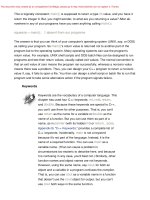
As these examples show, the function prototype describes the function interface—that is,
how the function interacts with the rest of the program. The argument list shows what sort
of information goes into the function, and the function type shows the type of value
returned. Pro grammers sometimes describe functions as black boxes (a term from
electronics) specified by the flow of information into and out of them. The function prototype
perfectly portrays that point of view. (See Figure 2.9.)
This document was created by an unregistered ChmMagic, please go to to register it. Thanks.
Figure 2.9. The function prototype and the function as a black box.
The stonetolb() function is short and simple, yet it embodies a full range of functional
features:
It has a heading and a body.
It accepts an argument.
It returns a value.
It requires a prototype.
Consider stonetolb() as a standard form for function design. You'll go further into functions
in Chapters 7 and 8. In the meantime, the material in this chapter should give you a good
feel for how functions work and how they fit into C++.
Real-World Note: Naming Conventions
C++ programmers are blessed (or cursed) with myriad
options when naming functions, classes, and variables.
This document was created by an unregistered ChmMagic, please go to to register it. Thanks.
Programmers have strong and varied opinions about style,
and these often surface as holy wars in public forums.
Starting with the same basic idea for a function name, a
programmer might select any of the following:
MyFunction( )
myfunction( )
myFunction( )
my_function( )
my_funct( )
The choice will depend upon the development team, the
idiosyncrasies of the technologies or libraries used, as well
as the tastes and preferences of the individual
programmer. Rest assured that all legal styles are correct,
as far as the C++ language is concerned, and can be used
based on your own judgment.
Language allowances aside, it is worth noting that a
personal naming style—one that aids you through
consistency and precision—is well worth pursuing. A
precise, recognizable personal naming convention is a
hallmark of good software engineering, and it will aid you
throughout your programming career.
Statement Summary
The following list is a summary of the several kinds of C++ statements you've learned and
used in this chapter:
A declaration statement announces the name and the type of a variable used in a
function.
An assignment statement uses the assignment operator (=) to assign a value to a
variable.
A message statement sends a message to an object, initiating some sort of action.
This document was created by an unregistered ChmMagic, please go to to register it. Thanks.
A function call activates a function. When the called function terminates, the
program returns to the statement in the calling function immediately following the
function call.
A function prototype declares the return type for a function along with the number
and type of arguments the function expects.
A return statement sends a value from a called function back to the calling function.
Summary
A C++ program consists of one or more modules called functions. Programs begin
executing at the beginning of the function called main() (all lowercase), so you always
should have a function by this name. A function, in turn, consists of a heading and a body.
The function heading tells you what kind of return value, if any, the function produces and
what sort of information it expects to be passed to it by arguments. The function body
consists of a series of C++ statements enclosed in paired braces: {}.
C++ statement types include declaration statements, assignment statements, function call
statements, object message statements, and return statements. The declaration statement
announces the name of a variable and establishes the type of data it can hold. An
assignment statement gives a value to a variable. A function call passes program control to
the called function. When the function finishes, control returns to the statement in the
calling function immediately following the function call. A message instructs an object to
perform a particular action. A return statement is the mechanism by which a function
returns a value to its calling function.
A class is a user-defined specification for a data type. This specification details how
information is to be represented and also the operations that can be performed with the
data. An object is an entity created according to a class prescription, just as a simple
variable is an entity created according to a data type description.
C++ provides two predefined objects (cin and cout) for handling input and output. They are
examples of the istream and ostream classes, which are defined in the iostream file.
These classes view input and output as streams of characters. The insertion operator (<<),
which is defined for the ostream class, lets you insert data into the output stream, and the
extraction operator (>>), which is defined for the istream class, lets you extract information
from the input stream. Both cin and cout are smart objects, capable of automatically
This document was created by an unregistered ChmMagic, please go to to register it. Thanks.
converting information from one form to another according to the program context.
C++ can use the extensive set of C library functions. To use a library function, you should
include the header file that provides the prototype for the function.
Now that you have an overall view of simple C++ programs, you can go on in the next
chapters to fill in details and expand horizons.
Review Questions
You find the answers to these and subsequent review questions in Appendix J, "Answers
to Review Questions."
.1:What are the modules of C++ programs called?
.2:What does the following preprocessor directive do?
#include <iostream>
.3:What does the following statement do?
using namespace std;
.4:What statement would you use to print the phrase "Hello, world" and then start
a new line?
.5:What statement would you use to create an integer variable with the name
cheeses?
.6:What statement would you use to assign the value 32 to the variable
cheeses?
.7:What statement would you use to read a value from keyboard input into the
variable cheeses?
.8:What statement would you use to print "We have X varieties of cheese,"
where the current value of the cheeses variable replaces X?
This document was created by an unregistered ChmMagic, please go to to register it. Thanks.
.9:What does the following function header tell you about the function?
int froop(double t)
.10:When do you not have to use the keyword return when you define a function?
Programming Exercises
1:Write a C++ program that displays your name and address.
2:Write a C++ program that asks for a distance in furlongs and converts it to yards
(one furlong is 220 yards).
3:Write a C++ program that uses three user-defined functions (counting main() as
one) and produces the following output:
Three blind mice
Three blind mice
See how they run
See how they run
One function, called two times, should produce the first two lines, and the
remaining function, also called twice, should produce the remaining output.
4:Write a program that has main() call a user-defined function that takes a
Celsius temperature value as an argument and then returns the equivalent
Fahrenheit value. The program should request the Celsius value as input from
the user and display the result, as shown in the following code:
Please enter a Celsius value: 20
20 degrees Celsius is 68 degrees Fahrenheit.
For reference, here is the formula for making the conversion:
This document was created by an unregistered ChmMagic, please go to to register it. Thanks.
5:Write a program that has main() call a user-defined function that takes a
distance in light years as an argument and then returns the distance in
astronomical units. The program should request the light year value as input
from the user and display the result, as shown in the following code:
Enter the number of light years: 4.2
4.2 light years are 265608 astronomical units.
An astronomical unit is the average distance from the Earth to the Sun (about
150,000,000 km or 93,000,000 miles) and a light year is the distance light
travels in a year (about 10 trillion kilometers or 6 trillion miles). (The nearest star
after the Sun is about 4.2 light years away.) Use type double (as in Listing 2.4)
and this conversion factor:
CONTENTS
This document was created by an unregistered ChmMagic, please go to to register it. Thanks.
CONTENTS
Chapter 3. DEALING WITH DATA
In this chapter you learn
Simple Variables
The const Qualifier
Floating-Point Numbers
C++ Arithmetic Operators
Summary
Review Questions
Programming Exercises
The essence of object-oriented programming is designing and extending your own data types.
Designed types represent an effort to make a type match the data. If you do this properly, you'll find it
much simpler to work with the data later. But before you can create your own types, you must know
and understand the types built in to C++ because these types will be your building blocks.
The built-in C++ types come in two groups: fundamental types and compound types. In this chapter
you'll meet the fundamental types, which represent integers and floating-point numbers. That might
sound like just two types; however, C++ recognizes that no one integer type and no one floating-point
type match all programming requirements, so it offers several variants on these two data themes. Next,
Chapter 4, "Compound Types," follows up by covering several types built upon the basic types; these
additional compound types include arrays, strings, pointers, and structures.
Of course, a program also needs a means to identify stored data. You'll examine one method for doing
so—using variables. Next, you'll look at how to do arithmetic in C++. Finally, you'll see how C++
converts values from one type to another.
Simple Variables
Programs typically need to store information—perhaps the current price of IBM stock, the average
humidity in New York City in August, the most common letter in the Constitution and its relative
frequency, or the number of available Elvis imitators. To store an item of information in a computer, the
program must keep track of three fundamental properties:
Where the information is stored
What value is kept there
What kind of information is stored
This document was created by an unregistered ChmMagic, please go to to register it. Thanks.
The strategy the examples have been using so far is to declare a variable. The type used in the
declaration describes the kind of information, and the variable name represents the value symbolically.
For example, suppose Chief Lab Assistant Igor uses the following statements:
int braincount;
braincount = 5;
These statements tell the program that it is storing an integer and that the name braincount represents
the integer's value, 5 in this case. In essence, the program locates a chunk of memory large enough to
hold an integer, notes the location, assigns the label braincount to the location, and copies the value 5
into the location. These statements don't tell you (or Igor) where in memory the value is stored, but the
program does keep track of that information, too. Indeed, you can use the & operator to retrieve
braincount's address in memory. You'll take up that operator in the next chapter when you investigate
a second strategy for identifying data—using pointers.
Names for Variables
C++ encourages you to use meaningful names for variables. If a variable represents the cost of a trip,
call it cost_of_trip or costOfTrip, not just x or cot. You do have to follow a few simple C++ naming
rules:
The only characters you can use in names are alphabetic characters, digits, and the
underscore (_) character.
The first character in a name cannot be a digit.
Uppercase characters are considered distinct from lowercase characters.
You can't use a C++ keyword for a name.
Names beginning with two underscore characters or with an underscore character followed by
an uppercase letter are reserved for use by the implementation. Names beginning with a single
underscore character are reserved for use as global identifiers by the implementation.
C++ places no limits on the length of a name, and all characters in a name are significant.
The next-to-last point is a bit different from the preceding points because using a name like
__time_stop or _Donut doesn't produce a compiler error; instead, it leads to undefined behavior. In
other words, there's no telling what the result will be. The reason there is no compiler error is that the
names are not illegal but rather are reserved for the implementation to use. The bit about global names
refers to where the names are declared; Chapter 4 touches on that topic.
The final point makes C++ different from ANSI C (the recent C99 standard), which guarantees only that
the first 63 characters in a name are significant. (In ANSI C, two names that have the same first 63
characters are considered identical, even if the 64th characters differ.)
This document was created by an unregistered ChmMagic, please go to to register it. Thanks.
Here are some valid and invalid C++ names:
int poodle; // valid
int Poodle; // valid and distinct from poodle
int POODLE; // valid and even more distinct
Int terrier; // invalid has to be int, not Int
int my_stars3 // valid
int _Mystars3; // valid but reserved starts with underscore
int 4ever; // invalid because starts with a digit
int double; // invalid double is a C++ keyword
int begin; // valid begin is a Pascal keyword
int __fools; // valid but reserved – starts with two underscores
int the_very_best_variable_i_can_be_version_112; // valid
int honky-tonk; // invalid no hyphens allowed
If you want to form a name from two or more words, the usual practice is to separate the words with an
underscore character, as in my_onions, or to capitalize the initial character of each word after the first,
as in myEyeTooth. (C veterans tend to use the underscore method in the C tradition, while Pascalians
prefer the capitalization approach.) Either form makes it easier to see the individual words and to
distinguish between, say, carDrip and cardRip, or boat_sport and boats_port.
Real World Note: Variable Names
Schemes for naming variables, like schemes for naming functions,
provide fertile ground for fervid discussion. Indeed, this topic produces
some of the most strident disagreements in programming. Again, as
with function names, the C++ compiler doesn't care about your
variable names as long as they are within legal limits, but a
consistent, precise personal naming convention will serve you well.
As in function naming, capitalization is a key issue in variable naming
(see the Chapter 2 sidebar,"Naming Conventions"), but many
programmers may insert an additional level of information in a
variable name, a prefix that describes the variable's type or contents.
For instance, the integer myWeight might be named nMyWeight;
here, the n prefix is used to represent an integer value, useful when
you are reading your code and the definition of the variable isn't
immediately at hand. Alternatively, this variable might be named
intMyWeight, which is more precise and legible, although it does
include a couple of extra letters (anathema to many programmers).
Other prefixes are commonly used in like fashion: str or sz represent
a null-terminated string of characters, b might represent a boolean
value, p a pointer, c a single character.
As you progress into the world of C++, you will find many examples of
This document was created by an unregistered ChmMagic, please go to to register it. Thanks.
the prefixed naming style (including the handsome m_lpctstr
prefix—a class member value which contains a long pointer to a
constant, null-terminated string of characters), as well as other, more
bizarre and possibly counterintuitive styles which you may or may not
adopt as your own. As in all of the stylistic, subjective parts of C++,
consistency and precision are best. Use variable names to fit your
own needs, preferences, and personal style. (Or, if required, choose
names that fit the needs, preferences, and personal style of your
employer.)
Integer Types
Integers are numbers with no fractional part, such as 2, 98, –5286, and 0. There are lots of integers,
assuming you consider an infinite number to be a lot, so no finite amount of computer memory can
represent all possible integers. Thus, a language only can represent a subset of all integers. Some
languages, such as Standard Pascal, offer just one integer type (one type fits all!), but C++ provides
several choices. This gives you the option of choosing the integer type that best meets a program's
particular requirements. This concern with matching type to data presages the designed data types of
OOP.
The various C++ integer types differ in the amount of memory they use to hold an integer. A larger
block of memory can represent a larger range in integer values. Also, some types (signed types) can
represent both positive and negative values, whereas others (unsigned types) can't represent negative
values. The usual term for describing the amount of memory used for an integer is width. The more
memory a value uses, the wider it is. C++'s basic integer types, in order of increasing width, are called
char, short, int, and long. Each comes in both signed and unsigned versions. That gives you a choice
of eight different integer types! Let's look at these integer types in more detail. Because the char type
has some special properties (it's most often used to represent characters instead of numbers), this
chapter will cover the other types first.
The short, int, and long Integer Types
Computer memory consists of units called bits. (See the "Bits and Bytes" note.) By using different
numbers of bits to store values, the C++ types of short, int, and long can represent up to three
different integer widths. It would be convenient if each type were always some particular width for all
systems; for example, if short were always 16 bits, int always 32 bits, and so on. But life is not that
simple. The reason is that no one choice is suitable for all computer designs. C++ offers a flexible
standard with some guaranteed minimum sizes. Here's what you get:
A short integer is at least 16 bits wide.
An int integer is at least as big as short.
This document was created by an unregistered ChmMagic, please go to to register it. Thanks.
A long integer is at least 32 bits wide and at least as big as int.
Bits and Bytes
The fundamental unit of computer memory is the bit. Think of a bit as
an electronic switch that you can set either to off or on. Off represents
the value 0, and on represents the value 1. An 8-bit chunk of memory
can be set to 256 different combinations. The number 256 comes
from the fact that each bit has two possible settings, making the total
number of combinations for 8 bits 2 x 2 x 2 x 2 x 2 x 2 x 2 x 2, or 256.
Thus, an 8-bit unit can represent, say, the values 0 through 255 or the
values –128 through 127. Each additional bit doubles the number of
combinations. This means you can set a 16-bit unit to 65,536 different
values and a 32-bit unit to 4,294,672,296 different values.
A byte usually means an 8-bit unit of memory. Byte in this sense is
the unit of measurement that describes the amount of memory in a
computer, with a kilobyte equal to 1024 bytes and a megabyte equal
to 1024 kilobytes. C++, however, defines a byte differently. The C++
byte consists of at least enough adjacent bits to accommodate the
basic character set for the implementation. That is, the number of
possible values must equal or exceed the number of distinct
characters. In the U.S., the basic character sets usually are the ASCII
and EBCDIC sets, each of which can be accommodated by 8 bits, so
the C++ byte typically is 8 bits on systems using these character sets.
However, international programming can require much larger
character sets, such as Unicode, so some implementations may use
a 16-bit byte or even a 32-bit byte.
Many systems currently use the minimum guarantee, making short 16 bits and long 32 bits. This still
leaves several choices open for int. It could be 16, 24, or 32 bits in width and meet the standard.
Typically, int is 16 bits (the same as short) for older IBM PC implementations and 32 bits (the same as
long) for Windows 95, Windows 98, Windows NT, Macintosh, VAX, and many other minicomputer
implementations. Some implementations give you a choice of how to handle int. (What does your
implementation use? The next example shows you how to determine the limits for your system without
your having to open a manual.) The differences between implementations for type widths can cause
problems when you move a C++ program from one environment to another. But a little care, as
discussed later in this chapter, can minimize those problems.
You use these type names to declare variables just as you would use int:
short score; // creates a type short integer variable
int temperature; // creates a type int integer variable
long position; // creates a type long integer variable
This document was created by an unregistered ChmMagic, please go to to register it. Thanks.
Actually, short is short for short int and long is short for long int, but hardly anyone uses the longer
forms.
The three types, int, short, and long, are signed types, meaning each splits its range approximately
equally between positive and negative values. For example, a 16-bit int might run from –32768 to
+32767.
If you want to know how your system's integers size up, C++ offers tools to let you investigate type
sizes with a program. First, the sizeof operator returns the size, in bytes, of a type or a variable. (An
operator is a built-in language element that operates on one or more items to produce a value. For
example, the addition operator, represented by +, adds two values.) Note that the meaning of "byte" is
implementation-dependent, so a two-byte int could be 16 bits on one system and 32 bits on another.
Second, the climits header file (or, for older implementations, the limits.h header file) contains
information about integer type limits. In particular, it defines symbolic names to represent different
limits. For example, it defines INT_MAX to be the largest possible int value and CHAR_BIT as the
number of bits in a byte. Listing 3.1 demonstrates how to use these facilities. The program also
illustrates initialization, which is the use of a declaration statement to assign a value to a variable.
Listing 3.1 limits.cpp
// limits.cpp some integer limits
#include <iostream>
using namespace std;
#include <climits> // use limits.h for older systems
int main()
{
int n_int = INT_MAX; // initialize n_int to max int value
short n_short = SHRT_MAX; // symbols defined in limits.h file
long n_long = LONG_MAX;
// sizeof operator yields size of type or of variable
cout << "int is " << sizeof (int) << " bytes.\n";
cout << "short is " << sizeof n_short << " bytes.\n";
cout << "long is " << sizeof n_long << " bytes.\n\n";
cout << "Maximum values:\n";
cout << "int: " << n_int << '\n';
cout << "short: " << n_short << '\n';
cout << "long: " << n_long << "\n\n";
cout << "Minimum int value = " << INT_MIN << '\n';
cout << "Bits per byte = " << CHAR_BIT << '\n';
return 0;
This document was created by an unregistered ChmMagic, please go to to register it. Thanks.
}
Compatibility Note
The climits header file is the C++ version of the ANSI C limits.h
header file. Some earlier C++ platforms have neither header file
available. If you're using such a system, you must limit yourself to
experiencing this example in spirit only.
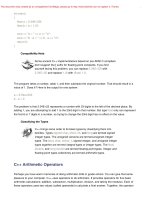
Here is the output using Microsoft Visual C++ 6.0:
int is 4 bytes.
short is 2 bytes.
long is 4 bytes.
Maximum values:
int: 2147483647
short: 32767
long: 2147483647
Minimum int value = -2147483648
Bits per byte = 8
Here is the output for a second system (Borland C++ 3.1 for DOS):
int is 2 bytes.
short is 2 bytes.
long is 4 bytes.
Maximum values:
int: 32767
short: 32767
long: 2147483647
Minimum int value = -32768
Bits per byte = 8
Program Notes
Let's look at the chief programming features for this program.
The sizeof operator reports that int is 4 bytes on the base system, which uses an 8-bit byte. You can
apply the sizeof operator to a type name or to a variable name. When you use the sizeof operator with
a type name, such as int, you enclose the name in parentheses. But if you use the operator with the
This document was created by an unregistered ChmMagic, please go to to register it. Thanks.
name of the variable, such as n_short, parentheses are optional:
cout << "int is " << sizeof (int) << " bytes.\n";
cout << "short is " << sizeof n_short << " bytes.\n";
The climits header file defines symbolic constants (see the "Symbolic Constants" note) to represent
type limits. As mentioned, INT_MAX represents the largest value type int can hold; this turned out to
be 32767 for our DOS system. The compiler manufacturer provides a climits file that reflects the
values appropriate to that compiler. For example, the climits file for a system using a 32-bit int would
define INT_MAX to represent 2147483647. Table 3.1 summarizes the symbolic constants defined in
this file; some pertain to types you have not yet learned.
Table 3.1. Symbolic Constants from climits
Symbolic Constant Represents
CHAR_BITNumber of bits in a char
CHAR_MAXMaximum char value
CHAR_MINMinimum char value
SCHAR_MAXMaximum signed char value
SCHAR_MINMinimum signed char value
UCHAR_MAXMaximum unsigned char value
SHRT_MAXMaximum short value
SHRT_MINMinimum short value
USHRT_MAXMaximum unsigned short value
INT_MAXMaximum int value
INT_MINMinimum int value
UINT_MAXMaximum unsigned int value
LONG_MAXMaximum long value
LONG_MINMinimum long value
ULONG_MAXMaximum unsigned long value
Initialization combines assignment with declaration. For example, the statement
int n_int = INT_MAX;
declares the n_int variable and sets it to the largest possible type int value. You also can use regular
constants to initialize values. You can initialize a variable to another variable, provided that the other
variable has been defined first. You even can initialize a variable to an expression, provided that all the
values in the expression are known when program execution reaches the declaration:
int uncles = 5; // initialize uncles to 5
int aunts = uncles; // initialize aunts to 5
This document was created by an unregistered ChmMagic, please go to to register it. Thanks.
int chairs = aunts + uncles + 4; // initialize chairs to 14
Moving the uncles declaration to the end of this list of statements would invalidate the other two
initializations, for then the value of uncles wouldn't be known at the time the program tried to initialize
the other variables.
The initialization syntax shown previously comes from C; C++ has a second initialization syntax not
shared with C:
int owls = 101; // traditional C initialization
int wrens(432); // alternative C++ syntax, set wrens to 432
Remember
If you don't initialize a variable defined inside a function, the variable's
value is undefined. That means the value is whatever happened to be
sitting at that memory location prior to the creation of the variable.
If you know what the initial value of a variable should be, initialize it. True, separating the declaring of a
variable from assigning it a value can create momentary suspense:
short year; // what could it be?
year = 1492; // oh
But initializing the variable when you declare it protects you from forgetting to assign the value later.
Symbolic Constants the Preprocessor Way
The climits file contains lines similar to the following:
#define INT_MAX 32767
The C++ compilation process, recall, first passes the source code
through a preprocessor. Here #define, like #include, is a
preprocessor directive. What this particular directive tells the
preprocessor is this: Look through the program for instances of
INT_MAX and replace each occurrence with 32767. So the #define
directive works like a global search-and-replace command in a text
editor or word processor. The altered program is compiled after these
replacements occur. The preprocessor looks for independent tokens
(separate words), skipping embedded words. That is, the
preprocessor doesn't replace PINT_MAXIM with P32767IM. You
can use #define to define your own symbolic constants, too. (See
Listing 3.2.) However, the #define directive is a C relic. C++ has a
better way for creating symbolic constants (the const keyword,
This document was created by an unregistered ChmMagic, please go to to register it. Thanks.
discussed in a later section), so you won't be using #define much.
But some header files, particularly those designed to be used with
both C and C++, do use it.
Unsigned Types
Each of the three integer types you just learned comes in an unsigned variety that can't hold negative
values. This has the advantage of increasing the largest value the variable can hold. For example, if
short represents the range –32768 to +32767, then the unsigned version can represent the range 0 to
65535. Of course, you should use unsigned types only for quantities that are never negative, such as
populations, inventory counts, and happy face manifestations. To create unsigned versions of the
basic integer types, just use the keyword unsigned to modify the declarations:
unsigned short change; // unsigned short type
unsigned int rovert; // unsigned int type
unsigned quarterback; // also unsigned int
unsigned long gone; // unsigned long type
Note that unsigned by itself is short for unsigned int.
Listing 3.2 illustrates the use of unsigned types. It also shows what might happen if your program tries
to go beyond the limits for integer types. Finally, it gives you one last look at the preprocessor #define
statement.
Listing 3.2 exceed.cpp
// exceed.cpp exceeding some integer limits
#include <iostream>
using namespace std;
#define ZERO 0 // makes ZERO symbol for 0 value
#include <climits> // defines INT_MAX as largest int value
int main()
{
short sam = SHRT_MAX; // initialize a variable to max value
unsigned short sue = sam;// okay if variable sam already defined
cout << "Sam has " << sam << " dollars and Sue has " << sue;
cout << " dollars deposited.\nAdd $1 to each account.\nNow ";
sam = sam + 1;
sue = sue + 1;
cout << "Sam has " << sam << " dollars and Sue has " << sue;
cout << " dollars deposited.\nPoor Sam!\n";
This document was created by an unregistered ChmMagic, please go to to register it. Thanks.
sam = ZERO;
sue = ZERO;
cout << "Sam has " << sam << " dollars and Sue has " << sue;
cout << " dollars deposited.\n";
cout << "Take $1 from each account.\nNow ";
sam = sam - 1;
sue = sue - 1;
cout << "Sam has " << sam << " dollars and Sue has " << sue;
cout << " dollars deposited.\nLucky Sue!\n";
return 0;
}
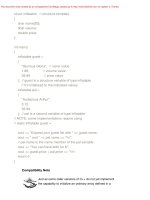
Compatibility Note
Listing 3.2, like Listing 3.1, uses the climits file; older compilers might
need to use limits.h, and some very old compilers might not have
either file available.
Here's the output:
Sam has 32767 dollars and Sue has 32767 dollars deposited.
Add $1 to each account.
Now Sam has -32768 dollars and Sue has 32768 dollars deposited.
Poor Sam!
Sam has 0 dollars and Sue has 0 dollars deposited.
Take $1 from each account.
Now Sam has -1 dollars and Sue has 65535 dollars deposited.
Lucky Sue!
The program sets a short variable (sam) and an unsigned short variable (sue) to the largest short
value, which is 32767 on our system. Then, it adds 1 to each value. This causes no problems for sue
because the new value still is much less than the maximum value for an unsigned integer. But sam
goes from 32767 to –32768! Similarly, subtracting 1 from 0 creates no problems for sam, but it makes
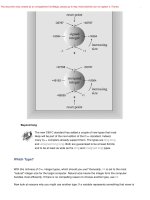
the unsigned variable sue go from 0 to 65535. As you can see, these integers behave much like an
odometer or a VCR counter. If you go past the limit, the values just start over at the other end of the
range. (See Figure 3.1.) C++ guarantees that unsigned types behave in this fashion. However, C++
doesn't guarantee that signed integer types can exceed their limits (overflow and underflow) without
complaint, but that is the most common behavior on current implementations.
Figure 3.1. Typical overflow behavior for integers.
This document was created by an unregistered ChmMagic, please go to to register it. Thanks.