The Complete IS-IS Routing Protocol- P5 potx
Bạn đang xem bản rút gọn của tài liệu. Xem và tải ngay bản đầy đủ của tài liệu tại đây (329.25 KB, 30 trang )
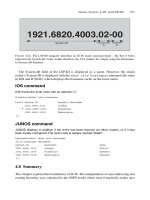
The System-ID field of the LSP-ID is displayed as a name. However, the origin
router’s System-ID is displayed with the show isis hostname command (the same
in IOS and JUNOS), which displays the hostname cache on the local router.
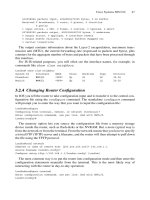
IOS command
IOS marks the local node with an asterisk (*):
Frankfurt#show isis hostname
Level System ID Dynamic Hostname
1921.6800.1013 London
* 1921.6800.1014 Frankfurt
1921.6800.1018 Washington
[…]
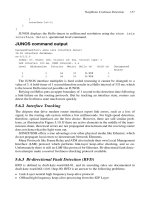
JUNOS command
JUNOS displays in addition if the entry has been learned via other routers, or if it has
been locally configured. The local node is always marked “Static”.
hannes@London> show isis hostname
IS-IS hostname database:
System ID Hostname Type
1921.6800.1013 London Static
1921.6800.1014 Frankfurt Dynamic
1921.6800.1018 Washington Dynamic
[…]
4.8 Summary
This chapter explored the foundations of IS-IS. The independence of area addressing and
routing hierarchy was contrasted to the OSPF model where Area 0 implicitly makes up a
Names, System-, LAN- and LSP-IDs 107
1921.6820.4003.02-00
System-ID
Pseudonod
e-
ID
Fragment-
ID
F
IGURE 4.24. The LSP-ID uniquely identifies an IS-IS router announcement – the first 6 bytes
represent the System-ID of the sender therefore the CLI renders the output using the Hostname-
to-System-ID database
routing hierarchy. The concept of an arbitrarily assigned level to the underlying physical
topology was explained. This flexibility allows IS-IS to make very resilient POP top-
ology without spending extra costs for physical intra-POP links just to heal the topology.
The IP addressing model and the OSI addressing model were discussed in a comparative
way; interestingly, the IS-IS model corresponds almost exactly to the unnumbered IP
routing model. IS-IS inherits its addressing structure from the OSI suite of protocols.
Address assignment is a relatively easy task. The fixed part of the NET can be calculated
based on the IP loopback address of the router and/or the POP/topology codes that are
unique to each service provider. The Area-ID is the only variable part in the system, and
based on network size, most IS-IS networks use 3 or 5 byte Area-IDs. Most Area-IDs
start with 49 because the 49/8 prefix has been allocated for private use – it is the RFC
1918 of the OSI suite. Finally, this chapter presented the IS-IS built-in name resolution
service and several commands to display those ID formats which benefit from the address
resolution service as well.
108 4. IS-IS Basics
Virtually all routing (and signalling) protocols include a method of automatic neighbour
discovery that enables a router to determine if there are any other adjacent routers running
the same routing protocol. Once you enable IS-IS on an interface, the routing protocol
will automatically find out if there are other routers out there speaking the same protocol
and version and immediately start to interact with these remote routers. Additionally the
routing protocol needs to verify if the link is two-way capable (that is, equally able to pass
protocol traffic in both directions) before it can announce a Reachability Information TLV
in a link-state PDU (LSP) and flood it throughout the topology. This verification of link
capabilities and bi-directional checks is done using a process known as handshaking. This
chapter examines how IS-IS routers perform neighbour discovery and handshaking on
LAN and WAN circuits. Additionally, different properties of handshaking methods, such as
the simple 2-way handshake and the inherent problems of using this 2-way handshaking
method are discussed.
You will also learn the details of adjacency finite state machine changes and network
stability improvement techniques like adjacency hold downs. Finally, requirements of
highly resilient neighbour “liveness” checking will be presented and popular solutions
will be explored including technologies like bi-directional fault detection. Everything
will include configuration snippets, show command and debug output, plus tcpdump out-
put for a better understanding of the IS-IS protocol.
5.1 Hello Message Encoding
Each routing protocol uses Hello messages for neighbour discovery and to perform
handshaking. In IS-IS, just like in any other routing protocol, this function is performed
through the use of what IS-IS calls Intermediate System to Intermediate System Hello
(IIH) messages. IS-IS uses dedicated IIH messages for the two types of topologies a
router can be configured to be a member of: there is one Hello type for the Level 1 adja-
cencies and one Hello type for the Level 2 adjacencies. There are more details about the
IS-IS hierarchical Level 1/Level 2 routing paradigm in Chapter 4 “IS-IS Basics”.
IS-IS supports two different circuit types: point-to-point (p2p) and broadcast LAN cir-
cuits. There is a dedicated type of Hello Message for point-to-point circuits and another
one for broadcast circuits. So in theory there should be two Hello messages for each cir-
cuit type (point-to-point or broadcast) and two Hello message types for each Level, L1
or L2. This should total four distinct Hello message types.
109
5
Neighbour Discovery and Handshaking
In ISO 10589, however, there was some concern that running two Hellos (one per
level) on point-to-point links would consume too much bandwidth on narrow-band links.
So IS-IS is optimized for point-to-point circuits and only uses one PDU type for both
levels. Figure 5.1 shows the structure of the IS-IS common header, which starts every IS-IS
message. The 8-bit PDU type field indicates the type of message that is carried inside the
IS-IS message. On the right of the figure there is a list of the nine distinct PDU types for
IS-IS. Three out of the nine PDU types are reserved for Hello messages. The point-
to-point circuit types share one PDU type (17) for both levels, so there are not really
four different Hello messages but only three.
What do the Hello messages look like on the wire? Each IS-IS message type is
prepended with an 8-byte common header that tells the receiver about the IS-IS protocol
version being used, the header length, the maximum number of concurrent areas sup-
ported, as well as other IS-IS global parameters, such as the length of the System-ID
field. Figure 5.1 shows the structure of the common header that is prepended to all IS-IS
related messages. In the figure, you can see that some of the fields are already filled in
with number values. We have chosen not only to show the frame structure, but also to
show how the frames are populated with number values. These numbers represent con-
stants and fill in the common header with typical values. It is interesting to note that some
header fields, such as the number of supported areas and the length of the System-ID
field, are set to zero. Zero has a special meaning in IS-IS. Using the zero value is equiv-
alent to telling routers to use the default value for a field, which is not typically zero.
110 5. Neighbour Discovery and Handshaking
Intra-domain routing protocol discriminator
Header Length Indicator
Version/Protocol ID Extension
0x83
Bytes
1
1
1
1
1
1
1
1
1
ID Length
PDU Type
R
0
R
0
R
0
PDU Version
Reserved
Maximum Area Addresses
6 (0)
1
3 (0)
0
PDU specific fields
17–33
TLV section
0–1467
15
16
17
18
20
24
25
26
27
Level 1 LAN Hello
Level 2 LAN Hello
p2p Hello
Level 1 Link State PDU
Level 2 Link State PDU
Level 1 CSNP
Level 2 CSNP
Level 1 PSNP
Level 2 PSNP
PDU
Type
Name
15
Level LAN circuit p2p circuit
1
2
16
17
FIGURE 5.1. Three out of the nine IS-IS PDU types are allocated for Hello messages on p2p and
broadcast circuits
Oddly, because the default value is not explicitly set out in detail in IS-IS, each imple-
mentation has to intuitively know the default values. The default value for System-ID-
Length is 6 bytes and the default value for Maximum Area Addresses is 3, but these are
really de facto defaults and not set out as hard limitations.
You should now have a basic understanding of IS-IS Hello messages. The following
sections discuss LAN Hello messages and point-to-point messages in greater detail.
5.1.1 LAN Hello Messages
Figure 5.2 shows the structure of an IS-IS Hello message as it is used on LAN (IS-IS
broadcast) circuits. First there is the IS-IS common header. The header length of LAN
Hello messages is always set to 27 bytes – this represents the aggregate length of the
common header (8 bytes) and the LAN Hello header (19 bytes). The PDU type is either
15 or 16 depending on whether or not this is a Hello message targeted for Level 1 routers
or Level 2 routers respectively.
Hello Message Encoding 111
Intra-domain routing protocol discriminator
Header Length Indicator
Version/protocol ID Extension
0x83
Bytes
1
1
1
1
1
1
1
1
1
ID Length
PDU Type
R
0
R
0
R
0
PDU Version
Reserved
Maximum Area Addresses
6 (0)
1
3 (0)
0
Reserved
TLV section
0–1467
15, 16
27
circuit
type
1, 2, 3
Source ID
Holding Time
PDU Length
PriorityR
Designated IS LAN-ID
1
ID Length (6)
2
2
1
ID Length (6) ϩ 1
FIGURE 5.2. Structure of the L1, L2 LAN Hello PDU
The IS-IS LAN Hello message header starts with a field indicating which levels have
been configured on this circuit (the LAN). For the two lower order bits (the six other high
order bits are reserved and should be set to zero) there are three valid values:
•
0x1 Level 1 only
•
0x2 Level 2 only
•
0x3 Level 1 and Level 2
If the Circuit Type field is set to zero (both bits are zero, or “cleared” as code devel-
opers say) this represents an illegal value and the router will silently discard the Hello
message, assuming that there is something broken.
The Source-ID field contains the System-ID (the default length is 6 bytes) of the sender.
Holding Time represents the time after which the neighbour wants to be declared
dead. This sounds strange, but unlike humans, routers can specify their maximum ses-
sion lifetime. Typically, default holding time values are between 27 and 30 seconds
depending on the routing code implementation (IOS ϭ 30 seconds and JUNOS ϭ 27
seconds). Setting the holding time (for example) to 30 seconds is interpreted by the
receivers of the Hello message as follows: “If the neighbour router with the reported
System-ID does not send a Hello message for a period of 30 seconds, we’ll declare the
neighbour router dead and take appropriate action.” This action usually involves telling
the other neighbours that the adjacency relationship between these two routers has been
terminated. Each Hello message received resets the countdown number for this drop-
dead timer.
Figure 5.3 illustrates the sequence of events that refresh the hold timer. At t[0s], the
router receives a Hello message that sets the hold timer to 30 seconds. So the receiving
112 5. Neighbour Discovery and Handshaking
Neighbour
down
threshold
40
30
20
10
0
Hold Timer
(s)
10 20 30 40
50 60
New hello received
new hold time 30s,
reset hold timer
t (s)
New hello received
new hold time 30s,
reset hold timer
New hello received
new hold time
increased to 40s,
reset hold timer
FIGURE 5.3. Each Hello message resets the hold timer
router initializes a countdown timer, starting at 30 seconds. Next, the neighbouring
router will refresh the adjacency. To calculate the frequency for those refreshes there is a
constant called the Hello multiplier which is by default set to the value 3. The neigh-
bouring routers refreshes the Hello each (hold-timer divided by the Hello multiplier
time) period. Using the default values of 30/3, the adjacency should get a refresh every
10 seconds. If a router wants to lower the Hello frequency, no problem, as long as the
neighbouring router makes sure that the adjacency gets properly refreshed within the
hold-time period. The Hello message is resent every 10 seconds (or t[10s,20s], as repre-
sented in Figure 5.3) resulting in a saw-tooth shaped figure over time. A router can also
decide to change its hold-timer anytime – for example, at t[30s] a Hello message with the
hold time set to 40 seconds is received. This resets the countdown timer, as might be
expected, to 40 seconds. This is a unique capability among IP routing protocols: each
IS-IS router can set its hold-timer independently from every other router on the network.
This feature is quite different from OSPF networks where the Hello and the dead timer
have to match throughout entire sub-net, otherwise the routers will not form neighbour
adjacencies. On OSPF LANs, changing timers on the fly is disruptive and lacks the flexi-
bility that IS-IS gives you, unless you somehow manage to change all the Hello and
dead timers at the same point in time using a configuration script/robot. IS-IS is much
more operationally friendly in that respect, because IS-IS does not rely on any other
routers to match its timers like OSPF does. In OSPF, all the timers have to be aligned
with the designated router (DR).
In IS-IS such a change does not require any coordination/scripting effort. If you want
to change your own timers, you simply do it in a step-by-step fashion with no service dis-
ruption at all.
The PDU Length field contains the length of the entire packet including the common
header and the LAN Hello header.
The Priority and DIS LAN-ID fields are related to the election procedure of the
Designated Intermediate System (DIS). Chapter 7, “Pseudonodes and Designated
Routers”, contains a detailed description of why a DIS is needed and how the DIS
is elected on a LAN. The IS-IS DIS has much the same duties and functions as the
OSPF DR.
Multiple adjacencies on a circuit are displayed differently in the command line inter-
faces of Cisco and Juniper Networks. Cisco IOS displays multi-level LAN adjacencies in
one line, while JUNOS displays multi-level LAN adjacencies in two lines.
IOS command output
In IOS a Level 1 and Level 2 adjacency on a LAN circuit is displayed as L1L2 in the show
isis Adjacency output.
London#show clns neighbors
System Id Interface SNPA State Holdtime Type Protocol
Amsterdam GigE8/0 00a0.a512.3318 Up 21 L1L2 IS-IS
Pennsauken GigE4/0 00a0.a512.28d7 Up 18 L2 IS-IS
Frankfurt FastE5/0 0090.6900.fe27 Up 24 L2 IS-IS
Hello Message Encoding 113
114 5. Neighbour Discovery and Handshaking
Intra-domain routing protocol discriminator
Header Length Indicator
Version/Protocol ID Extension
0x83
Bytes
1
1
1
1
1
1
1
1
1
ID Length
PDU Type
R
0
R
0
R
0
PDU Version
Reserved
Maximum Area Addresses
6 (0)
1
3 (0)
0
Reserved
TLV section
4–1467
17
20
circuit
type
1, 2, 3
Source ID
Holding Time
PDU Length
Local circuit ID
1
ID Length (6) ϩ 1
2
2
1
FIGURE 5.4. Structure of the point-to-point Hello PDU
JUNOS command output
In JUNOS a Level 1 and Level 2 adjacency on a point-to-point circuit is displayed as two
separate adjacencies in the show isis Adjacency output.
hannes@Munich> show isis Adjacency
Interface System L State Hold (secs) SNPA
ge-0/1/0.0 Vienna 2 Up 17 0:90:69:2b:e:7
ge-0/1/0.0 Vienna 1 Up 22 0:90:69:2b:e:7
ge-0/2/0.0 Munich-2 1 Up 21 0:90:69:2b:e:7
On point-to-point circuits there is a dedicated Hello type for adjacency management:
the point-to-point IIH PDU (17), which will be highlighted in the next section.
5.1.2 Point-to-point Hello Messages
Figure 5.4 shows the basic structure of a Hello message used on point-to-point cir-
cuits. The point-to-point Hello message is a little shorter than its LAN counterpart, but
essentially it contains the same set of information that the LAN Hello message does.
For instance, the point-to-point Hello contains:
•
Circuit Type
•
Source ID
•
Holding Time
•
PDU Length
All of these fields have the same meaning and function as in the LAN Hello. Note that
the Designated Router and Priority fields are missing. That’s because on point-to-point
circuits there is no election of a designated router, and so the point-to-point Hello mes-
sage does not need to carry the Priority and DIS LAN-ID fields.
Additionally, there is the Local Circuit-ID field that carries the link’s circuit number
The IS-IS specification leaves it quite open as to what value should be inserted for the
Local Circuit-ID. For example, in the IOS implementation, the Interface Index of the
sender’s interface is taken as the Local Circuit-ID. The JUNOS implementation always
sets this value to 0x1. The JUNOS implementers of this “constant” Local Circuit-ID
argue that the Circuit-ID is not needed anywhere for processing, such as in SPF calcula-
tions, timer countdowns, or anything else. The Local Circuit-ID is there for purely link-
local informational purposes. And if something has just informational purposes, then no
harm can be done by not setting it to anything other than a constant.
How can IS-IS build both Level 1 and Level 2 adjacencies on a point-to-point link with just
one message type? Figure 5.2 showed that LAN Hellos have two PDU types, one for each
level, whereas point-to-point Hellos share one PDU type for both levels. The difference in pro-
cessing the point-to-point Hello compared to the LAN Hello is that receipt of a point-to-point
Hello resets the hold timers for all levels, as indicated in the Circuit Type field. For example,
if the Circuit Type field indicates that this is just a Level 1 adjacency, then just the hold timer
of Level 1 is reset. The same logic goes for Level 2 and Level 1/Level 2 capable circuits –
whatever level is indicated in the Circuit Type, those corresponding hold timers get reset.
In contrast to point-to-point Hellos, receipt of a LAN Hello just resets the hold timer
according to the PDU type. A received Hello containing PDU Type 15 just resets the
Level 1 hold timer, while a PDU Type 16 resets the Level 2 hold timer only.
Command line interfaces of routers have different ways of displaying a joint Level
1/Level 2 adjacency. For example, JUNOS displays an L1L2 adjacency on a point-to-
point circuit as Level 3. Of course there is (yet) no Level 3, but the reason for this is sim-
ple: if you take the bit patterns of a Level 2 circuit (10b) plus the bit pattern of a Level 1
circuit (01b) the sum equals to (11b), which is the binary value for 3.
JUNOS command output
In JUNOS a Level 1 and Level 2 adjacency on a point-to-point circuit is displayed as
Level 3 in the show isis Adjacency output.
hannes@Frankfurt> show isis Adjacency
Interface System L State Hold (secs) SNPA
so-0/0/0.0 Munich 3 Up 28
so-0/1/0.0 London 2 Up 27
so-0/2/0.0 Milan 2 Up 25
so-1/0/0.0 paris 2 Up 24
Hello Message Encoding 115
IOS command output
In IOS a Level 1 and Level 2 adjacency on a point-to-point circuit is displayed as L1L2 in
the show clns neighbors output.
London#show clns neighbors
System Id Interface SNPA State Holdtime Type Protocol
Amsterdam PO4/0 *PPP* Up 19 L1L2 IS-IS
Pennsauken PO4/1 *PPP* Up 18 L2 IS-IS
Frankfurt PO4/1 *PPP* Up 24 L2 IS-IS
To summarize, Hello messages are the method used for discovering neighbours. IS-IS
routers send Hellos according to their configured link types, and wait for responses that
are a match. Receipt of a matching Hello message means another router on the link is at
least configured to run IS-IS. This is a good start, but not the whole story of establishing
and maintaining a full IS-IS router adjacency.
The next step is to check if the underlying circuit to the neighbour router is two-
way capable. Two-way capable means a pair of routers can transmit and receive their
peer’s Hello messages. A router needs to be sure that “I can see you and you can see
me”, before advertising an adjacency in its LSP. In order to verify two-way circuit
capability the router needs to perform a handshaking function. There are several differ-
ent handshake algorithms available and, unfortunately, some cannot even guarantee
that the underlying link is two-way capable, due to a mistake in the ISO 10589
specification.
Even if the router is fooled by a broken handshake mechanism, nothing breaks on
the network if (for example) the circuit is just one-way capable and the router announces
the one-way reachability (I can see you, but you cannot see me) in its router LSP. During the
SPF calculation there is a verification called the two-way check that makes sure no
transit path is calculated through a one-way circuit. The two-way check will be described
in more detail in Chapter 10 “SPF and Route Calculation”.
Before IS-IS starts to verify two-way connectivity over a link it actually probes
the link first to find out if it supports large packets for data exchange at a later
stage.
5.2 MTU Check
In IS-IS the largest packet (which is typically the LSP) may become 1492 bytes (MAC
layer excluded). IS-IS tests the link by artificially bloating its Hello size up to 1492 bytes.
There is a dedicated Message Element in the Hello PDU called a Padding TLV that is
used for this purpose. Figure 5.5 shows the structure of the Padding TLV #8. The
content of the Padding TLV is filled up with random data. The information that it
does contain does not matter – what matters is that it makes the PDU artificially big
up to maxLSPsize (ϭ1492 bytes). The tcpdump output below shows such a padded
Hello.
116 5. Neighbour Discovery and Handshaking
Tcpdump output
20:16:37.411690 OSI, IS-IS, length: 1492
L1 Lan IIH, hlen: 27, v: 1, pdu-v: 1, sys-id-len: 6 (0), max-area: 3 (0)
source-id: 1921.6800.1008, holding time: 120s, Flags: [L1, L2]
lan-id: 1921.6800.1008.02, Priority: 64, PDU length: 1492
IS Neighbor(s) TLV #6, length: 6
SNPA: 0090.692b.0e52
Protocols supported TLV #129, length: 1
NLPID(s): IPv4 (0xcc)
IPv4 Interface address(es) TLV #132, length: 4
IPv4 interface address: 193.83.223.236
Area address(es) TLV #1, length: 4
Area address (length: 3): 49.0001
Restart Signaling TLV #211, length: 3
Flags [none], Remaining holding time 0s
Padding TLV #8, length: 255
Padding TLV #8, length: 255
Padding TLV #8, length: 255
Padding TLV #8, length: 255
Padding TLV #8, length: 255
Padding TLV #8, length: 150
If a router exchanges these bloated Hello PDUs in both directions then it can be sure
that the underlying media sufficiently supports the maximum packet sizes necessary for
IS-IS.
IOS and JUNOS do have different styles of how and when they do implement adja-
cency checks. IOS pads each and every Hello that it transmits on the wire. On large WAN
Hub Routers that terminate a lot of circuits – for example on a Router running Frame
relay or ATM circuits – periodic emission of large packets can be a burden to
the control plane processor. If you know that your underlying link supports at least
1492 bytes sized packets then you can turn off the artificial bloating of Hello PDUs using
the no hello padding router configuration command.
MTU Check 117
TLV Type
TLV Length
Padding Data
8
Bytes
1
1
1–255
FIGURE
5.5. The Padding TLV #8 is used to bloat IIHs up to at least 1492 bytes
IOS configuration
The no hello padding command turns off MTU check against the underlying
media.
!
router isis
no hello padding
[… ]
!
JUNOS encompasses a technique called smart padding, where the router transmits
padded Hellos only at the beginning of the Adjacency Bring up. After both ends of a
router have completed the handshake procedure JUNOS automatically omits the Padding
TLVs in the Hello message. That behaviour is a nice compromise between strict MTU
checking and making sure that the IS-IS router does not consume excess bandwidth in
tight WAN environments. The brief Tcpdump output shows the JUNOS specific vari-
ation in packet sizes during an IS-IS Adjacency bring up.
Tcpdump output
20:16:37.411690 OSI, IS-IS, L1 Lan IIH, src-id 1921.6800.1002,
lan-id 1921.6800.1002.02, prio 64, length 1492
20:16:37.412312 OSI, IS-IS, L2 Lan IIH, src-id 1921.6800.1002,
lan-id 1921.6800.1002.02, prio 90, length 1492
20:16:37.414060 OSI, IS-IS, L1 Lan IIH, src-id 1921.6800.1003,
lan-id 1921.6800.1003.02, prio 70, length 1492
20:16:37.414466 OSI, IS-IS, L2 Lan IIH, src-id 1921.6800.1003,
lan-id 1921.6800.1003.02, prio 64, length 1492
20:16:37.418232 OSI, IS-IS, L1 Lan IIH, src-id 1921.6800.1002,
lan-id 1921.6800.1003.02, prio 64, length 65
20:16:37.418742 OSI, IS-IS, L2 Lan IIH, src-id 1921.6800.1002,
lan-id 1921.6800.1002.02, prio 90, length 65
20:16:37.420914 OSI, IS-IS, L1 Lan IIH, src-id 1921.6800.1003,
lan-id 1921.6800.1003.02, prio 70, length 90
20:16:37.421055 OSI, IS-IS, L2 Lan IIH, src-id 1921.6800.1003,
lan-id 1921.6800.1002.02, prio 64, length 90
20:16:37.423429 OSI, IS-IS, L1 Lan IIH, src-id 1921.6800.1002,
lan-id 1921.6800.1003.02, prio 64, length 65
20:16:37.423909 OSI, IS-IS, L2 Lan IIH, src-id 1921.6800.1002,
lan-id 1921.6800.1002.02, prio 90, length 65
The next few sections show how the IS-IS Protocol verifies two-way connectivity over
a link. From now on, the term handshaking is used as a replacement for “verifying two-
way connectivity”. That is really all that handshaking means.
118 5. Neighbour Discovery and Handshaking
5.3 Handshaking
In the IS-IS specification there are two general ways of handshaking:
•
2-way handshake
•
3-way handshake
Figure 5.6 illustrates what occurs during a 2-way handshake. IS-IS is started on Router
A. A Hello message is sent to Router B. As soon as Router B responds with a Hello
Message of its own, Router A will declare the Adjacency with Router B up. The impor-
tant aspect here is that Router A does not know if the Hello message from Router B is in
response to the Hello message that Router A sent or if it is just any Hello message that
Router B has generated (perhaps Router A’s Hello message has been lost on the link).
There is no state that is kept. That insight is significant later when we explore a failure
conditions resulting from a pure 2-way handshake check. Of course the same procedure
is executed from Router B’s perspective as well. The Router B perspective is not shown
in Figure 5.6, because the picture would have been too crowded and harder to under-
stand. But Router B of course also sends a Hello message and as soon as Router B
receives any Hello message from Router A, Router B will declare the adjacency up.
Only two messages are necessary in the 2-way handshake. The 3-way handshake works
differently.
Handshaking 119
Router A Router B
t
t
Router B
Adjacency UP
IIH
Router A
misc. TLVs
IIH
Router B
misc. TLVs
IS-IS enabled
on the circuit
Router A
Adjacency UP
F
IGURE 5.6. For 2-way handshakes only two messages are required to declare a circuit up
Figure 5.7 shows a 3-way handshake transition. Router A first sends the Hello mes-
sage out, just as before. Next, Router B responds with a Hello message. Router A will
know that this Hello was not sent by accident (in the 2-way case Router A never really
knows) because the Hello message from Router B carries an indication that this Hello
has been sent in response to Router A’s original Hello. This is done by mentioning Router
A explicitly in the message body, by means of a special TLV. Later, in the finite state
machine section such an event is described as Seenself. Router B receives Router A’s
Hello message and now realizes that it has been seen by the neighbour (Router A) and
declares the adjacency up. Router A now responds by sending a third Hello message
back to Router B confirming that it has also seen Router B’s Hello message, which
causes Router B to declare the adjacency (from its perspective) now up as well. The
3-way handshake is a stateful transition and much more robust than the simple 2-way
version, but does require an extra message.
IS-IS uses different message elements and handshaking methods depending on
whether it is performing the handshaking on LAN or on point-to-point circuits. The
following section shows where and in which environment the different handshaking
methods are used, and what TLVs are encoded in the Hello messages to convey neigh-
bour adjacency state in IS-IS.
5.3.1 The 3-way Handshake on LAN Circuits
On LANs, IS-IS uses a 3-way handshake. Figure 5.8 shows the state changes on the LAN
from Router A’s perspective. Please note that for better visibility again, only the state
120 5. Neighbour Discovery and Handshaking
t
t
Router B
Adjacency UP
IIH
Router A
misc. TLVs
IIH
Router B
“I have seen Router A”
&
IS-IS enabled
on the circuit
IIH
Router A
“I have seen Router B”
&
Router A
Adjacency UP
Router A Router B
misc. TLVs
misc. TLVs
FIGURE 5.7. The 3-way handshake is a stateful transition
t
t
Router A
MAC 0090.69aa.aaaa
Router B
MAC 0000.0cbb.bbbb
Router C
MAC 0090.69cc.cccc
t
Router C
Adjacency UP
IS-IS enabled
on the circuit
Router A
Adjacency UP
IIH
Router C
I’ve Seen
MAC 0090.69aa.aaaa
misc. TLVs
IIH
Router A
misc. TLVs
IIH
Router B
I’ve Seen
MAC 0090.69aa.aaaa
misc. TLVs
Router B
Adjacency UP
IIH
Router A
I’ve Seen
MAC 0000.0cbb.bbbb
MAC 0090.69cc.cccc
misc. TLVs
Router A
Adjacency UP
F
IGURE
5.8. On LANs the routers need to send a list of visible neighbours to complete the 3-w
ay handshake
121
transactions for Router A are shown in the figure. First, Router A sends a Hello onto the
LAN. Routers B and C, which both get the LAN-based message of course, respond to
Router A’s Hello by sending a Hello that lists Router A’s source MAC address from
Router A’s original Hello message encoded in a dedicated TLV. The structure of the TLV
will be discussed shortly.
Router A receives these Hellos from Routers B and C and realizes “Hey, they both got
my Hello message! Otherwise, my MAC address would not be listed in their Hello.”
Thus, Router A declares the adjacencies to Router B and C up. To complete the 3-way
handshake, Router A notifies Routers B and C that Router A has seen the recent Hello
from both of them by listing Router B and C’s MAC address in one of its own TLVs.
Once Routers B and C receive the Hello from Router A, the 3-way handshake is com-
pleted (due to Seenself ) and the adjacency to Router A is declared up by both Router B
and C.
The TLV that conveys the MAC addresses is called the “IS Neighbor TLV #6”. The
structure and encoding rules for this are discussed in the following section.
5.3.1.1 IS Neighbour TLV #6
Figure 5.9 shows the structure of the TLV that provides the “Hello, I have seen you”
function in order to complete the 3-way handshake. The TLV code point allocated to the
IS neighbour’s TLV is #6. The structure is actually very simple. It is essentially an array
of SNPAs. SNPA is an abbreviation for Sub-Network Point of Attachment. On broadcast
LANs a SNPA is the ISO term for a standard, 48-bit IEEE MAC address. The 48-bits
equals six bytes, so the maximum length of this TLV is always a multiple of six. If it is
not, then the TLV is malformed.
On the network analyzer’s output, the list of MAC addresses is listed under the IS
Neighbour stanza. The number of MAC addresses (4 entries) matches the TLV length of
4 bytes (4 ϫ 6 ϭ 24).
Tcpdump output
The IS Neighbour TLV #6 contains a list of MAC addresses of the routers that are
visible from the sending router’s perspective:
122 5. Neighbour Discovery and Handshaking
TLV Type
TLV Length
IS Neighbor MAC Address (SNPA)
6
Bytes
1
1
6
N * 6
IS Neighbor MAC Address (SNPA) 6
FIGURE 5.9. The IS Neighbour TLV #6 conveys the neighbour state for the 3-way handshaking
procedure
09:38:23.996041 OSI, IS-IS, length: 74
L1 Lan IIH, hlen: 27, v: 1, pdu-v: 1, sys-id-len: 6 (0), max-area: 3 (0)
source-id: 1921.6800.1012, holding time: 27s, Flags: [L1, L2]
lan-id: 1921.6800.1012.02, Priority: 64, PDU length: 75
IS Neighbor(s) TLV #6, length: 24
SNPA: 0090.69b2.71ca
SNPA: 0090.69b2.41cc
SNPA: 0000.0c54.fadd
SNPA: 0000.0c11.cc1e
Protocols supported TLV #129, length: 2
NLPID(s): IPv4, IPv6
IPv4 Interface address(es) TLV #132, length: 4
IPv4 interface address: 172.16.33.1
Area address(es) TLV #1, length: 4
Area address (length: 3): 49.0001
Restart Signaling TLV #211, length: 3
Flags: [none], Remaining holding time 0s
On LAN circuits there is only a single handshaking method available: the 3-way
handshake using the IS-Neighbour TLV #6. On point-to-point circuits there is an imple-
mentation choice between 2-way and 3-way handshakes. The next section shows how
handshaking on point-to-point circuits works, what flaws have been revealed in the ori-
ginal specifications, and how the handshake methods finally evolved.
5.3.2 The 2-way Handshake on Point-to-point Circuits
The original ISO 10589 specification proposed just a 2-way handshake on point-to-point
circuits. Through implementation and deployment experience, several scenarios are
known today where the use of 2-way handshakes causes IS-IS to get blind spotted and in
the worst case, to completely black hole traffic.
Most of these failure scenarios are related to routers connected by unidirectional links,
which is quite frequently the result of a failure to network equipment. In networking
environments, unidirectional links can occur quite easily. Typically, a fibre path between
a pair of routers is composed of two fibres: one for transmitting and one for receiving. If
one of the two fibres breaks, the routers are reduced to one-way connectivity. In most
cases this is not a big problem if there is just a simple fibre run between a pair of routers
and the transmit fibre on one side breaks. The receiver on the other end of a fibre link will
detect a loss of signal and the entire circuit is declared down. The trouble really starts if
there is an active network element between the two routers, such as a LAN switch, so that
the light is not missing on one side and the circuit always stays up.
Figure 5.10 shows Router A and Router B connected through an ATM switch. Please
note that this problem is not just specific to the ATM technology. The ATM switch here
serves just as an example: it could be any Layer 2 technology like an active Ethernet
device or a Frame Relay switch and so on.
In total, there are four fibres in this small network. There is a pair of fibres between
Router A and the ATM switch, and another pair of fibres between Router B and the ATM
switch. Now imagine that the transmit link between Router B and the ATM switch
Handshaking 123
breaks. Router A is still receiving a signal from the ATM switch, because the local link is
still fine. But because “the light does not go out” at the Router A end, both sides (Router
A and the ATM switch) think that everything is fine and the link is up and running to
Router B.
Please note that in practice there are Layer-2 management protocols like LMI, PPP LCP
or ATM OAM cells that would help to detect that there is an end-to-end connectivity prob-
lem. However, these protocols take time to detect error conditions and in the meantime
IS-IS could have announced bogus information and flood it through the network.
This example of the conditions that result in unidirectional links will be the basis for most
of the issues with the 2-way handshake in IS-IS. The next two sections describe very common
failure scenarios that all start with one-way connectivity as the root cause of the problem.
5.3.2.1 Failure Scenario 1: SONET/SDH APS
In most carrier environments, an underlying SONET/SDH network is used to provision
broadband links between routers. SONET/SDH networks are complex networks on their
own and offer a variety of functions at the OSI-RM Layer 1, the Physical Layer. One
of these functions is Automatic Protection Switching (APS), where “extra” bandwidth
and ports in the network are provisioned to support redundancy of the SONET/SDH
circuits.
There are rumblings in the networking industry that this additional layer of network-
ing intelligence will be made obsolete in the near future and that IP routers will soon be
connected just by raw Dense Wavelength Division Multiplexing (DWDM) pipes. This
might come true for very high speed (OC-48/STM-16 and beyond) links in the core, but
at the edges of the network and in regional access networks, SONET/SDH networks will
be present for a long time to come. And DWDM has been stalled somewhat by expensive
equipment, so a discussion of SONET/SDH APS and IS-IS is still important and will be
so for the foreseeable future.
In any case, DWDM core or not, look at the edge of the network and assume the net-
work uses transport capacity from a regional city or metropolitan area carrier. Typically
the customer has the choice of an unprotected circuit or a protected circuit. In the pro-
tected circuit, the regional carrier pre-provisions bandwidth and ports in order to recover
from failed or broken equipment in any part of the network. Assume this is the protected
flavour of the circuit, which is always a good idea if the budget allows. What follows
124 5. Neighbour Discovery and Handshaking
RxTx
Rx Tx
My Adjacency
to Router B is ok
Router BRouter A
ATM Switch
F
IGURE 5.10. Active elements between routers do not propagate downstream loss of signal errors
does not require any detailed familiarity with SONET/SDH. All terms and equipment
roles are fully explained as needed.
Figure 5.11 shows a failure scenario where Router A and Router B are connected by a
SONET/SDH pipe. Router A is located at the spoke site and Router B is located at the
central hub site. Additionally, a second redundant SONET/SDH port has been pre-
provisioned in case a link to one of the routers or even the router itself at the central site
fails. The SONET/SDH Add–Drop Multiplexer (ADM), the network element that links the
routers at both customer sites, needs to make sure its ports are still up. In SONET/SDH
networks, the ends of a SONET/SDH link (in this case, the routers) can send heartbeat
signalling messages in the overhead bytes of the SONET/SDH transmission frame
header for redundancy purposes. Routers A and B send heartbeat signals in order to
inform the ADMs that everything is okay. If the ADM does not receive a heartbeat signal
from the routers for a period of 50 milliseconds (ms), then the ADM will automatically
switch over to the backup circuit (Router C).
Note that both Router B and Router C listen on the wire for APS signalling messages
because the ADM connects both routers, receive fibres. However, Router C’s transmit
fibre is not ordinarily active (it is not needed). This fibre only gets activated in failure
mode when Router B or one of its links goes down. Realize that this is a purposeful, one-
way connection for SONET/SDH APS. It is exactly this one-way connection that will
cause trouble in IS-IS environments. Consider the following scenario:
1. Router A sends a Hello message
2. Both Routers B and C receive the Hello message
3. Router B responds with a Hello message and declares the adjacency to Router A up
4. Router C also responds with a Hello message. But the Hello response does not get
through to the spoke site (no active transmit). However, Router C thinks it has suc-
cessfully delivered the Hello and declares the adjacency up. So Router A knows it has
an adjacency with Router B and vice versa, which is fine. The problem is that Router C
also thinks it has an adjacency with Router A and therefore will forward traffic
down the “broken” (inactive) link, which is only to be used for APS purposes. This is
a serious issue because the traffic from Router C to Router A will get black holed
because the transmit fibre is not connected all the way through the ADM.
Handshaking 125
Central "Hub" site
Network cloud
Spoke site
Network cloud
SONET/SDH
Add drop multiplexer
(ADM)
Rx
Tx
Rx
Rx
Tx
1
2
3
2
4
3
Tx
Router B
Router C
Router A
FIGURE 5.11. The protected SONET circuit is creating a unidirectional link in the backup case
The whole point here is that a backup link at the Physical Layer looks like it can be
used by Layer 3 (IP and IS-IS), but this is not the case. This is just a consequence of the
use of the 2-way handshake on point-to-point circuits. Scenarios like this, where traffic
gets black holed, are very difficult to troubleshoot. Most Network Operation Centre
(NOC) teams are fooled by the fact that the router adjacency is up and their thinking is
that the circuit must be delivering injected traffic. Trusting the 2-way handshake in this
case leads to a serious impairment of the network.
5.3.2.2 Failure Scenario 2: Parallel Links
The previous failure scenario does not do any damage, because all the IS-IS routers in the
network would soon realize during the SPF calculation that Router C believes it has an
adjacency with Router A, but Router A does not report an adjacency to Router C. The
SPF algorithm, which is used to calculate paths through the network, has an additional
stability rule built in. If two routers do not indicate to each other that they have an adja-
cency, then the SPF algorithm disregards the adjacency between the two routers, which
means that no transit traffic is sent over the unidirectional link. However, based on the
previous failure condition, it is relatively easy to construct a four router scenario (two
routers on each side of the link) where both sides report a stale adjacency that ultimately
passes the 2-way check during the SPF calculation. This example simply uses a three
router scenario for a clearer explanation of the underlying problem. So far, we have not
mentioned the details of the SPF calculation, but there will be much more about that
topic in Chapter 10 “SPF and Router Calculation”.
This section shows one other example of failure. In this example even the SPF-2-way
check will be spoofed, which serves as a last resort protection from black holing traffic.
Consider the scenario in Figure 5.12. Here there are two routers interconnected by two
circuits composed of two fibres in each direction. Now, assume there are two fibre
breaks. The transmit fibre from Router A to Router B on circuit #1 has failed and, in addi-
tion, the transmit fibre from Router B to Router A on circuit #2 is broken. Here is the
sequence of events that happens:
1. Router A sends a Hello message on circuit #2
2. Router B responds to the Hello message on circuit #2 and declares the adjacency up
3. Router B sends a Hello message on circuit #1
4. Router A responds to the Hello message on circuit #1 and declares the adjacency up
5. Both Routers A and B tell other routers in the network that they can see each other,
when in fact they can’t because of the fibre failures mentioned earlier. This failure sce-
nario passes even the check during the SPF calculation. This makes both Router A and
B attract transit traffic which will be black holed by both sides.
So 2-way handshaking on point-to-point links in IS-IS suffers from robustness prob-
lems in practice. Therefore the basic IS-IS protocol needs to be extended so that the more
reliable 3-way handshakes are made on point-to-point circuits. Using the error-prone
2-way handshake procedure results in the set of problems generated by unidirectional links
due to APS or multiple fibre breaks. The 3-way handshake on point-to-point circuits is
discussed in the following section.
126 5. Neighbour Discovery and Handshaking
Router A
Router B
circuit #1
circuit #2
I have an adjacency with
Router B on circuit #1
I have an adjacency with
Router A on circuit #2
1
Tx
Rx
Tx
Rx
Rx
Tx
Rx
Tx
2
3
4
5
F
IGURE
5.12. Two reported unidirectional LSP advertisements make other routers think that there is a single bi-directional adv
ertisement
127
5.3.3 The 3-way Handshake on Point-to-point Circuits
In LAN environments, the IS Neighbour TLV #6 does convey the information elements
needed for performing the 3-way handshaking function. Unfortunately, this specific TLV
is tailored to LAN environments only. Recall that the information elements to transport
the “Hello, I have seen you” message is the SNPA,a MAC address. MAC addresses are
typical to broadcast circuits such as, Ethernet, however, the typical WAN OSI-RM Layer 2
protocols like PPP, Cisco-HDLC, Frame-Relay, or ATM RFC 1483-SNAP, do not have
the notion of MAC addresses. All of those WAN protocols are optimized for point-to-
point environments where MAC addressing is not used or necessary. Typically the WAN
protocols just need to frame a packet and transmit it to the remote end. Addressing is not
needed because there are just two speakers on the circuit: the remote router and the local
router. Fortunately, there is an extension to the base ISO 10589 specification, RFC 3373,
that specifies an optional TLV that carries adjacency states and a few other information
elements in a special TLV. The Adjacency State TLV #240 is discussed in the next section.
5.3.3.1 Adjacency State TLV #240
The main purpose of transporting adjacency states is to find out if the Hello message that
a router has received was sent in response to receipt of a previous Hello, or is just any
Hello sent by the remote router. If a router detects that the Hello received was sent in
response to a previous Hello message sent, it is safe to assume the routers are on a work-
ing, bi-directional circuit. This excludes the set of problems previously discussed that
resulted from the presence of unidirectional circuits.
Figure 5.13 shows the structure of the Adjacency State TLV #240 TLV. The TLV is a
variable length and can span 1, 5, 11 or 15 bytes. The minimum length is 1 byte. The first
byte conveys the current state of the adjacency, which can be one of three values:
•
0x2 Down
•
0x1 Initializing
•
0x0 Up
128 5. Neighbour Discovery and Handshaking
TLV Type
TLV Length
Adjacency State
240
Bytes
1
1
1
1, 5, 11, 15
Extended Local Circuit-ID 4
Neighbour System-ID 6
Neighbour Extended Local Circuit-ID 4
Optional
FIGURE 5.13. The second part of the Adjacency State TLV is optional
Figure 5.14 shows how the TLV content is changed during a 3-way handshake. Here
is how the TLV works in the 3-way handshake:
1. Router A send a Hello reporting the adjacency as Down
2. Router B replies to Router A’s Hello. Router B tells Router A that this particular Hello
message was generated in response to Router A’s previous Hello message by setting
the Adjacency State to Initializing. Router A now knows that the circuit is truly
bi-directional and declares the adjacency Up.
3. Router A sends a Hello back to Router B setting the Adjacency State to Up which
causes Router B to declare the adjacency up on the Router B side as well.
There are two different flavours of the Adjacency TLV deployed in the field. The
first one is derived from one of the first Internet drafts before the document was extended
and finally went to RFC state. The early version is a crippled version which just carries
a single byte adjacency state. The more recent flavour implements the full 15 bytes
of RFC 3373. From the router’s debug logs and show commands you cannot tell
if you receive the single or 15-byte version. Tcpdump is used to reveal the version
received.
Handshaking 129
tt
Router A Router B
Router B
Adjacency UP
IS-IS enabled
on the circuit
Router A
Adjacency UP
IIH
Router B
Adj. State TLV #240
“Initializing”
IIH
Router A
Adj. State TLV #240
“Down”
IIH
Router A
Adj. State TLV #240
“Up”
FIGURE 5.14. JUNOS always sends the 15-byte version of TLV #240, IOS per default sends the
1-byte version and optionally the 15-byte version
Tcpdump output
Older versions of JUNOS and IOS only support the 1-byte Adjacency state TLV #240:
00:29:47.706711 OSI, IS-IS, length: 38
p2p IIH, hlen: 20, v: 1, pdu-v: 1, sys-id-len: 6 (0), max-area: 3(0)
source-id: 1921.6809.0034, holding time: 27s, Flags: [Level 2 only]
circuit-id: 0x01, PDU length: 38
Point-to-point Adjacency State TLV #240, length: 1
Adjacency State: Up
Protocols supported TLV #129, length: 1
NLPID(s): IPv4
IPv4 Interface address(es) TLV #132, length: 4
IPv4 interface address: 172.16.5.156
Area address(es) TLV #1, length: 4
Area address (length: 3): 49.0001
Tcpdump output
Recent versions of JUNOS and IOS support the fully fledged, 15-byte version of the
Adjacency State TLV #240:
11:35:23.248504 OSI, IS-IS, length: 50
p2p IIH, hlen: 20, v: 1, pdu-v: 1, sys-id-len: 6 (0), max-area: 3 (0)
source-id: 1921.6809.0034, holding time: 27s, Flags: [Level 2 only]
circuit-id: 0x01, PDU length: 50
Point-to-point Adjacency State TLV #240, length: 15
Adjacency State: Up
Extended Local circuit ID: 0x0000001a
Neighbor SystemID: 2092.1113.4007
Neighbor Extended Local circuit ID: 0x0000005f
Protocols supported TLV #129, length: 1
NLPID(s): IPv4
IPv4 Interface address(es) TLV #132, length: 4
IPv4 interface address: 172.16.5.156
Area address(es) TLV #1, length: 4
Area address (length: 3): 49.0001
Wrapping just the Adjacency State (1 byte) inside the TLV and not adding the optional 14
bytes information only addresses the unidirectional link problem to some degree. One issue
is still open: A router can never be 100% sure if a change in the adjacency state is targeted
to the receiver itself. A broken or flapping (rapidly up and down) link in a SONET/SDH
environment, which frequently terminates at two different routers, can make IS-IS blind
spotted and causes the same problems that have been observed with the plain 2-way checks.
This issue might seem very far-fetched or esoteric. But the IETF is known for deliver-
ing pragmatic protocols that solve real problems. The fact that the Adjacency State TLV
was revised in a later version of the draft that finally went into RFC 3373 to include the
Neighbours System-ID so that the neighbour can be sure that a change of adjacency state
130 5. Neighbour Discovery and Handshaking
was generated by receipt of the neighbour’s recent Hello message indicates that this was
a real concern. If there was a state change by a neighbour and the Source-ID is not listed
in the Neighbor Extended Local Circuit-ID field, then it was certainly not the receipt of
the router’s Hello change that triggered the state change.
Additionally, there was concern about the size (8 bits) of the Local Circuit-ID field in
the point-to-point Hello message. Modern routers can be configured with literally thou-
sands of interfaces (usually logical interfaces, but still interfaces) and so that field needed
to be extended. TLV #240 transports 32-bit Local Circuit IDs, which should give any
router plenty of Circuit-IDs for the time being. Normally routers insert the local interface
index or SNMP index into this field.
Contemporary JUNOS releases support the 15-byte version of TLV #240 only. In IOS
you can control the emission of the 1-byte or 15-byte version using the isis three-
way-handshake interface configuration option.
IOS configuration
The ietf option to the isis three-way-handshake configuration command emits the
15-byte version of TLV #240. The default parameter is the cisco option which generates
the one-byte TLV payload.
interface POS4/1
[… ]
isis three-way-handshake ietf
encapsulation ppp
[… ]
!
If an implementation follows ISO 10589 by the letter, then the expectation would be
that after a completed 2-way or 3-way check, an adjacency goes into the Up state.
However, this may not be the case. Most implementations perform additional checks
before an adjacency is declared Up.
5.4 Sub-net Checking
IS-IS is often expected to be a true multi-protocol IGP. Because adjacency formation,
database synchronization and topology calculation (through SPF) is based on Layer-2
information, one would expect that it is entirely decoupled from any network layer
dependencies. That assumption does not match the deployed reality. IS-IS routers indeed
do verify that the next-hop the router is announcing is valid. The receiving router checks
all occurrences of the Interface Address TLV #132 and also checks it against the list of
local IP addresses configured on that circuit. Figure 5.15 shows the structure of the IP
Interface Address TLV #132 which is a simple list of IP addresses that contains a router’s
primary and secondary IP addresses.
Both IOS and JUNOS verify that there is a common IP sub-net. If there is no common
IP sub-net there is also no viable next-hop that can be entered in a routing table, and
therefore the adjacency is considered invalid and stays in the Down / Initializing state.
Sub-net Checking 131