Beginning C# 2005 Databases From Novice to Professional phần 4 potx
Bạn đang xem bản rút gọn của tài liệu. Xem và tải ngay bản đầy đủ của tài liệu tại đây (765.37 KB, 52 trang )
How It Works
In this program, you use a scalar query and two statements, storing the SQL in three
string variables:
// define scalar query
string sqlqry = @"
select
count(*)
from
employees
";
// define insert statement
string sqlins = @"
insert into employees
(
firstname,
lastname
)
values('Zachariah', 'Zinn')
";
// define delete statement
CHAPTER 6 ■ INTRODUCING COMMANDS 131
Figure 6-6. Executing statements
777Xch06final.qxd 11/18/06 3:24 PM Page 131
string sqldel = @"
delete from employees
where
firstname = 'Zachariah'
and
lastname = 'Zinn'
";
Then you create two commands. The first is cmdqry, which encapsulates the scalar
query to count the rows in the
Employees table. You use this command several times to
monitor the number of rows as you insert and delete employees. The second is
cmdnon,
which you use twice, first to insert a row, then to delete the same row. You initially set
its
CommandText to the INSERT statement SQL
SqlCommand cmdnon = new SqlCommand(sqlins, conn);
and later reset it to the DELETE statement SQL
cmdnon.CommandText = sqldel;
executing the SQL statements with two calls to
cmdnon.ExecuteNonQuery();
ExecuteNonQuery()
returns an int indicating how many rows are affected by the
command. Since y
ou want to display the number of affected rows, you put the call to
ExecuteNonQuery() within a call to Console.WriteLine(). You use ExecuteScalar() to display
the number of rows, before and after the
INSERT and DELETE operations:
Console.WriteLine("After INSERT: Number of Employees is: {0}",
selectCommand.ExecuteScalar() );
N
ote that both
cmdqry and cmdnon ar
e
SqlCommand objects
. The difference between sub-
mitting quer
ies and statements is the method y
ou use to submit them.
■Note With ExecuteNonQuery(), you can submit virtually any SQL statement, including Data Definition
Langua
ge (DDL) statements to create and drop database objects such as tables and indexes. We’ll create
tables in Chapter 11, using SSMSE, because that’s how they’re typically created, but the SQL you learn there
can be submitted from a C# program with ExecuteNonQuery().
CHAPTER 6 ■ INTRODUCING COMMANDS132
777Xch06final.qxd 11/18/06 3:24 PM Page 132
Command Parameters
When you insert the new row into Employees, you hard-code the values. Although this
is perfectly valid SQL, it’s something you almost never want (or need) to do. You need
to be able to store whatever values are appropriate at any given time. There are two
approaches to doing this. Both are reasonable, but one is far more efficient than the
other.
The less efficient alternative is to dynamically build a SQL statement, producing
a string that contains all the necessary information in the
CommandText property. For
example, you could do something like this:
string fname = "Zachariah";
string lname = "Zinn";
string vals = "('" + fname + "'," + "'" + lname +"')" ;
string sqlins = @"
insert into employees
(
firstname,
lastname
)
values"
+ vals
;
You’d then assign sqlins to some command’s CommandText before executing the
statement.
■Note Of course, we’re using fname and lname simply as rudimentary sources of data. Data most likely
comes from some dynamic input source and involves many rows over time, but the technique is nonetheless
the same: building a SQL string from a combination of hard-coded SQL keywords and values contained in
variables.
A much better way to handle this is with command par
ameters
. A command par
ame
-
ter is a
placeholder in the command text wher
e a v
alue will be substituted. In SQL Server,
named par
ameters
ar
e
used.
They begin with
@ follo
w
ed b
y the parameter name with no
inter
v
ening space
. So, in the following
INSERT statement, @MyName and @MyNumber ar
e both
par
ameters:
INSERT INTO MyTable VALUES (@MyName, @MyNumber)
CHAPTER 6 ■ INTRODUCING COMMANDS 133
777Xch06final.qxd 11/18/06 3:24 PM Page 133
■Note Some data providers use the standard SQL parameter marker, a question mark (?), instead of
named parameters.
Command parameters have several advantages:
• The mapping between the variables and where they’re used in SQL is clearer.
• Parameters let you use the type definitions that are specific to a particular
ADO.NET data provider to ensure that your variables are mapped to the correct
SQL data types.
• Parameters let you use the
Prepare method, which can make your code run
faster because SQL Server parses the SQL in a “prepared” command only the
first time it’s executed. Subsequent executions run the same SQL, changing
only parameter values.
• Parameters are used extensively in other programming techniques, such as
stored procedures (see Chapter 13) and working with irregular data (see
Chapter 18).
Try It Out: Using Command Parameters
Follow these steps:
1. Add a new C# Console Application project named CommandParameters to your
Chapter06 solution. Rename Program.cs to CommandParameters.cs.
2. Replace the code in CommandParameters.cs with the code in Listing 6-5. This is a
variation of Listing 6-4, with salient changes highlighted.
Listing 6-5. CommandParameters.cs
using System;
using System.Data;
using System.Data.SqlClient;
namespace Chapter06
{
class CommandParameters
{
static void Main()
CHAPTER 6 ■ INTRODUCING COMMANDS134
777Xch06final.qxd 11/18/06 3:24 PM Page 134
{
// set up rudimentary data
string fname = "Zachariah";
string lname = "Zinn";
// create connection
SqlConnection conn = new SqlConnection(@"
server = .\sqlexpress;
integrated security = true;
database = northwind
");
// define scalar query
string sqlqry = @"
select
count(*)
from
employees
";
// define insert statement
string sqlins = @"
insert into employees
(
firstname,
lastname
)
values(@fname, @lname)
";
// define delete statement
string sqldel = @"
delete from employees
where
firstname = @fname
and
lastname = @lname
";
CHAPTER 6 ■ INTRODUCING COMMANDS 135
777Xch06final.qxd 11/18/06 3:24 PM Page 135
// create commands
SqlCommand cmdqry = new SqlCommand(sqlqry, conn);
SqlCommand cmdnon = new SqlCommand(sqlins, conn);
// add parameters to the command for statements
cmdnon.Parameters.Add("@fname", SqlDbType.NVarChar, 10);
cmdnon.Parameters.Add("@fname", SqlDbType.NVarChar, 20);
try
{
// open connection
conn.Open();
// execute query to get number of employees
Console.WriteLine(
"Before INSERT: Number of employees {0}\n"
, cmdqry.ExecuteScalar()
);
// execute nonquery to insert an employee
cmdnon.Parameters["@fname"].Value = fname;
cmdnon.Parameters["@lname"].Value = lname;
Console.WriteLine(
"Executing statement {0}"
, cmdnon.CommandText
);
cmdnon.ExecuteNonQuery();
Console.WriteLine(
"After INSERT: Number of employees {0}\n"
, cmdqry.ExecuteScalar()
);
// execute nonquery to delete an employee
cmdnon.CommandText = sqldel;
Console.WriteLine(
"Executing statement {0}"
, cmdnon.CommandText
);
CHAPTER 6 ■ INTRODUCING COMMANDS136
777Xch06final.qxd 11/18/06 3:24 PM Page 136
cmdnon.ExecuteNonQuery();
Console.WriteLine(
"After DELETE: Number of employees {0}\n"
, cmdqry.ExecuteScalar()
);
}
catch (SqlException ex)
{
Console.WriteLine(ex.ToString());
}
finally
{
conn.Close();
Console.WriteLine("Connection Closed.");
}
}
}
}
3. Make it the startup project, and then run it with Ctrl+F5. You should see the result
shown in Figure 6-7.
How It Works
First, you set up the sample data:
// set up rudimentary data
CHAPTER 6 ■ INTRODUCING COMMANDS 137
Figure 6-7. Using command parameters
777Xch06final.qxd 11/18/06 3:24 PM Page 137
string fname = "Zachariah";
string lname = "Zinn";
Then you add two parameters, @fname and @lname, to the Parameters collection
property of the command you want to parameterize:
// create commands
SqlCommand cmdqry = new SqlCommand(sqlqry, conn);
SqlCommand cmdnon = new SqlCommand(sqlins, conn);
// add parameters to the command for statements
cmdnon.Parameters.Add("@fname", SqlDbType.NVarChar, 10);
cmdnon.Parameters.Add("@fname", SqlDbType.NVarChar, 20);
Note that you provide the parameter names as strings, then specify the data types
of the columns you expect to use them with. The
SqlDbType enumeration contains a
member for every SQL Server data type except
cursor and table, which C# programs
can’t directly use. The
Add method is overloaded. Since nvarchar requires you to specify
its maximum length, you include that as the third argument.
Finally, you set the parameter values before executing the command:
// execute nonquery to insert an employee
cmdnon.Parameters["@fname"].Value = fname;
cmdnon.Parameters["@lname"].Value = lname;
■Note The same command, cmdnon, is used to execute both the INSERT and DELETE statements.
The parameter values don’t change, even though the SQL in
CommandText does. The Parameters
collection is the source of parameter values for whatever SQL is in CommandText. The SQL doesn’t have to
use all or even any of the parameters, but it cannot use any parameters not in the command’s
Parameters collection.
N
otice in F
igure 6-7 that when you display the SQL in
CommandText, y
ou see the
par
ameter names r
ather than their values. Values are substituted for parameters when
the SQL is submitted to the
database server, not when the values are assigned to the
members of the
Parameters collection.
The Prepare Method
When y
ou
expect to execute a par
ameterized command multiple times, you should
pr
epar
e it with the
Prepare method.
The syntax is simple:
CHAPTER 6 ■ INTRODUCING COMMANDS138
777Xch06final.qxd 11/18/06 3:24 PM Page 138
command.Prepare();
You can execute it any time after the parameters have been added to the command
and before the command is executed.
Prepare() avoids SQL parsing overhead. The query or statement associated with
the command is parsed only on first execution. After that, the cached SQL is executed,
changing only parameter values. You never have to prepare any commands, but it’s
always the best practice to do this if you expect to execute a command multiple times.
■Note If you change its CommandText after you prepare a command, you must prepare the command
again to gain the advantage of prepared SQL. For a command to stay prepared, only parameter values can
change between command executions.
You can use Prepare() even if you only execute a command once, but it’s a waste of
your time and the computer’s. For example, you could change
CommandParameters.cs by
adding the following line in bold:
// execute nonquery to insert an employee
cmdnon.Parameters["@fname"].Value = fname;
cmdnon.Parameters["@lname"].Value = lname;
Console.WriteLine(
"Executing statement {0}"
, cmdnon.CommandText
);
cmdnon.Prepare();
cmdnon.ExecuteNonQuery();
Console.WriteLine(
"After INSERT: Number of employees {0}\n"
, cmdqry.ExecuteScalar()
);
I
t would still r
un as expected, but now you’ve added an unnecessary call to
Prepare().
F
ur
ther, the prepared command is discarded when you change the
CommandText befor
e
per
forming the
DELETE
cmdnon.CommandText = sqldel;
CHAPTER 6 ■ INTRODUCING COMMANDS 139
777Xch06final.qxd 11/18/06 3:24 PM Page 139
because the new SQL statement is different (though it still uses the same parameters and
they stay in effect).
■Tip If you prepare commands, use them for only one SQL query or statement. Create as many command
objects as you need to prepare.
Summary
In this chapter, we covered quite a few things:
• What an ADO.NET command is and does
• How to create a command
• How to associate a command with a connection
• How to set command text
• How to use
ExecuteScalar() for queries that return single values
• How to use
ExecuteReader() to process result sets
• How to use
ExecuteNonQuery() for statements
• What command parameters are and how to use them
• How to use the
Prepare method
In the next chapter, we’ll look at data readers.
CHAPTER 6 ■ INTRODUCING COMMANDS140
777Xch06final.qxd 11/18/06 3:24 PM Page 140
Introducing Data Readers
In Chapter 4, you used data readers to retrieve data from a multirow result set. In this
chapter, we’ll look at data readers in more detail. You’ll see how they’re used and their
importance in ADO.NET programming.
In particular, you’ll see how to use data readers to do the following:
• Retrieve query results
• Get information with ordinal and column name indexers
• Get result set information
• Get schema information
• Process multiple result sets
Understanding Data Readers in General
The third component of a data provider, in addition to connections and commands, is
the
data reader. Once you’ve connected to a database and queried it, you need some
way to access the result set. This is where the data reader comes in.
■Note If you’re from an
ADO background,
an
ADO.NET da
ta reader is like an ADO forward-only/read-only
client-side recordset, but it’s not a COM object.
Data readers are objects that implement the System.Data.IDataReader interface.
A data reader is a fast, unbuffered, forward-only, read-only
connected stream that
retrieves data on a per-row basis. It reads one row at a time as it loops through
a result set.
141
CHAPTER 7
■ ■ ■
777Xch07final.qxd 11/18/06 2:46 PM Page 141
You can’t instantiate a data reader directly; instead, you create one with the
ExecuteReader method of a command. For example, assuming cmd is a SqlClient
command object for a query, here’s how to create a SqlClient data reader:
SqlDataReader rdr = cmd.ExecuteReader();
You can now use this data reader to access the query’s result set.
■Tip One point that we’ll discuss further in the next chapter is choosing a data reader vs. a dataset. The
general rule is to always use a data reader for simply retrieving data. If all you need to do is display data, all
you need to use in most cases is a data reader.
We’ll demonstrate basic data reader usage with a few examples. The first example
is the most basic; it simply uses a data reader to loop through a result set.
Let’s say you’ve successfully established a connection with the database, a query
has been executed, and everything seems to be going fine—what now? The next sensible
thing to do would be to retrieve the rows and process them.
Try It Out: Looping Through a Result Set
The following steps show how to use a SqlDataReader to loop through a result set and
retrieve rows:
1. Create a new Console Application project named Chapter07. When Solution
Explorer opens, save the solution.
2. Rename the Chapter07 project to DataLooper. Rename the Program.cs file to
DataLooper.cs, and replace the generated code with the code in Listing 7-1.
Listing 7-1. DataLooper.cs
using System;
using System.Data;
using System.Data.SqlClient;
CHAPTER 7 ■ INTRODUCING DATA READERS142
777Xch07final.qxd 11/18/06 2:46 PM Page 142
namespace Chapter07
{
class DataLooper
{
static void Main(string[] args)
{
// connection string
string connString = @"
server = .\sqlexpress;
integrated security = true;
database = northwind
";
// query
string sql = @"
select
contactname
from
customers
";
// create connection
SqlConnection conn = new SqlConnection(connString);
try
{
// open connection
conn.Open();
// create command
SqlCommand cmd = new SqlCommand(sql, conn);
// create data reader
SqlDataReader rdr = cmd.ExecuteReader();
// loop through result set
while (rdr.Read())
{
// print one row at a time
Console.WriteLine("{0}", rdr[0]);
}
CHAPTER 7 ■ INTRODUCING DATA READERS 143
777Xch07final.qxd 11/18/06 2:46 PM Page 143
// close data reader
rdr.Close();
}
catch(Exception e)
{
Console.WriteLine("Error Occurred: " + e);
}
finally
{
//close connection
conn.Close();
}
}
}
}
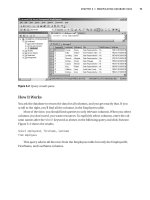
3. Run it with Ctrl+F5. You should see the result shown in Figure 7-1. (Only the last
20 rows are displayed in the figure.)
How It Works
SqlDataReader is an abstr
act class that y
ou can
’
t instantiate explicitly. For this reason,
y
ou obtain an instance of a
SqlDataReader b
y executing the
ExecuteReader method of
SqlCommand:
// create data reader
SqlDataReader rdr = cmd.ExecuteReader();
CHAPTER 7 ■ INTRODUCING DATA READERS144
Figure 7-1. Looping through a result set
777Xch07final.qxd 11/18/06 2:46 PM Page 144
ExecuteReader() doesn’t just create a data reader, it sends the SQL to the connec-
tion for execution. When it returns, you can loop through each row of the result set
and retrieve values column by column. To do this, you call the
Read method of
SqlDataReader, which returns true if a row is available and advances the cursor (the
internal pointer to the next row in the result set) or returns
false if another row isn’t
available. Since
Read() advances the cursor to the next available row, you have to call
it for all the rows in the result set, so you call it as the condition in a
while loop:
// loop through result set
while (rdr.Read())
{
// print one row at a time
Console.WriteLine("{0}", rdr[0]);
}
Once you call the Read method, the next row is returned as a collection and stored
in the
SqlDataReader object itself. To access data from a specific column, you can use
a number of methods (we’ll cover these in the next section), but for this application, you
use the ordinal indexer lookup method, giving the column number to the reader to
retrieve values (just as you’d specify an index for an array). Since in this case you choose
a single column from the
Customers table while querying the database, only the “zero
th
”
indexer is accessible, so you hard-code the index as
rdr[0].
To use the
connection for another purpose or to run another query on the data-
base, it’s important to call the
Close method of SqlDataReader to close the reader
explicitly. Once a reader is attached to an active connection, the connection remains
busy fetching data for the reader and remains unavailable for other use until the reader
has been detached from it. That’s why you close the reader in the
try block rather than
in the
finally block
(even though this simple program doesn’t need to use the connec-
tion for another purpose):
// close data reader
rdr.Close();
Using Ordinal Indexers
You use an ordinal indexer to retrieve column data from the result set. Let’s learn more
about ordinal indexers. The code
rdr[0]
is a reference to the data reader’s Item property, and returns the value in the column
specified for the current row. The value is returned as an object.
CHAPTER 7 ■ INTRODUCING DATA READERS 145
777Xch07final.qxd 11/18/06 2:46 PM Page 145
Try It Out: Using Ordinal Indexers
Let’s build a console application that uses an ordinal indexer:
1. Add a new C# Console Application project named O
rdinalIndexer
to your
Chapter07 solution. Rename Program.cs to OrdinalIndexer.cs.
2. Replace the code in OrdinalIndexer.cs with the code in Listing 7-2.
Listing 7-2. OrdinalIndexer.cs
using System;
using System.Data;
using System.Data.SqlClient;
namespace Chapter07
{
class OrdinalIndexer
{
static void Main(string[] args)
{
// connection string
string connString = @"
server = .\sqlexpress;
integrated security = true;
database = northwind
";
// query
string sql = @"
select
companyname,
contactname
from
customers
where
contactname like 'M%'
";
// create connection
SqlConnection conn = new SqlConnection(connString);
CHAPTER 7 ■ INTRODUCING DATA READERS146
777Xch07final.qxd 11/18/06 2:46 PM Page 146
try
{
// Open connection
conn.Open();
// create command
SqlCommand cmd = new SqlCommand(sql, conn);
// create data reader
SqlDataReader rdr = cmd.ExecuteReader();
// print headings
Console.WriteLine("\t{0} {1}",
"Company Name".PadRight(25),
"Contact Name".PadRight(20));
Console.WriteLine("\t{0} {1}",
"============".PadRight(25),
"============".PadRight(20));
// loop through result set
while (rdr.Read())
{
Console.WriteLine(" {0} | {1}",
rdr[0].ToString().PadLeft(25),
rdr[1].ToString().PadLeft(20));
}
// close reader
rdr.Close();
}
catch(Exception e)
{
Console.WriteLine("Error Occurred: " + e);
}
finally
{
// close connection
conn.Close();
}
}
}
}
CHAPTER 7 ■ INTRODUCING DATA READERS 147
777Xch07final.qxd 11/18/06 2:46 PM Page 147
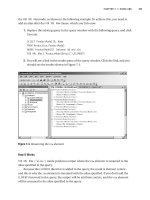
3. Make this the startup project, and run it with Ctrl+F5. You should see the result
shown in Figure 7-2.
How It Works
You query the Customers table for the columns CompanyName and ContactName, where
contact names begin with the letter
M:
// query
string sql = @"
select
companyname,
contactname
from
customers
where
contactname like 'M%'
";
Since your query selects two columns, the returned data also comprises a collection
of r
ows from only these two columns, thus allowing access to only two possible ordinal
indexers
, 0 and 1.
Y
ou read each row in a
while loop
, fetching values of the two columns with their
indexers
. Since the returned value is an object, you need to explicitly convert the value
to a str
ing so that you can use the
PadLeft method to for
mat the output:
CHAPTER 7 ■ INTRODUCING DATA READERS148
Figure 7-2. Displaying multiple columns
777Xch07final.qxd 11/18/06 2:46 PM Page 148
// loop through result set
while (rdr.Read())
{
Console.WriteLine(" {0} | {1}",
rdr[0].ToString().PadLeft(25),
rdr[1].ToString().PadLeft(20));
}
After processing all rows in the result set, you explicitly close the reader to free the
connection:
// close reader
rdr.Close();
Using Column Name Indexers
Most of the time we don’t really keep track of column numbers and instead prefer
retrieving values by their respective column names, simply because it’s much easier to
remember them by their names, which also makes the code more self-documenting.
You use column name indexing by specifying column names instead of ordinal
index numbers. This has its advantages. For example, a table may be changed by the
addition or deletion of one or more columns, upsetting column ordering and raising
exceptions in older code that uses ordinal indexers. Using column name indexers
avoids this issue, but ordinal indexers are faster, since they directly reference columns
rather than look them up by name.
The following code snippet retrieves the same columns (
CompanyName and
ContactName) that the last example did, using column name indexers:
// loop through result set
while (rdr.Read())
{
Console.WriteLine(" {0} | {1}",
rdr["companyname"].ToString().PadLeft(25),
rdr["contactname"].ToString().PadLeft(20));
}
Replace the ordinal indexers in OrdinalIndexer.cs with column name indexers, rerun
the project, and you’ll get the same results as shown in Figure 7-2.
The next section discusses a better approach for most cases.
CHAPTER 7 ■ INTRODUCING DATA READERS 149
777Xch07final.qxd 11/18/06 2:46 PM Page 149
Using Typed Accessor Methods
When a data reader returns a value from a data source, the resulting value is retrieved
and stored locally in a .NET type rather than in the original data source type. This in-
place type-conversion feature is a trade-off between consistency and speed, so to give
some control over the data being retrieved, the data reader exposes typed accessor
methods that you can use if you know the specific type of the value being returned.
Typed accessor methods all begin with
Get, take an ordinal index for data retrieval,
and are type safe; C# won’t allow you to get away with unsafe casts. These methods turn
out to be faster than both the ordinal and the column name indexer methods. Being
faster than column name indexing seems only logical, as the typed accessor methods
take ordinals for referencing; however, we need to explain how it’s faster than ordinal
indexing. This is because even though both techniques take in a column number, the
conventional ordinal indexing method needs to look up the data source data type of the
result and then go through a type conversion. This overhead of looking up the schema is
avoided with typed accessors. .NET types and typed accessor methods are available for
almost all data types supported by SQL Server and OLE DB databases.
Table 7-1 should give you a brief idea of when to use typed accessors and with what
data type. It lists SQL Server data types, their corresponding .NET types, .NET typed
accessors, and special SQL Server–specific typed accessors designed particularly for
returning objects of type
System.Data.SqlTypes.
Table 7-1. SQL Server Typed Accessors
SQL Server Data Type .NET Type
.NET Typed Accessor
bigint Int64 GetInt64
binary Byte[] GetBytes
bit Boolean GetBoolean
char String
or Char[] GetString or GetChars
datetime
DateTime
GetDateTime
decimal Decimal GetDecimal
float Double GetDouble
image
or long varbinary
Byte[] GetBytes
int Int32 GetInt32
money Decimal GetDecimal
nchar String
or Char[] GetString or GetChars
ntext String
or Char[] GetString or GetChars
numeric Decimal GetDecimal
nvarchar String
or Char[] GetString or GetChars
CHAPTER 7 ■ INTRODUCING DATA READERS150
777Xch07final.qxd 11/18/06 2:46 PM Page 150
SQL Server Data Type .NET Type .NET Typed Accessor
real Single GetFloat
smalldatetime DateTime GetDateTime
smallint Int16 GetInt16
smallmoney Decimal GetDecimal
sql_variant Object GetValue
long varchar String
or Char[] GetString or GetChars
timestamp Byte[] GetBytes
tinyint
Byte GetByte
uniqueidentifier Guid GetGuid
varbinary Byte[] GetBytes
varchar String or Char[] GetString or GetChars
Table 7-2 shows some available OLE DB data types, their corresponding .NET types,
and their .NET typed accessors.
Table 7-2. OLE DB Typed Accessors
OLE DB Type .NET T
ype .NET Typed Accessor
DBTYPE_I8 Int64 GetInt64
DBTYPE_BYTES Byte[] GetBytes
DBTYPE_BOOL
Boolean GetBoolean
DBTYPE_BSTR String GetString
DBTYPE_STR String GetString
DBTYPE_CY Decimal GetDecimal
DBTYPE_DATE DateTime GetDateTime
DBTYPE_DBDATE DateTime GetDateTime
DBTYPE_DBTIME DateTime GetDateTime
DBTYPE_DBTIMESTAMP DateTime GetDateTime
DBTYPE_DECIMAL Decimal GetDecimal
DBTYPE_R8
Double
GetDouble
DBTYPE_ERROR ExternalException GetValue
DBTYPE_FILETIME
DateTime
GetDateTime
DBTYPE_GUID
Guid
GetGuid
Continued
CHAPTER 7 ■ INTRODUCING DATA READERS 151
777Xch07final.qxd 11/18/06 2:46 PM Page 151
Table 7-2. Continued
OLE DB Type .NET Type .NET Typed Accessor
DBTYPE_I4 Int32 GetInt32
D
BTYPE_LONGVARCHAR String GetString
DBTYPE_NUMERIC Decimal GetDecimal
DBTYPE_R4 Single GetFloat
DBTYPE_I2 Int16 GetInt16
DBTYPE_I1 Byte GetByte
DBTYPE_UI8 UInt64 GetValue
DBTYPE_UI4 UInt32 GetValue
DBTYPE_UI2 UInt16 GetValue
DBTYPE_VARCHAR String GetString
DBTYPE_VARIANT Object GetValue
DBTYPE_WVARCHAR String GetString
DBTYPE_WSRT String GetString
To see typed accessors in action, let’s build a console application that uses them.
For this example, you’ll use the
Products table from the Northwind database.
Table 7-3 shows the data design of the table. Note that you can look up the data
types given in the table for their corresponding typed accessor methods in Table 7-1,
so you can use them correctly in your application.
Table 7-3. Northwind Products Table Data Types
Column Name Data Type Length Allow Nulls?
ProductID (unique) int 4No
ProductName
nvarchar
40
N
o
SupplierID int 4Yes
CategoryID int 4Yes
QuantityPerUnit
nvarchar
20
Y
es
UnitPrice money 8Yes
UnitsInStock smallint 2Yes
UnitsOnOrder
smallint
2
Y
es
ReorderLevel smallint 2Yes
Discontinued bit 1No
CHAPTER 7 ■ INTRODUCING DATA READERS152
777Xch07final.qxd 11/18/06 2:46 PM Page 152
Try It Out: Using Typed Accessor Methods
Let’s build a console application that uses typed accessors:
1. Add a new C# Console Application project named T
ypedAccessors
to your
Chapter07 solution. Rename Program.cs to TypedAccessors.cs.
2. Replace the code in TypedAccessors.cs with the code in Listing 7-3.
Listing 7-3. TypedAccessors.cs
using System;
using System.Data;
using System.Data.SqlClient;
namespace Chapter07
{
class TypedAccessors
{
static void Main(string[] args)
{
// connection string
string connString = @"
server = .\sqlexpress;
integrated security = true;
database = northwind
";
// query
string sql = @"
select
productname,
unitprice,
unitsinstock,
discontinued
from
products
";
// create connection
SqlConnection conn = new SqlConnection(connString);
CHAPTER 7 ■ INTRODUCING DATA READERS 153
777Xch07final.qxd 11/18/06 2:46 PM Page 153
try
{
// open connection
conn.Open();
// create command
SqlCommand cmd = new SqlCommand(sql, conn);
// create data reader
SqlDataReader rdr = cmd.ExecuteReader();
// fetch data
while (rdr.Read())
{
Console.WriteLine(
"{0}\t {1}\t\t {2}\t {3}",
// nvarchar
rdr.GetString(0).PadRight(30),
// money
rdr.GetDecimal(1),
// smallint
rdr.GetInt16(2),
// bit
rdr.GetBoolean(3));
}
// close data reader
rdr.Close();
}
catch(Exception e)
{
Console.WriteLine("Error Occurred: " + e);
}
finally
{
// close connection
conn.Close();
}
}
}
}
CHAPTER 7 ■ INTRODUCING DATA READERS154
777Xch07final.qxd 11/18/06 2:46 PM Page 154
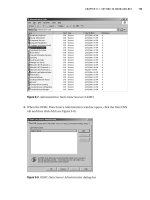
3. Make this the startup project, and run it with Ctrl+F5. You should see the result
shown in Figure 7-3. (Only the first 20 rows are displayed in the figure.)
How It Works
You query the Products table for ProductName, UnitPrice, UnitsInStock, and Discontinued:
// query
string sql = @"
select
productname,
unitprice,
unitsinstock,
discontinued
from
products
";
W
e chose these columns to deal with differ
ent kinds of data types and to show how
to use r
elev
ant typed accessors to obtain the correct results:
// fetch data
while (rdr.Read())
{
Console.WriteLine(
"{0}\t {1}\t\t {2}\t {3}",
// nvarchar
rdr.GetString(0).PadRight(30),
CHAPTER 7 ■ INTRODUCING DATA READERS 155
Figure 7-3. Using typed accessors
777Xch07final.qxd 11/18/06 2:46 PM Page 155