Rails for Java Developers phần 6 doc
Bạn đang xem bản rút gọn của tài liệu. Xem và tải ngay bản đầy đủ của tài liệu tại đây (238.91 KB, 36 trang )
LOGGING, DEBUGGING, AND BENCHMARKING 157
of ActiveRecord and ActionCon troller provide a logger method, with a pre-
configured logger. The logger has named methods for different log levels,
just as in Java. T o log an INFO message, do the following:
Download code/rails_xt/app/controllers/people_controller.rb
def destroy
logger.info
"Entering destroy method"
That is easy enough, but you will not see that kind of logging in a Rails
application often. Rails includes a ton of in formation in its own logging
statements, and this infor mation is often sufficient enough that you
do not need to make any additional calls to the logger. Here is the log
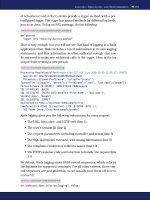
output from creating a new person:
Download code/people/snippets /create_person.log
Processing PeopleController#create (for 127.0.0.1 at 2006-10-30 11:58:17) [POST]
Session ID: 08ecf4526b2d1b38406396d58a538e02
Parameters: {"commit"=>"Create", "action"=>"create",\
"controller"=>"people", "person"=>{"first_name"=>"Jean", "last_name"=>"Dough"}}
Person Columns (0.001395) SHOW FIELDS FROM people
SQL (0.000290) BEGIN
SQL (0.273139) INSERT INTO people (‘first_name‘, ‘last_name‘)\
VALUES('Jean', 'Dough')
SQL (0.186078) COMMIT
Redirected to http://localhost:3000/people/list
Completed in 0.47041 (2 reqs/sec) | DB: 0.46090 (97%) | \
302 Found [http://localhost/people/create]
Rails logging g i ves you the following information for every request:
• The URL, host, time, and HTTP verb (line 1)
• The user’s session ID (line 2)
• The request parameters, including controller and action (line 3)
• The SQL statements executed, with timi ng information (line 5)
• The templates rendered or redirects issued ( l i ne 10)
• The HTTP response code and total time to handle the request (line
11)
By default, Rails logging emits ANSI control sequences, which colorize
the log lines for supported terminals. For all other viewers, these con-
trol sequences are just gibberish, so we usually t urn them off in envi-
ronment.rb:
Download code/people/config/e nvironment.rb
ActiveRecord::Base.colorize_logging = false
LOGGING, DEBUGGING, AND BENCHMARKING 158
Rails log level names are almost the same as the log4j defaults: DEBUG,
INFO, WARN, ERROR, and FATAL. (There is no TRACE.) These levels come
from t he Logger class in the Ruby standard library, which Rails uses
by default. The development and test environments set the log level
to DEBUG, and the production environment uses INFO. You can override
these settings in the environment-specific .rb file. For example, this line
sets the production log level to WARN:
Download code/people/config/e nvironments/production.rb
config.log_level = :warn
By default, Rails logging is “clean”—it shows the message only, without
any of the other context to which you may be accustomed. However, the
Logger class provides a format_message th at you can override to include
additional information. Rails redefines format_message on Logger itself.
We will overcome this by subclassing Logger and providing our own
format_message:
Download code/rails_xt/config/environment.rb
class BetterLogger < Logger
Format =
"[%s#%d] %5s %s: %s\n"
def format_message(severity, timestamp, msg, progname)
Format % [timestamp, $$, severity, progname, msg]
end
end
This is basic sprintf-style formatting. The only puzzler is the variable $$.
That’s Ruby for the current process ID. To make BetterLogger the default Thanks a lot, Perl.
logger for the application, we must add a line to environment.rb. While
we are there, we will set the progname that will appear in log output:
Download code/rails_xt/config/environment.rb
config.logger = BetterLogger.new
"#{RAILS_ROOT}/log/#{RAILS_ENV}.log"
config.logger.progname =
'rails_xt'
Rails logging h as a couple of nice features that take advantage of Ruby
blocks. Instead of passing a string to a log method, you can pass a
block. The result of running the block will be the message to be logged.
Instead of using the following:
# bad Ruby style!
if logger.info?
logger.info expensive_message
end
you can simply say this:
logger.info {expensive_message}
LOGGING, DEBUGGING, AND BENCHMARKING 159
The block semantics guarantee that expensi ve_message will evaluate
only if the INFO level is enabled. For example, this logger call avoids
the call to inspect unless DEBUG logging is enabled:
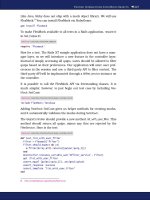
Download code/rails_xt/app/controllers/people_controller.rb
def edit
@person = Person.find(params[:id])
logger.debug {
"Found person #{@person.inspect}"
}
end
In several places, Rails uses a sil ence idiom to adjust the log level for
the duration of the block. W hen silence is called, the log level is boosted
(usually to ERROR), squelching log messages. Rails uses this to hide
irrelevant details from the log. For example, the ActiveRecord imple-
mentation of session stores silences logging so that your logging will
show ActiveRecord messages for your domain objects but not for ses-
sion objects:
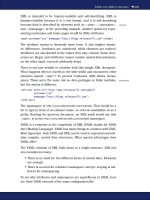
Download code/rails/actionpack/lib/action_ controller/session/active_record_store.rb
def update
if @session
ActiveRecord::Base.silence { @session.save }
end
end
The place w here Rails’ default logging falls far short of log4j is in sup-
porting a variety of appenders (log message destinations). Fortunately,
there is a log4r project
1
that is inspired by log4j. If you need more capa-
ble logging than what we have shown her e, you can trivially switch to
log4r. Because of Ruby’s duck typing, you do not need an adapter layer
such as Java’s Commons Logging.
Benchmarking
Rails in cludes three tools to help benchmark application per formance:
script/performance/benchmarker, script/performance/profiler, and th e con-
troller method benchmark. T o put them through their paces, consider
the following question: Can the Rails XT application be made to handle
5,000 logins per second?
The benchmarker command measures the elapsed time for some Ruby
code, running in the environment of your application. We are not aware
of any major performance problems in the sample applications, but we
1. />LOGGING, DEBUGGING, AND BENCHMARKING 160
know th at security functions are often slow. Let’s try authenticating a
user
2
in the Rails XT application:
$ script/performance/benchmarker 'User.authenticate("quentin","test")'
user system total real
#1 0.010000 0.000000 0.010000 ( 0.000836)
The numbers (reported in seconds) are pretty small, so let’s try running
the benchmark fifty times in a row:
$ script/performance/benchmarker 50 'User.authenticate("quentin","test")'
user system total real
#1 0.020000 0.010000 0.030000 ( 0.090123)
It appears that our system will have no trouble authenticating quite a
few more t han fift y users in a second. For many applications this is
good enough.
But our proposed goal is much h i gher: We want to authenticate 5,000
users in a second. Plus, the benchmarker measured only the API call,
not the progression through the web stack before and af ter t he key
method call. Should we add more web servers, try to optimize the
authenticate method, use some native code, or give up on a Ruby-based
approach?
To answer th ese questions, we need to know where User.authenticate is
spending i ts time. Enter the profiler. The profiler instruments the code
to tell us which methods authenticate calls and the relative time spent
in each:
$ script/performance/profiler 'User.authenticate("quentin","test")' 50
Loading Rails
Using the standard Ruby profiler.
% cumulative self self total
time seconds seconds calls ms/call ms/call name
5.78 0.10 0.10 51 1.96 29.41 ActiveRecord::Base#method_missing
5.20 0.19 0.09 1229 0.07 0.10 Hash#[]
5.20 0.28 0.09 354 0.25 0.25 Kernel.==
4.62 0.36 0.08 50 1.60 12.00 ActiveRecord::Base#find_every
4.62 0.44 0.08 21 3.81 4.29 Gem::GemPathSearcher#matching_file
4.62 0.52 0.08 50 1.60 4.00 Enumerable.each_with_index
4.62 0.60 0.08 50 1.60 14.00 ActiveSupport::Deprecation.silence
4.62 0.68 0.08 77 1.04 2.21 Class
#new
4.05 0.75 0.07 50 1.40 5.40 ActiveRecord::Base#construct_condi
4.05 0.82 0.07 200 0.35 0.35 ActiveRecord::Base#current_scoped_
about 100 more lines of decreasing importance
2. The security API we us e here is discussed in detail in Chapter 10, Security, on
page 282. The quentin/test combination comes from our fixture data .
LOGGING, DEBUGGING, AND BENCHMARKING 161
Note the following points here:
• Everything took much longer under the profiler than the bench-
marker. This is not a problem; it merely indicates the overhead
of profiling. (As a rule of thumb, the benchmarker gives useful
absolute numbers, and the profiler gives useful relative numbers.)
• There is no “smoking gun” method that dominates the elapsed
time. If we start optimizing Ruby code, or even switching to native
code for some methods, we expect percentage improvements, not
order-of-magnitude improvements.
• That we see Class.new and Gem::GemPathSearcher#matching_file
makes us suspicious that we are seeing start-up costs that are
not representative of the application’s long-run behavior.
Given the last point, let’s r un the profiler again, but for 500 iterations
instead of just 50:
$ script/performance/profiler 'User.authenticate("quentin","test")' 500
Loading Rails
Using the standard Ruby profiler.
% cumulative self self total
time seconds seconds calls ms/call ms/call name
5.46 0.73 0.73 11129 0.07 0.08 Hash
#[]
4.57 1.34 0.61 501 1.22 24.35 ActiveRecord::Base#method_missing
3.97 1.87 0.53 501 1.06 2.14 Benchmark.measure
3.29 2.31 0.44 2501 0.18 0.32 ActiveRecord::Base#connection
2.47 2.64 0.33 500 0.66 6.82 ActiveRecord::Base#construct_finde
2.32 2.95 0.31 2000 0.15 0.19 ActiveRecord::Base#current_scoped_
2.02 3.22 0.27 500 0.54 1.84 User#authenticated?
2.02 3.49 0.27 500 0.54 3.08 ActiveRecord::Base#add_conditions!
1.95 3.75 0.26 1000 0.26 0.48 User#encrypt
1.95 4.01 0.26 500 0.52 1.86 ActiveRecord::Base#construct_condi
That looks more realistic. All the dominant methods are directly related
to the operation w e are trying to evaluate. Some further observations
are as follows:
• Encryption is not an issue. Even if User#encrypt could calculate an
SHA1 hash instantly, we would see only a 2 percent increase in
speed overall.
• We might benefit by replacing ActiveRecord with a custom SQL
implementation.
• The calls column suggests that each call to User.authenticate tr i g-
gers five calls to get the connection. It might be worth looking at
the code path to see whether that number could be reduced.
LOGGING, DEBUGGING, AND BENCHMARKING 162
We should step back for second. Alth ough the pr ofiler results suggest
some possible optimizations, we would not bother trying any of them.
The optimizations are likely to make the code more complex, error-
prone, and difficult to maintain. Plus, nothing in the profiler results
convinces us that the code would not scale to a second web server. In
many scenarios, that second server will be far cheaper than t he devel-
opment effort to make the code perform on one server.
The key question here is whether the authentication scales. Can we
increase throughput and lower response time by simply adding hard-
ware? We can get a partial answer to this question from ActionController’s
benchmark method.
benchmark takes three arguments and a block. The block is executed,
and timing information is wri tten to the log, as controlled by t he three
arguments: a message t o include i n the log, a log level, and a silence
argument, which disables any logging inside the block being bench-
marked. You could call benchmark yourself:
Download code/rails_xt/app/controllers/examples_controller.rb
def benchmark_demo
self.class.benchmark
"log message here"
do
# add some expensive operation you want to test
render :text=>
'<h1>Hello world</h1>'
end
end
In practice this is rarely necessary. Rails already benchmarks all sorts
of in teresting activities. Most importantly, Rails benchmarks both the
total time to process a request, and the time spent in the database.
If we believe that the application can scale perfectly linearly (an unlikely
ideal), then we have this:
M = 5000 / R
In this equation, R is the number of requests per second on a single
machine, and M is the number of web tier machines we wil l need.
Let’s switch to production mode and run a production-quality server
(Mongrel). We will load the production database with our sample data.
3
RAILS_ENV=production rake db:migrate
RAILS_ENV=production rake db:fixtures:load
RAILS_ENV=production mongrel_rails
3. Be careful about doing this on real projects, where the production database data is
important!
LOGGING, DEBUGGING, AND BENCHMARKING 163
Now, we can log in through the web interface and then review the per-
formance numbers in the Rails log. Here is what we saw on a develop-
ment laptop (2.16GHz MacBook Pro, 2GB RAM, random developer stuff
running in the background):
Processing AccountController#login (for 127.0.0.1 at 2006-10-31 13:05:04) [POST]
Session ID: 80dcc7858d5fcef6385f50a0e90e9f94
Parameters: {"commit"=>"Log in", "action"=>"login",\
"controller"=>"account", "login"=>"quentin", "password"=>"[FILTERED]"}
Redirected to http://localhost:3000/quips
Completed in 0.00262 (381 reqs/sec) | DB: 0.00038 (14%)\
| 302 Found [http://localhost/login]
Two numbers jump out. First, the 381 requests per second. If that is t he
best we can do, then we will need 5000/381, or about 14 web servers
to allow 5,000 logins per second. Second, the database (DB) pr oportion
of that time was low, only 14 percent. Notice that 14 percent tells us
nothing about how loaded the MySQL process was, only how long we
had to wait for it. This suggests that we could have at least five to
six web servers hitting the database simultaneously with no loss of
throughput, and quite possibly more.
We have not seen Rails deployments with as many as fourteen web
servers i n front, so we would not cavalierly assume that th ere are no
problems lurking there. But we have seen Rails deployments with four
or even eight web servers. Given the numbers we have shown her e,
would you be willing to bet that you could handle 5,000 logins per
second with eight web servers? This simple exercise has us within a
close order of magnitude, and we have not done any optimizations yet.
We are confident it would be possible.
How does this all compare with the Java options for profiling? If pro-
filing is your chief concern, Java beats Ruby hands down. Java has
more profiling tools and better profiling tools. Both commercial and
open source options exist. Because the Java platform includes a vir-
tual machine specification with documented profiling hooks, it beats
Ruby profiling not only in practice but in concept.
That said, we have not missed Java’s cool profilers while writi ng Ruby
and Rails applications. We rarely used them in Java and rarely use
their lesser cousins in Ruby. In our experience, most well-tested, well-
factored applications are already fast enough. W hen they ar e not fast
enough, the solutions usually require only two tools: observation of the
application and log files and a little bit of pencil-and-paper reckoning.
In an aggregate thirty-plus years of software development, we have done
LOGGING, DEBUGGING, AND BENCHMARKING 164
performance tuning of some form on almost every application we have
ever developed. In 95 percent of them, we never wanted or n eeded a
profiler.
Debugging
As Java developers, we are accustomed to powerful GUI debuggers f or
our applications. In Ruby, support for debugging is primitive. We have
tried a few open source and commercial debuggers. They are all so slow
that we never bother to launch them.
We rarely miss the debugger, because our development method uses
a variety of diff erent tests to catch program errors. But “rarely” is not
the same thing as “never,” and a good GUI debugger for Ruby would be
appreciated.
Until the mythical GUI debugger arrives, you can use a console-based
alternative. Rails includes a console-based debugger based on the ruby-
breakpoint
4
library. To use thi s debugger, simply add a breakpoint state-
ment anywhere in your code. To see breakpoint in action, consider this
buggy code:
Download code/rails_xt/sample s/debug_me.rb
class Widget
attr_accessor :name
def initialize(value)
name = value
end
end
w = Widget.new(
'zipper'
)
puts w.name
You might expect this code to print “zipper”; however, it prints “nil”—to
find out why, let’s add a breakpoint at the end of initialize:
Download code/rails_xt/sample s/debug_me.rb
def initialize(value)
name = value
breakpoint
end
When the program reaches the breakpoint, it will start an irb session.
You can use this session to inspect or modify progr am values. We will
show the current instance_variables so you can see what happened to
our name:
4. />LOGGING, DEBUGGING, AND BENCHMARKING 165
$ ruby samples/debug_me.rb
Executing break point at samples/debug_me.rb:19 in ‘initialize'
irb(#<Widget:0x2a8c2d8>):001:0> instance_variables
=> ["@__bp_file", "@__bp_line"]
The variables prefixed with @__bp are used in ternally by the breakpoint
library and do not concern us. More important, there is no @name vari-
able. The next part to look at is local_variables:
irb(#<Widget:0x2a8c2d8>):002:0> local_variables
=> ["value", "name", "_"]
irb(#<Widget:0x2a8c2d8>):003:0> value
=> "zipper"
Gotcha! Ruby is treating name as a local variable. Ruby is interpreting
our name= to mean “Set the name local variable,” when we were mistak-
enly expecting “Call the name= method.” Now that we understand the
problem, we can continue past the breakpoint by typing exit ( all plat-
forms), Ctrl-D ( Unix), or Ctrl-Z (Windows). Then, we will correct th e code
to use self.name= to avoid ambiguity:
Download code/rails_xt/sample s/debug_me.rb
def initialize(value)
self.name = value
end
It is worth pointing out that instance_variables and local_variab l es are
not special debugging commands. These are regular Ruby methods,
available at any time in any Ruby program.
Java GUI debuggers will l et you debug a local program, but they w i l l
also let you connect to a server process. This can be helpful in tracking
down problems that manifest only at the level of th e ent i re system. The
breakpoint library can do the same. If you set a breakp o i nt in a Rails
server process, the breakpoint library will call out to a remote debug-
ger. You can launch the remote debugger with the script/breakpointer
command included in every Rails application. Don’t forget to remove
breakpoints from production code!
Additional instr uctions for debugging with breakpoint are available on
the Rails Wiki.
5
Intrepid Rubyists are also debugging Ruby applica-
tions using gdb; see _why’s blog post
6
for a summary of a few different
approaches.
5. /HowtoDebugWithBreakpoint
6. msRaceNowAtAStandoff.html
RESOURCES 166
5.8 Resources
A Look at Common Performance Problems in Rails. . .
. . .
/>Stefan Kaes on finding and fixing Rails performance problems.
Regaining Control of Rails Logging. . .
. . . />Advice on how to log more structured information and how to filter and search
your Rails logs.
Roll your own SQL session store. . .
. . .
/>Stefan Kaes’s custom SQL session store, which offers better performance than
ActiveRecord-based sessions.
Sessions N Such . .
/>Chris Wanstrath explains turning off sessions in Rails.
Under the hood: Rails’ routing DSL. . .
. . . />First in a series of articles describing Rails routing from the implementation
up. Routing is already extremely flexible; armed with this information, you can
extend it any way you like.
Using memcached for Ruby on Rails Session Storage. . .
. . .
/>Stefan Kaes’s test results using memcached. Stefan regularly updates his blog
with new test results, so in addition to this article, make s ure you read his
most recent entries.
Chapter
6
Rendering Output with
ActionView
ActionView is the view in Rails’ approach to MVC. ActionView takes the
objects created by the controller and r enders output, usually as HTML
or XML. ActionView is bundled with ActionController in a Ruby gem
called ActionPack, which is included i n Rails. Together with ActiveRe-
cord, ActionView and ActionController form the core of Rails.
Although it is possible to render content directly from the c ont roller,
almost 100 percent of Rails applications use ActionView. ActionView
supports many different approaches to rendering through a pluggable
template mechanism. ActionView ships with three styles of templates.
Embedded Ruby (ERb) templates are stored in .rhtml files and use a
mix of markup and embedded Ruby to build dynamic content. Builder
templates are stored as .rxml files and use pure Ruby to build XML
output. JavaScript templates are stored as .rjs files and use a Ruby API
to build JavaScript output.
It is easy to add new template types, either your own or from third
parties. To demonstrate this we will also look at Markaby, a third-party
gem that uses pure Ruby to render HTML.
Java w eb applications employ a slew of techniques to write dynamic
view code: inline Java, tag libraries, the JSTL expression language,
and the Object Graph Notation Lang uage. In ActionView, most of these
roles are filled by plain old Ruby code in the form of helpers. L i ke tag
libraries, Rails helpers reduce the amount of code in the view. However,
Rails helpers do not try to hide their Rubyness.
CREATING BASIC .RHTML FILES 168
Rails is rightly famous for its Ajax support. We can only begin to cover
the Ajax API in the short space we have here, and we use a sampling
of the various APIs to demonstrate the key concepts. We also cover
acceptance testing with Selenium. Selenium is not part of Rails, or
even R ails-specific, but it has an important role in ensuring quality.
Selenium allows you to write, record, step through, and play back tests
in the browser, exercising your entire application.
6.1 Creating Ba sic .rhtml Files
In Java web applications, JavaServer Pages (JSPs) are the nor m for
basic page rendering. JSPs include static content, plus chunks of code
dynamic. To execute code in a JSP, place i t inside <% %>. To execute
Java code and write the result into the page, use <%= %> instead. Here
is a “Hello, World” page that includes your name (if it was available in
the query st ring):
Download code/java_xt/snippets/hello.jsp
<h1>Hello</h1>
<% if request.getParameter(
'name'
) %>
Welcome, <%= request.getParameter(
'name'
) %>
<% end %>
In ActionView, the JSP role is filled by .rhtml files. Rails evaluates .rhtml
files using Embedded Ruby (ERb), a templating library that is part of
the Ruby standard library. If you know the JSP syntax, ERb should
look familiar:
Download code/people/app/views/people/hello.rhtml
<h1>Hello</h1>
<% unless request.params['name'].blank? %>
Welcome, <%= request.params['name'] %>
<% end %>
In both JSP and ActionView, view code can access the same web object
model seen by the controller: the request (as shown in the previous
examples), the response, the session, and so on. Therefore, it is possible
to build enti re applications inside the view template. Don’t do this. In
both JSP and Rails, doing significant coding in the view is a Bad Thing.
The combination of HTML markup and template code is difficult to read,
test, and maintain. The only code in the view layer should be code
dedicated to the formatting of output.
MINIMIZING VIEW CODE WITH VIEW HELPERS 169
Both JSPs and ActionView have mechanisms to reduce the “codiness” of
view templates. In JSP, there are declarations and tag libraries. Action-
View provides helpers, layouts, and partials.
6.2 Minimizing View Code with View Helpers
Rather than doing direct Java coding in a JSP, many Java programmers
prefer to use tag libraries. Tag libraries are custom markup backed by tag libraries
Java code. Tag libraries require a bit more work to create: you h ave t o
implement the code in Java, create a tag library descriptor, and then
configure the page (or the web application) to make the tag library avail-
able. The advantage is clean syntax in the view. Rather than mixed
markup and Java code, you can have pure markup.
One of the most common tag libraries is the JSTL core library, which
includes tags for control flow and output. Using these tags, the JSP
“Hello, World” example becomes as follows:
Download code/app f use_people/web/pages/hello.jsp
<%@ taglib uri=
" />prefix=
"c"
%>
<h1>Hello</h1>
<c:if test=
"not empty request.name"
>
Welcome, <c:out value=
"request.name"
/>
</c:if>
All the Java code has been replaced by tags. The c:if tag replaces an if
statement, and the c:out tag replaces the JSP output expression. This
has two goals. First, the tags are intended to be more readable t han
the Java code, particularly to page designers who may be editing the
view code. Second, the tags allow a level of validation th at does not
require parsing Java code (or understanding Java stack traces). The
downside is two new syntaxes to learn: the custom tag vocabulary and
the expression language that is used, for example, to create the boolean expression language
expressions in c:if’s test attribute.
The JSP world includes a huge number of tag libraries that you can add
to your project: formatting tags, tags that help create HTML markup,
tags that access user credentials from the session, and more. Action-
View does not have a direct equivalent to tag librar i es. Instead, Action-
View provides built-in view helpers. ActionView includes dozens of h el- view helpers
per methods, which are automatically available to all .rhtml pages. In
addition, Rails adds formatting helpers to the Ruby classes for strings,
numbers, and dates.
WRITING CUSTOM HELPERS 170
6.3 Writing Custom H elpers
The built-in ActionView helpers are extremely useful but cannot cover
every possible situation. So, Rails provides a standard place for your
own helpers. The app/helpers directory contains a helper file for each
controller in y our application. When you use script/generate to create
a controller FooController, Rails also creates a helper file, app/helpers/
foo_helper.rb. This code is automatically included in all of FooController’s
views.
Because Rails includes so many built-in helpers, simple web applica-
tions may not need many (or any) custom helpers. You’ll know when
and if you need them. When you see the same code repeated in multi-
ple places in your view, it is ti me to write a helper.
As a simple example, imagine that the users of the Rails XT applica-
tion want a politeness filter for quips. Their specific requirement states
that when the politeness filter is on, four-letter words should render as
!@#$. We’ll add this capability as a helper in QuipsHelper:
Download code/rails_xt/app/helpers/quips_helper.rb
module QuipsHelper
# See />def bowdlerize_four_lettered(str)
h(str.to_s.gsub(/\b\w{4}\b/,
'!@#$'
))
end
alias_method :bfl, :bowdlerize_four_lettered
end
The implementati on is probably a bit more literal than i ntended, but we
like to code to spec. We are automatically doing HTML escaping (the h
method) because we are lazy and don’t want to have to call both h and
bfl all over our views. We have given the method a meaningful name and
a short alias. This stri kes a good balance between our desire to have
self-documenting names and the fact that this particular method may
be used quite a lot. With the helper in place, a show view for quips can
be as simple as th i s:
Download code/rails_xt/app/views/quips/filtered_show.rhtml
<% for column in Quip.content_columns %>
<p>
<b><%= column.human_name %>:</b> <%=bfl @quip.send(column.name) %>
</p>
<% end %>
<%= link_to 'Edit', :action => 'edit', :id => @quip %> |
<%= link_to 'Back', :action => 'list' %>
WRITING CUSTOM HELPERS 171
Joe Asks. . .
How Do You Test Custom Helpers?
Rails automatically creates test/unit for model code and cre-
ates test/functional for controller code. There is no corresponding
test/helper for helper code. Don’t let that bother you; just make
your own. Here is a Rake task that you can add to lib/tasks to
manage your helper tests:
Download code/rails _xt/lib/tasks/test_helpers . r ake
namespace :test do
desc
"Run the helper tests in test/helpers"
Rake::TestTask.new(:helpers => [ :prepare_test_database ]) do |t|
t.libs <<
"test"
t.pattern =
'test/helpers/
**
/
*
_test.rb'
t.verbose = true
end
end
task :default => [
'test:helpers'
]
And here is an example test for the bfl method from the main
text. Notice that we stub out any required Rails helpers (such as
h) to decouple the test from Rails.
Download code/rails _xt/test/helpers/quips_helper_test.rb
require File.dirname(__FILE__) +
'/ /test_helper'
require
'quips_helper'
class QuipsHelperTest < Test::Unit::TestCase
include QuipsHelper
# handmade stub method
def h(s); s; end
def test_bfl
assert_equal
'safely sized words'
, bfl(
'safely sized words'
)
assert_equal
'!@#$ and !@#$'
, bfl(
'darn and drat'
)
end
end
REUSE WITH LAYOUTS AND PAR TIALS 172
6.4 Reuse with Layouts and Par tials
View templates often need to share code. In JSP, you can move com-
mon code into a separate .jsp file and then use an include directive. The include directive
include directive is often used to compose the key elements of the page,
such as headers, footers, menus, status messages, and content. For
example, here is a JSP page from the Struts sample application, edited
to show only the basic page structure:
<div id=
"page"
>
<div id=
"header"
class=
"clearfix"
>
<jsp:include page=
"/common/header.jsp"
/>
</div>
<div id=
"content"
class=
"clearfix"
>
<div id=
"main"
>
<jsp:include page=
"/common/messages.jsp"
%>
<! main content here! >
</div>
<div id=
"nav"
>
<div class=
"wrapper"
>
<jsp:include page=
"/WEB-INF/pages/menu.jsp"
/>
</div>
</div>
</div>
<div
id=
"footer"
class=
"clearfix"
>
<jsp:include page=
"/common/footer.jsp"
/>
</div>
</div>
The jsp:include tag pulls in the header, messages, navigation, and footer.
You can then reuse these JSP fragments across multiple pages. Action-
View does something similar. Two things, in fact: layouts and partials. l ayouts
partials
A layout is a template that is automatically rendered around th e main
content of a page. A parti al is a template that is explicitly invoked from
another template. Pages automatically use a layout, if one is available.
By default, the layout for a controller named Foo is a template named
app/views/layouts/foo.html. If a controller-specific layout is unavailable,
ActionView will automatically use ap p /views/layouts/application.html, if it
exists. The PeopleController in the Rails XT application demonstrates
layouts and partials in action:
Download code/rails_xt/app/views/layouts/people.rhtml
<html>
<head>
<title>
People: <%= controller.action_name %></title>
<%= stylesheet_link_tag 'scaffold' %>
</head>
REUSE WITH LAYOUTS AND PAR TIALS 173
<body>
<%= render :partial=>'header' %>
<p style=
"color: green"
><%= flash[:notice] %></p>
<%= @content_for_layout %>
<%= render :partial=>'/shared/footer' %>
</body>
</html>
As you can see here, the layout is usually responsible for rendering the
head section of the document. Inside the body, the @content_for_layout
variable contains the main content for an action.
1
For example, when
rendering /people/list, @content_for_layout would usually contain the ren-
dered output from app/views/people/list.rhtml.
The calls to render :partial let us reuse common templates for the header
and footer of the page. To distinguish parti als from complete pages, th ey
are named with a leading underscore. Thus, the header partial points
to a p p /views/people/_header.rhtml. Partials such as headers and footers
are often shared across all controllers. The app/views/shared directory
holds such shared partials, which can be accessed with names such as
’/shared/footer’. Note th at the underscore is omitted in the call to render
but present on the file system.
Every partial has a local variable named after the partial. You can pass
this local variable to a partial wi th the :object option. You can also set
local variables with the :l o cals option:
Download code/rails_xt/app/views/examples/call_partials.rhtml
<%= render :partial=> 'listmaker',
:object=> 'My Todo List',
:locals => {:items => ['climb Everest', 'swim Channel']} %>
Inside the partial, listmaker will be ’My Todo List’, and items will be [’climb
Everest’, ’swim Channel’]. The partial might look like this:
Download code/rails_xt/app/views/examples/_listmaker.rhtml
<h1><%= listmaker %></h1>
<ol>
<% items.each do |item| %>
<li><%= item %></li>
<% end %>
</ol>
The do end loop in the partial is one way to render a collection. It is
ugly, and most web applications render many collections. ActionView
1. More recent versions of Rails use yield instead of @content_for_layout.
BUILDING HTML FORMS 174
provides a better way. When calling a partial, specify the :collection
option. The partial will execute once for each item in the collecti on,
setting the template variable to each item in turn. Using collection par-
tials, you could improve the previous two examples as follows:
Download code/rails_xt/app/views/examples/call_collection_partials.rhtml
<h1>My Todo List</h1>
<ol>
<%= render :partial=> 'listmaker2',
:collection => ['climb Everest', 'swim Channel'] %>
</ol>
The partial is now simply as follows:
Download code/rails_xt/app/views/examples/_listmaker2.rhtml
<li><%= listmaker2 %></li>
6.5 Building HTML Forms
Struts includes a page construction tag library to build HTML forms. In
our sample application, page construction tags are prefixed with h tml.
Here is the Struts code to render the input elements for a person’s first
and last names:
Download code/app f use_people/web/pages/personForm.jsp
<li>
<label for=
"firstName"
class=
"desc"
>First Name </label>
<html:errors property=
"firstName"
/>
<html:text property=
"firstName"
styleId=
"firstName"
styleClass=
"text medium"
/>
</li>
<li>
<label for=
"lastName"
class=
"desc"
>Last Name </label>
<html:errors property=
"lastName"
/>
<html:text property=
"lastName"
styleId=
"lastName"
styleClass=
"text medium"
/>
</li>
You should notice several points here. First, there is a seamless back-
and-forth between custom tags and plain HTML. The label tags are
HTML, but the html-prefixed tags invoke custom code. The html:errors
tag looks up error messages on a named form property. The html:text tag
generates an HTML input type="text". The styleId and styleClass attributes
become id and class attributes on the generated input elements.
The Rails scaffold code for editing the properties of a person lives at
app/views/people /_form.rhtml:
BUILDING HTML FORMS 175
Download code/people/app/views/people/_form.rhtml
<p><label for=
"person_first_name"
>First name</label><br/>
<%= text_field 'person', 'first_name' %><%= error_message_on 'person',
'first_name' %>
</p>
<p><label
for=
"person_last_name"
>Last name</label><br/>
<%= text_field 'person', 'last_name' %><%= error_message_on 'person',
'last_name' %>
</p>
Where the Struts ver sion used page construction tags, the Rails version
uses built-in form helpers. The error_message_on method emits valida-
tion errors. The text_field method takes two arguments here. Rails com-
bines the two arguments t o create a parameter name, so text_field ’per-
son’, ’first_name’ becomes a parameter named person[first_name]. When
the parameters are submitted to the server, Rails automatically con-
verts parameters named in this fashion into a hash. This is convenient,
since ActiveRecord constructors take a hash argument.
The Struts form validation has two featur es absent in Rails:
• Validations can be checked with client-side JavaScript.
• Error messages are internationalized.
If you need these features in your Rails application, you will have to find
a plugin or roll your own. We have found t hat Rails has advantages i n
other areas that outweigh these deficiencies, but it is important to be
aware of them when estimating development effort for a project. R ails
includes form helper methods for every kind of HTML form input. Here
are some examples of form helpers:
Download code/rails_xt/app/views/examples/forms.rhtml
<h2>Form Fields Bound To Query Params</h2>
<%= start_form_tag %>
<table>
<tr>
<td><label
for=
"sample_text"
>Text</label></td>
<td><%= text_field :sample, :text %></td>
</tr>
<tr>
<td><label for=
"sample_password"
>Passsword</label></td>
<td>
<%= password_field :sample, :password, {:style=>'color:blue;'} %></td>
</tr>
<tr>
<td><label
for=
"sample_area"
>Text Area</label></td>
<td><%= text_area :sample, :area, {:size=>'10x10'} %></td>
</tr>
</table>
<%= end_form_tag %>
BUILDING HTML FORMS 176
On line 6, you see the two-argument version of a form tag helper. The
first argument is an instance variable name, and the second argument
is the name of an accessor on that instance. Rails will populate the
initial value from the instance variable and will convert the query string
arguments into a hash named for the instance variable. On line 10, you
see the three-argument version. The third argument is a hash that is
converted into attributes on the tag. Here we set a CSS style.
On li ne 14, you see another three argument helper. This time, how-
ever, the third argument is n ot an HTML attribute. The argument is
size=>’10x10’, but a proper textarea expects rows and cols. Here Rails has
provided a shortcut. You can specify separate rows and cols if you want,
but Rails has special-cased the options handling for text_area_tag to
convert size arguments into rows and cols. As you are writing view code,
look out for helpers such as these that can simplify common tasks.
Rails form helpers are validation aware. If a model object has validation
errors, the Rails form helpers will put form tags for invalid data inside a
<div class="fieldWithErrors">. You can then use CSS styles to call attention
to errors. (The Rails scaffold adds a red border). Several other form
helpers are worth mentioning, and we’ll get to t hem shortly. First, we
have to do something about all the ugly HTML code we just showed
you. Each one of those form fields looks the same: Each is wrapped in
tr and td, and each is preceded by a label. The HTML around each field
is extremely repetitive. Surely there must be a better way!
Rails provides the form_for helper to reduce the repetitiveness of form
code. The previous form looks like this if you use form_for:
Download code/rails_xt/app/views/examples/form_for.rhtml
<h2>Form Fields Bound To Query Params</h2>
<% form_for :sample do |f| %>
<table>
<tr><td><label
for=
"sample_text"
>Text</label></td>
<td><%= f.text_field :text %></td></tr>
<tr><td><label for=
"sample_password"
>Password</label></td>
<td><%= f.password_field :password, {:style=>'color:blue;'} %></td></tr>
<tr><td><label
for=
"sample_area"
>Text Area</label></td>
<td><%= f.text_area :area, {:size=>'10x10'} %></td></tr>
</table>
<% end %>
Notice that form_for uses an ERb evaluation block (<% %>) instead of an
ERb output block (<%= %>). form_for takes a block parameter, which is
the form object. In the block, you can use the block parameter and omit
the first argument to each field helper; for example, you’d use f.text_field
instead of text_field :sample.
BUILDING HTML FORMS 177
That is not much of an improvement so far. The real power of form_for
comes in conjunction with form builders. A form builder g ets to override
how each form element is built. Here is a custom form builder that
automatically generates all the tr, td, and la b el goo around our HTML
fields:
Download code/rails_xt/app/helpers/tabular_form_builder.rb
class TabularFormBuilder < ActionView::Helpers::FormBuilder
(field_helpers - %w(hidden_field)).each do |selector|
src = <<-END_SRC
def #{selector}(field,
*
args, &proc)
"<tr>"
+
"<td><label for='\#{field}'>\#{field.to_s.humanize}:</label></td>"
+
"<td>"
+ super +
"</td>"
+
"</tr>"
end
END_SRC
class_eval src, __FILE__, __LINE__
end
def
submit_tag(value)
"<tr>"
+
"<td> </td>"
+
"<td><input name='commit' type='submit' value='#{value}'/></td>"
+
"</tr>"
end
end
This code looks a bit t ricky, but wh at it does is not that complex. The
call to field_he l p ers returns all the field helper names. Then, the src string
creates a new definition for each method that includes th e formatting
we want. Finally, submit_tag is special-cased because we do not want a
label for submit tags.
To use our custom form builder, we need to pass a named option to
the third parameter for form_for. We will capture t his in a new helper
method named tabular_form_for:
Download code/rails_xt/app/helpers/applicati on_helper.rb
require
'tabular_form_builder'
module ApplicationHelper
def tabular_form_for(name, object, options, &proc)
concat(
"<table>"
, proc.binding)
form_for(name, object, options.merge(:builder => TabularFormBuilder), &proc)
concat(
"</table>"
, proc.binding)
end
end
The calls to concat are the ERb version of puts, and the call to form_for
sets the :builder to be our TabularFormBuilder.
BUILDING HTML WITH MARKABY 178
Using the TabularFormBuilder, our form code simplifies to the following:
Download code/rails_xt/app/views/examples/tabular_form_for.rhtml
<h2>Tabular Form For</h2>
<% form_for :sample, @sample do |f| %>
<%= f.text_field :text %>
<%= f.password_field :password, {:style=>'color:blue;'} %>
<%= f.text_area :area, {:size=>'10x10'} %>
<% end %>
That is an enormous improvement in readability. And although the
FormBuilder code looks tricky, you do not have to st art from scratch.
We pasted the src block from the FormBuilder base class and tweaked it
until we li ked the results.
Sometimes you want a form that is not associated with a model object.
Methods such as text_field assume an associated model object, but Rails
has a second set of methods that do not scope query parameters to
a parti cular object. Instead of text_field, you use text_field_for. Similar l y
named methods exist for all the other form input ty pes.
6.6 Building HTML with Markab y
In the Java world, JSPs are the most controversial piece of the MVC
web stack. JSPs are oft en despised and sometimes replaced entirely. We
could spend an entire book debating the reasons for this and comparing
various alternatives.
But the underlying turmoil here comes from a simple fact. The view
layer is where programmers, interaction designers, and graphic design-
ers all have to work together. These groups h ave different goals, differ-
ent skills, and different tools. JSP syntax exists, in part, because Java
syntax is alien to designers and cannot be processed by pure-HTML
tools. But from there you start to get a sense that you are peeling an
onion. JS P tag libraries exists because JSP is too Java-like. Templat-
ing engines such as Velocity
2
exist because JSP tag libraries are too
arcane, and they require new Java code to support even the simplest
dynamic tasks. Tapestry
3
components hide inside attributes of regular
HTML tags and should be able to “play nice” with HTML tools.
Many people find this creative chaos distressing—why isn’t there one
right way to create dynamic views? We find the variety to be healthy,
2. />3. />BUILDING HTML WITH MARKABY 179
for two reasons: First, it validates the separation of the model, view,
and controller. The point of separation is to allow each layer to vary
independently of th e others, and in pract i ce this objective is realized
more often in the view than anywhere else. Second, the variety of view
choices is competition, and it spurs new innovation. You can tell the
Java web world is healthy by the variety and ongoing development of
view technologies.
Ditto for Rails. Most Rails programs use the built-in .rhtml templates,
to be sure. But a growing minority use third-party templating libraries.
Here we will show you one of these libraries, Markaby.
4
Markaby has
a pure-Ruby syntax that makes view code cleaner and easier to read
than .rhtml files. If your view code is developed and maintained by Ruby
programmers, Markaby may be perfect for you. To install Markaby as a
Rails plugin, use this:
script/plugin install />You can also install Markaby as a gem: gem install markaby. If you install
Markaby as a gem, you will have to manually register Markaby as the
template handler for files with the .mab extension:
Download code/rails_xt/config/environment.rb
require
'markaby'
require
'markaby/rails'
ActionView::Base::register_template_handler(
'mab'
,
Markaby::ActionViewTemplateHandler)
Here is the Rails scaffold layout written in Markaby:
Download code/rails_xt/app/views/layouts/astro.mab
html do
head do
title action_name
stylesheet_link_tag
'scaffold'
end
body do
p flash[:notice], :style=>
"color: green"
self << @content_for_layout
end
end
• Line 1 demonstrates generating an element. Simply call the ele-
ment by name, passing a block for anything that should nest
inside the element.
4. />CACHING PAGES, ACTIONS, AND FRAGMENTS 180
• Line 3 shows how to set the content of an element, simply by
passing it as a string.
• Line 4 demonstrates calling a Rails helper. Rails helpers are pre-
sumed to be output-generating and are written automatically.
• Line 7 shows creati ng HTML attributes, by passing them as a Ruby
hash.
• Line 8 demonstrates writin g content directly, by concatenating
onto self.
To demonstrate a few more of Markaby’s features, here is a simple show
template:
Download code/rails_xt/app/views/astro/show.mab
div.planet! do
for
column in Planet.content_columns
p do
span.emphasis column.human_name
h(@planet.send(column.name))
end
end
end
link_to
'Edit'
, :action =>
'edit'
, :id => @planet
link_to
'Back'
, :action =>
'list'
• Line 1 shows generating an element ID. Any method with a bang
becomes the ID of its element, so div.planet! turns into
<div id="planet">.
• Line 4 shows how to add a CSS class. Any method with no other
obvious meaning becomes a CSS class, so span.emphasis turns into
<span class="emphasis">.
As Markaby demonstrates, alternative view templates are alive and w ell
in the Rails world. See the references for pointers to some others.
6.7 Caching Pages, Actions, and Fragments
At the risk of overgeneralization, you could say that the Java world
caches models, and the Rails world caches views. Because there i s no
broadly used mechanism for caching views in Java, th i s section will
cover Rails only, without any comparison to Java.
Caching is a performance optimization, and Rails makes it easy to
apply caching at the right moment in the development process. Caching
should be done only after you have t he application working and in the
presence of performance measurements that in dicate the need. (More
CACHING PAGES, ACTIONS, AND FRAGMENTS 181
than half the Rails applications we have built never use caching at all.
Yes, it is easy to add, and in many cases the applications would run
faster. But we never build it until there is a demonstrated need.)
ActionView provides three levels of caching: page, action, and frag-
ment. Page caching causes entire pages to be cached. Turning on page
caching is trivial. In a controller, list the actions to be cached, like this:
Download code/people/app/controllers/people_controller.rb
caches_page :show, :edit
When Rails first renders an action that is page cached, it copies the
results into the public directory. Subsequent requests for the page do
not encounter Rails at all. Since the page is now in t he public directory,
it is returned like any other static resource. The performance of cached
pages is as good as it gets. Unfortunately, cached pages are often inap-
propriate. Any page that has per-user behavior (like security checks),
that has per-user stat e (sessions), or that changes over time cannot be
cached.
If your application requires per-user behavior such as a security check,
you can use cached actions i nstead of cached pages. The syntax is
almost the same:
Download code/rails_xt/app/controllers/quips_controller.rb
caches_action :show, :edit
When Rails first renders a cached action, it saves the results. Instead
of saving the page in the public directory, Rails caches the page at a
location unknown to the web server (tmp/cache by default). Subsequent
requests enter the controller layer, where all before filters (such as secu-
rity checks) execute. If the before filters return successfully, Rails ren-
ders the page from the cache without executing the action code. Cached
actions do not get nearly the performance boost of cached pages, but
they keep access control in tact.
If your web application produces different content for different users,
then even action caching is not an option. Even something as simple
as a status line saying “Logged in as ‘St u’ for 2 hours” means that
every user’s page is different, and action caching is not an option. Enter
fragment caching. If you can identify a part of a page that is generic and
slow to render, it is a candidate for fragment caching.
Imagine that we want to cache a controller’s show action. This time,
our page layout includes per-user data, so we cannot cache the entire