Phát triển web với PHP và MySQL - p 71 potx
Bạn đang xem bản rút gọn của tài liệu. Xem và tải ngay bản đầy đủ của tài liệu tại đây (667.73 KB, 10 trang )
LISTING 28.3 Continued
else
{
echo “<p>Sorry, that email address is already registered here.”;
echo “<p>You will need to log in with that address to change “
.” Web settings.”;
return false;
}
}
else // new account
{
$query = “insert into subscribers
values (‘$details[email]’,
‘$details[realname]’,
‘$details[mimetype]’,
password(‘$details[new_password]’),
0)”;
if(db_connect() && mysql_query($query))
{
return true;
}
else
{
echo “Could not store new account.<br><br><br><br><br><br>”;
return false;
}
}
}
}
This function first checks that the user has filled in the required details.
If this is okay, the function will then either create a new user, or update the account details if the
user already exists. A user can only update the account details of the user he is logged in as.
This is checked using the
get_email() function, which retrieves the email address of the user
who is currently logged in. We’ll return to this later, as it uses session variables that are set up
when the user logs in.
Logging In
If a user fills in the login form we saw back in Figure 28.4 and clicks on the Log In button, she
will enter the index.php script with the $email and $password variables set. This will activate
the login code, which is in the pre-processing stage of the script, as follows:
Building a Mailing List Manager
C
HAPTER 28
28
BUILDING A
MAILING LIST
MANAGER
675
34 7842 CH28 3/6/01 3:46 PM Page 675
LISTING 28.3 Continued
// need to process log in or out requests before anything else
if($email&&$password)
{
$login = login($email, $password);
if($login == ‘admin’)
{
$status .= “<p><b>”.get_real_name($email).”</b> logged in”
.” successfully as <b>Administrator</b><br><br><br><br><br>”;
$admin_user = $email;
session_register(“admin_user”);
}
else if($login == ‘normal’)
{
$status .= “<p><b>”.get_real_name($email).”</b> logged in”
.” successfully.<br><br>”;
$normal_user = $email;
session_register(“normal_user”);
}
else
{
$status .= “<p>Sorry, we could not log you in with that
email address and password.<br>”;
}
}
As you can see, we first try to log them in using the login() function from the
user_auth_fns.php library. This is slightly different from the login functions we have used else-
where, so we’ll take a look at it. The code for this function is shown in Listing 28.4.
LISTING 28.4 login() Function from user_auth_fns.php—This Function Checks a User’s
Login Details
function login($email, $password)
// check username and password with db
// if yes, return login type
// else return false
{
// connect to db
$conn = db_connect();
if (!$conn)
return 0;
$query = “select admin from subscribers
where email=’$email’
and password = password(‘$password’)”;
Building Practical PHP and MySQL Projects
P
ART V
676
34 7842 CH28 3/6/01 3:46 PM Page 676
LISTING 28.3 Continued
//echo $query;
$result = mysql_query($query);
if (!$result)
return false;
if (mysql_num_rows($result)<1)
return false;
if(mysql_result($result, 0, 0) == 1)
return ‘admin’;
else
return ‘normal’;
}
Previously with login functions, we have returned true if the login was successful and false
if it was not. In this case, we still return false if the login failed, but if it was successful we
return the user type, either ‘admin’ or ‘normal’. We check the user type by retrieving the
value stored in the admin column in the subscribers’ table, for a particular combination of
email address and password. If no results are returned, we return false. If a user is an admin-
istrator, this value will be 1 (true), and we return ‘admin’. Otherwise, we return ‘normal’.
Returning to the main line of execution, we register a session variable to keep track of who our
user is. This will either be $admin_user if she is an administrator, or $normal_user if she is a
regular user. Whichever one of these variables we set will contain the email address of the user.
To simplify checking for the email address of a user, we use the get_email() get email()
mentioned earlier.
This function is shown in Listing 28.5.
LISTING 28.5 get_email() function from mlm_fns.php—Returns the Email Address of the
Logged In User
function get_email()
{
global $normal_user;
global $admin_user;
if (session_is_registered(“normal_user”))
return $normal_user;
if (session_is_registered(“admin_user”))
return $admin_user;
return false;
}
Building a Mailing List Manager
C
HAPTER 28
28
BUILDING A
MAILING LIST
MANAGER
677
34 7842 CH28 3/6/01 3:46 PM Page 677
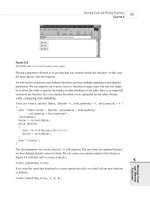
Back in our main program, we report to the user whether she was logged in or not, and at
what level.
The output from one login attempt is shown in Figure 28.6.
Building Practical PHP and MySQL Projects
P
ART V
678
FIGURE 28.6
The system reports to the user that login was successful.
Now that we have logged in a user, we can proceed to the user functions.
Implementing User Functions
There are five things we want our users to be able to do after they have logged in:
• Look at the lists available for subscription
• Subscribe and unsubscribe from lists
• Change the way their accounts are set up
• Change their passwords
• Log out
You can see most of these options in Figure 28.6. We will now look at the implementation of
each of these options.
34 7842 CH28 3/6/01 3:46 PM Page 678
Viewing Lists
We will implement a number of options for viewing available lists and list details. In Figure
28.6, you can see two of these options: Show My Lists, which will retrieve the lists this user is
subscribed to, and Show Other Lists, which will retrieve the lists the user is not subscribed to.
If you look back at Figure 28.4, you will see that we have another option, Show All Lists,
which will retrieve all the available mailing lists on the system. For the system to be truly scal-
able, we should add paging functionality (to display, say, 10 results per page). We have not
done this here for brevity.
These three menu options activate the
show-my-lists, show-other-lists, and show-all-lists
actions, respectively. As you have probably realized, all these actions work quite similarly. The
code for these three actions is as follows:
case ‘show-all-lists’ :
{
display_items(“All Lists”, get_all_lists(), ‘information’,
‘show-archive’,’’);
break;
}
case ‘show-other-lists’ :
{
display_items(“Unsubscribed Lists”,
get_unsubscribed_lists(get_email()), ‘information’,
‘show-archive’, ‘subscribe’);
break;
}
case ‘’:
case ‘show-my-lists’ :
{
display_items(“Subscribed Lists”, get_subscribed_lists(get_email()),
‘information’, ‘show-archive’, ‘unsubscribe’);
break;
}
As you can see, all these actions call the display_items() function from the output_fns.php
library, but they each call it with different parameters. They all also use the get_email()
function we mentioned earlier to get the appropriate email address for this user.
To see what this function does, look at Figure 28.7.
Building a Mailing List Manager
C
HAPTER 28
28
BUILDING A
MAILING LIST
MANAGER
679
34 7842 CH28 3/6/01 3:46 PM Page 679
FIGURE 28.7
The display_items() function has been used to lay out a list of the lists that the user is not subscribed to.
This is the Show Other Lists page.
Let’s look at the code for the display_items() function. It is shown in Listing 28.6.
LISTING 28.6 display_items() Function from output_fns.php—This Function Is Used to
Display a List of Items with Associated Actions
function display_items($title, $list, $action1=’’, $action2=’’, $action3=’’)
{
global $table_width;
echo “<table width = $table_width cellspacing = 0 cellpadding = 0
border = 0>”;
// count number of actions
$actions = (($action1!=’’) + ($action2!=’’) + ($action3!=’’));
echo “<tr>
<th colspan = “. (1+$actions) .” bgcolor=’#5B69A6’> $title </th>
</tr>”;
// count number of items
$items = sizeof($list);
Building Practical PHP and MySQL Projects
P
ART V
680
34 7842 CH28 3/6/01 3:46 PM Page 680
LISTING 28.6 Continued
if($items == 0)
echo “<tr>
<td colspan = “.(1+$actions).”align = center>No Items to Display</td>
</tr>”;
else
{
// print each row
for($i = 0; $items; $i++)
{
if($i%2) // background colors alternate
$bgcolor = “‘#ffffff’”;
else
$bgcolor = “‘#ccccff’”;
echo “<tr
<td bgcolor = $bgcolor
width = “. ($table_width - ($actions*149)) .”>”;
echo $list[$i][1];
if($list[$i][2])
echo “ - “.$list[$i][2];
echo “</td>”;
// create buttons for up to three actions per line
for($j = 1; $j<=3; $j++)
{
$var = ‘action’.$j;
if($$var)
{
echo “<td bgcolor = $bgcolor width = 149>”;
// view/preview buttons are a special case as they link to a file
if($$var == ‘preview-html’||$$var == ‘view-html’||
$$var == ‘preview-text’||$$var == ‘view-text’)
display_preview_button($list[$i][3], $list[$i][0], $$var);
else
display_button( $$var, “&id=” . $list[$i][0] );
echo “</td>”;
}
}
echo “</tr>\n”;
}
echo “</table>”;
}
}
This function will output a table of items, with each item having up to three associated action
buttons. The function expects five parameters, which are, in order:
Building a Mailing List Manager
C
HAPTER 28
28
BUILDING A
MAILING LIST
MANAGER
681
34 7842 CH28 3/6/01 3:46 PM Page 681
• $title is the title that appears at the top of the table—in the case shown in Figure 28.7,
we are passing in the title Unsubscribed Lists, as shown in the previously discussed code
snippet for the action “Show Other Lists”.
• $list is an array of items to display in each row of the table. In this case, it is an array
of the lists the user is not currently subscribed to. We are building this array (in this case)
in the function get_unsubscribed_lists(), which we’ll discuss in a minute. This is a
multidimensional array, with each row in the array containing up to four pieces of data
about each row. In order, again:
• $list[n][0] should contain the item id, which will usually be a row number. This
gives the action buttons the id of the row they are to operate upon. In our case, we
will use ids from the database—more on this in a minute.
• $list[n][1] should contain the item name. This will be the text displayed for a
particular item. For example, in the case shown in Figure 28.7, the item name in
the first row of the table is PHP Tipsheet.
• $list[n][2] and $list[n][3] are optional. We use these to convey that there is
more information. They correspond to the more information text and the more
information id, respectively. We will look at an example using these two parame-
ters when we come to the View Mail action in the “Implementing Administrative
Functions” section.
We could, as an alternative, have used keywords as indices to the array.
The third, fourth, and fifth parameters to the function are used to pass in three actions that will
be displayed on buttons corresponding to each item. In Figure 28.7, these are the three action
buttons shown as Information, Show Archive, and Subscribe.
We got these three buttons for the Show All Lists page by passing in the action names,
information, show-archive, and subscribe. By using the display_button() function, these
actions have been turned into buttons with those words on them, and the appropriate action
assigned to them.
Each of the Show actions calls the display_items() function in a different way, as you can
see by looking back at their actions. As well as having different titles and action buttons, each
of the three uses a different function to build the array of items to display. Show All Lists uses
the function get_all_lists(), Show Other Lists uses the function get_unsubscribed_
lists(), and Show My Lists uses the function get_subscribed_lists(). All these functions
work in a similar fashion. They are all from the mlm_fns.php function library.
We’ll look at get_unsubscribed_lists() because that’s the example we’ve followed so far.
The code for the get_unsubscribed_lists() function is shown in Listing 28.7.
Building Practical PHP and MySQL Projects
P
ART V
682
34 7842 CH28 3/6/01 3:46 PM Page 682
LISTING 28.7 get_unsubscribed_lists() Function from mlm_fns.php—This Function Is Used
to Build an Array of Mailing Lists That a User Is Not Subscribed To
function get_unsubscribed_lists($email)
{
$list = array();
$query = “select lists.listid, listname, email from lists left join sub_lists
on lists.listid = sub_lists.listid
and email=’$email’ where email is NULL order by listname”;
if(db_connect())
{
$result = mysql_query($query);
if(!$result)
echo “<p>Unable to get list from database.”;
$num = mysql_numrows($result);
for($i = 0; $i<$num; $i++)
{
array_push($list, array(mysql_result($result, $i, 0),
mysql_result($result, $i, 1)));
}
}
return $list;
}
As you can see, this function requires an email address passed into it. This should be the email
address of the subscriber that we are working with. The get_subscribed_lists() function
also requires an email address as a parameter, but the get_all_lists() function does not for
obvious reasons.
Given a subscriber’s email address, we connect to the database and fetch all the lists the sub-
scriber is not subscribed to. As usual for this kind of query in MySQL, we use a LEFT JOIN to
find unmatched items.
We loop through the result and build the array row by row using the array_push() built-in
function.
Now that we know how this list is produced, let’s look at the action buttons associated with
these displays.
Viewing List Information
The Information button shown in Figure 28.7 triggers the ‘information’ action, which is as
follows:
Building a Mailing List Manager
C
HAPTER 28
28
BUILDING A
MAILING LIST
MANAGER
683
34 7842 CH28 3/6/01 3:46 PM Page 683
case ‘information’ :
{
display_information($id);
break;
}
To see what the display_information() function does, look at Figure 28.8.
Building Practical PHP and MySQL Projects
P
ART V
684
FIGURE 28.8
The display_information() function shows a blurb about a mailing list.
The function displays some general information about a particular mailing list, as well as list-
ing the number of subscribers and the number of newsletters that have been sent out to that list
and are available in the archive (more on that in a minute).
The code for this function is shown in Listing 28.8.
L
ISTING 28.8 display_information() Function from output_fns.php—This Function
Displays List Information
function display_information($listid)
{
if(!$listid)
return false;
34 7842 CH28 3/6/01 3:46 PM Page 684